

Broken link building is a link building tactic that identifies broken links on other websites (links pointing to pages that return a 404 error) and convinces webmasters to replace those dead links with a working link to your content. Paid tools like Ahrefs and SEMrush speed up discovery, but the free Check My Links Chrome extension still makes it practical to find broken link building opportunities at scale across resource pages, competitor sites, and Wikipedia.
The core appeal is that you're not asking for a link with nothing in return. Instead, you're alerting a webmaster to a broken page on their own site. That changes the pitch entirely. You're fixing a problem they didn't know they had, and offering your content as the solution.
What Is Broken Link Building?
Broken link building works by finding pages that link to content that no longer exists. When a guide, tool, or resource disappears, because the domain expired, the company rebranded, or the URL changed without a redirect, every page linking to it now hosts a dead link. Visitors who click get a 404 error, and the webmaster's got a broken page experience they probably haven't noticed.
You find those broken links, create or surface replacement content that covers what the dead page offered, and reach out to the site owner. The pitch: here's the broken link, here's what it used to cover, here's my replacement. Webmasters accept this because fixing a broken link is genuinely in their interest. That makes broken link building different from most outreach tactics, where the benefit flows only one way.
Does Broken Link Building Still Work?
Yes, broken link building still works, but SEOs genuinely disagree on how well. Some practitioners call it close to a waste of time; others still run it as a standing part of their link program. Both views come from the same underlying fact: link outreach in general converts at low single-digit-to-low-double-digit rates, and broken link pitches are no exception. Backlinko and Pitchbox's analysis of 12 million outreach emails found an average reply rate of 8.5% across all outreach types, with a single follow-up message lifting replies by 65.8%. That is a general outreach benchmark, not a broken-link-specific one, since no public study breaks out broken link building on its own. Expect a similar order of magnitude: a handful of placed links from a batch of targeted, personalized pitches, not a flood of them.
The tactic remains viable, even though any single batch of prospects eventually dries up, because broken link building opportunities accumulate continuously. Every site that goes offline, every URL structure changed without redirects, every piece of content deleted to "clean up" a blog leaves behind orphaned backlinks. The supply of broken pages doesn't dry up, even though any single batch of prospects eventually does.
Broken link building works best on resource-heavy pages at educational, industry, or .gov domains, where content is rarely audited, though it struggles on sites that keep a tight link-hygiene process. Long-standing niche sites with older blog posts and resource page archives are also strong targets, especially when popular reference content from those archives has since been deleted, unlike a site that prunes its own archive regularly.
The tactic's harder to justify on fresh content sites that actively audit and fix broken links, in very small niches with few content creators and limited resource pages, and on sites maintained by active SEO teams who catch and replace dead links quickly.
What Are the Benefits of Broken Link Building?
- White hat and penalty-safe. Unlike a paid link scheme, there's no arrangement and no footprint for Google to penalize. You're earning a link by providing genuine value.
- Win-win pitch. You're helping the webmaster fix a poor user experience on their own page. Even when they don't swap the link, you've done them a favour. This lowers rejection friction compared to cold link requests.
- Prequalified demand. Unlike cold outreach, every prospect you approach has already demonstrated willingness to link to content like yours. The link intent exists; you just need to give them a working alternative.
- Scalable with tools. Once the process is established, you can run broken link discovery across multiple competitors or topic clusters, unlike manual link begging, and batch outreach efficiently.
- Works with existing content. You don't always need to create new pages. If you already have relevant content that matches what the dead page covered, you can pitch it directly without additional content investment.
For more on tactics that earn durable, penalty-safe links, see our guide to white hat SEO link building.
How to Find Broken Link Building Opportunities
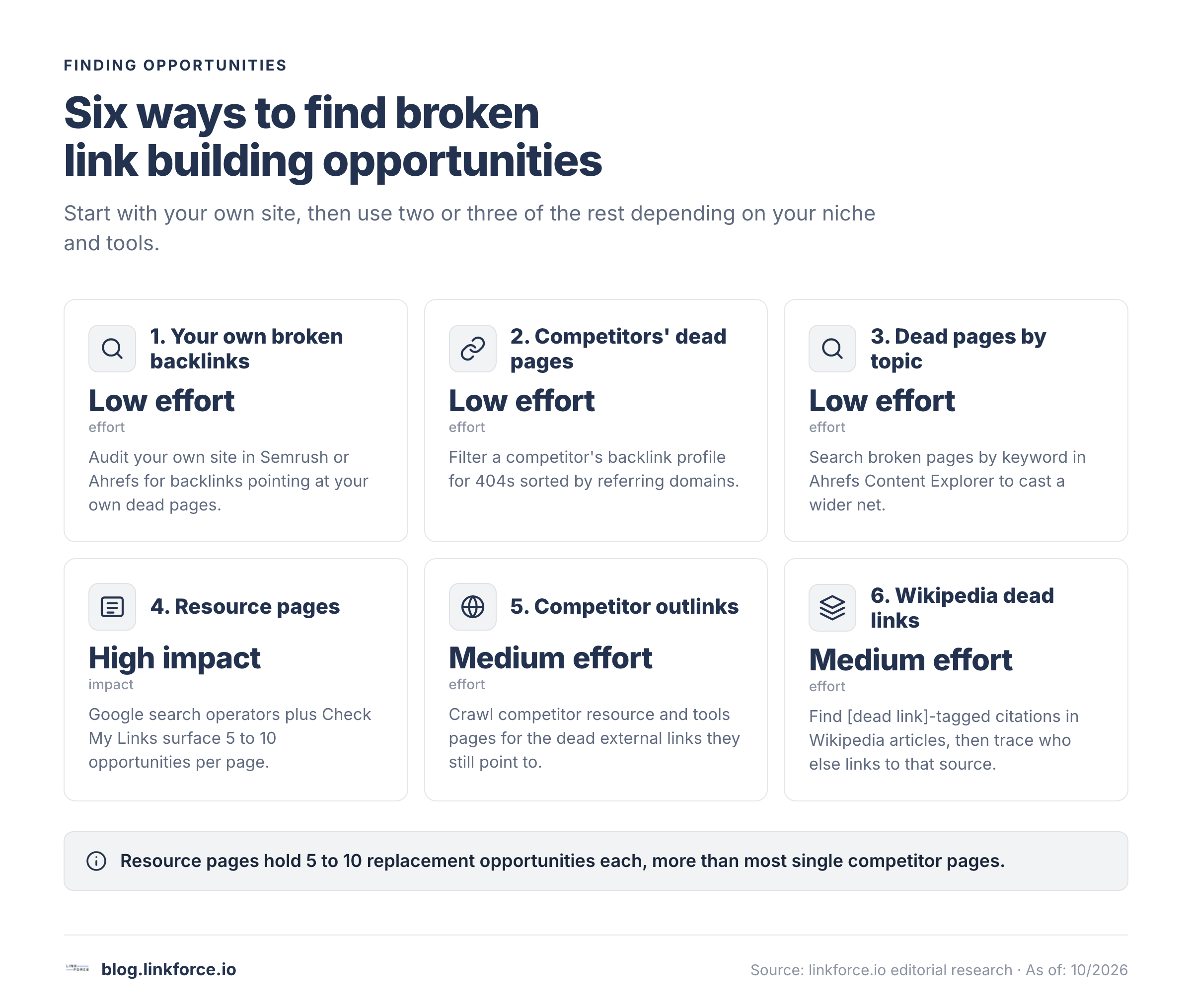
Six reliable methods uncover broken link opportunities. Start with your own site, then use two or three of the rest depending on your niche, target authority level, and available tools.
Step 1: Start With Your Own Broken Backlinks
Before chasing anyone else's dead pages, check your own site for backlinks that point to a URL of yours that no longer works. You already earned those links once, so the admin is more likely to simply restore them once you ask.
In Semrush's Backlink Audit tool, run an audit on your own domain, open the Audit tab, and check "Target URL error" to filter for links pointing at your own 4xx or 5xx pages. It's the same tool you'd use for competitor research, just pointed at yourself first. Filter the Toxicity Score to "0-44 Non-toxic" first, since restoring a toxic backlink can do more harm than leaving it dead. Ahrefs' Site Explorer does the same job: enter your own domain, go to Best by Links, and filter for your own 404s.
Fix the easy cases first, whether that's a redirect to the closest live equivalent or a quick outreach note asking the linking site to update the URL. Only move on to competitor and third-party dead pages once your own backlink profile is clean.
Step 2: Find Competitors' Dead Pages with Backlinks
In Ahrefs Site Explorer, enter a competitor's domain, navigate to Pages > Best by Links, and set the HTTP code filter to "404 not found." It's a two-minute setup. Results are sorted by referring domains, so the top entries are dead pages with the most orphaned backlinks, unlike a random sample of 404s. Those are your best-value broken link building opportunities.
In SEMrush, use Backlink Analytics on a competitor's domain and filter by status code 404. The Lost Backlinks report surfaces pages they've recently taken offline. SE Ranking's broken link checker performs a similar scan and returns referring domains and anchor text for each dead URL.
This works because these pages had proven link-earning potential. Now that they're broken, every linking page is an open prospect. If you've got better content on the same topic, you have a credible replacement to pitch to every site in that backlink profile.
Say you run a content marketing blog and want links to your guide on editorial calendars. Enter a competitor like CoSchedule or ContentMarketingInstitute.com into Ahrefs Site Explorer, navigate to Pages > Best by Links, and filter for 404s sorted by referring domains. You might surface a deleted page,
/blog/editorial-calendar-template/, sitting at 43 referring domains. Each of those 43 pages already linked to the same topic you cover, so you're not starting cold. That's 43 pre-qualified outreach prospects from one five-minute query.Step 3: Search for Dead Pages by Topic
Search for broken link building opportunities by topic rather than by competitor domain when you want to cast a wider net. In Ahrefs Content Explorer, enter your target keyword and add a filter for broken pages. This surfaces dead content across the web that people were linking to, not just from your direct competitors.
This works well when you're entering a new niche, though it takes longer than checking one competitor at a time.
For example: entering "link building" into Ahrefs Content Explorer and filtering for broken pages with 20+ referring domains returns dead content across the entire web: a deleted Moz primer on link velocity that once had 61 RDs, an expired Search Engine Land roundup of link building tools with 34 RDs, a shuttered SaaS company's blog post about anchor text strategy with 22 RDs. Each dead URL comes with its full backlink profile, so you can immediately see which linking pages are worth approaching, unlike a cold prospect list with no context.
Step 4: Find Broken Links on Resource Pages
Resource pages, meaning curated lists of useful links on a topic, are the most productive broken link building target type, even though they take longer to find than a single competitor's dead pages. They were built to link out to resources, they rarely get maintained, and they tend to accumulate dead links over years. One resource page can hold 5 to 10 replacement opportunities, far more than a single competitor's dead page usually does.
These Google search operators surface resource pages fast.
intitle:"resources" "link building"inurl:"resources" SEO tools"useful links" content marketing site:.edu
Once you find a resource page, use the Check My Links Chrome extension (it's free) to scan the page instantly. It highlights every broken link in red so you can identify dead link replacements without manually clicking each URL.
For example: the search
intitle:"resources" "link building"might return a curated resources page at a digital marketing university department, last updated in 2022, listing 16 tools and guides. Check My Links flags 5 of them in red. One is a dead link to an SEO glossary that previously had 28 referring domains. A single well-placed pitch replaces a dead link on a legitimate educational domain, not a directory.Resource pages are worth prioritizing. The site's already curated content in your niche, and a broken link there is an implicit invitation. See our full guide to resource page link building.
Step 5: Find Broken Links on Competitor Websites
Scan competitor sites for the dead external links they're currently pointing to. When those dead pages are on topics you cover, you've got a pitch opportunity. The approach finds broken links that are actively sending traffic (or trying to) from credible industry pages.
Use Ahrefs Site Audit on a competitor's domain and export the broken outlinks report: every external URL they link to that returns a 404. Screaming Frog SEO Spider crawls competitor sites and generates a full broken outlinks list with source page URLs, dead target URLs, and anchor text, all exportable to CSV. SEMrush Site Audit does the same and flags all outgoing 4xx errors.
Focus on the competitor's resource pages, tools pages, and integration directories, since they link heavily to third-party content and accumulate the most dead links over time, unlike a typical blog post that links out rarely.
Step 6: Use the Wikipedia Dead Link Technique
Wikipedia articles in your niche cite external sources in their references sections, though not every citation stays live for long. When those sources go offline, Wikipedia adds a "[dead link]" tag. Sites that independently linked to those same dead sources (or that would benefit from a live, citable alternative to what Wikipedia cited) are your prospects.
To find these broken link building opportunities: search Wikipedia for articles in your niche, scroll to the references section, and look for "[dead link]" tags. Note the domain and topic of each dead source. It won't take more than a few minutes per article. Then use Ahrefs Site Explorer to check who else links to those dead URLs. Those domains are your outreach list.
This surfaces high-authority targets, since Wikipedia's citations tend to come from credible, editorial sources rather than low-quality directories, and that's a distinction worth checking before you pitch.
Tip: Wikipedia's [dead link] tags are editorial quality signals. For a source to earn a citation in Wikipedia, it had to meet editorial standards for credibility. When that source goes offline, the sites that independently cited the same source are high-authority editorial targets, not directories or link farms. They were referencing a real resource and would benefit from a live, citable replacement.
Build Google search operator queries for link prospecting with the free Search Operator Generator.
How to Vet Broken Link Opportunities
Not every broken link's worth replacing. A quick vetting pass before you write outreach emails saves time, and it'll improve your conversion rate significantly.
Check Link Quality
Check these four signals before you add any prospect to your list.
- Domain Rating (DR) or Authority Score. Set a minimum of DR 40 as a baseline. Links from low-authority domains don't move the needle enough to justify the effort.
- Organic traffic to the linking page. A dead link on a page with no organic traffic has minimal value. Check traffic estimates in Ahrefs or SEMrush before including a prospect.
- Dofollow vs. nofollow. Confirm the broken link was a dofollow link, since nofollow replacements carry substantially less SEO value.
- Niche relevance. The linking page should be topically close to your content. A broken link on a tech page pointing to a marketing guide is a weaker opportunity.
Use Ahrefs Batch Analysis to run your full prospect list through a quality filter before you write a single email. Upload the dead URLs, sort results by referring domains, and remove anything below your DR threshold.
For example: a dead page on a well-known SEO blog about "types of backlinks" shows 94 referring domains in Ahrefs. After applying DR 40+, dofollow only, and organic traffic above 1,000 monthly visits, the qualified prospect list drops to 19 pages. That's a far more manageable and higher-converting outreach batch than mailing all 94, and skipping the low-quality 75 avoids the sender reputation cost of mass-emailing sites that won't convert anyway.
Check Link Reasons (Deep vs. General Linkers)
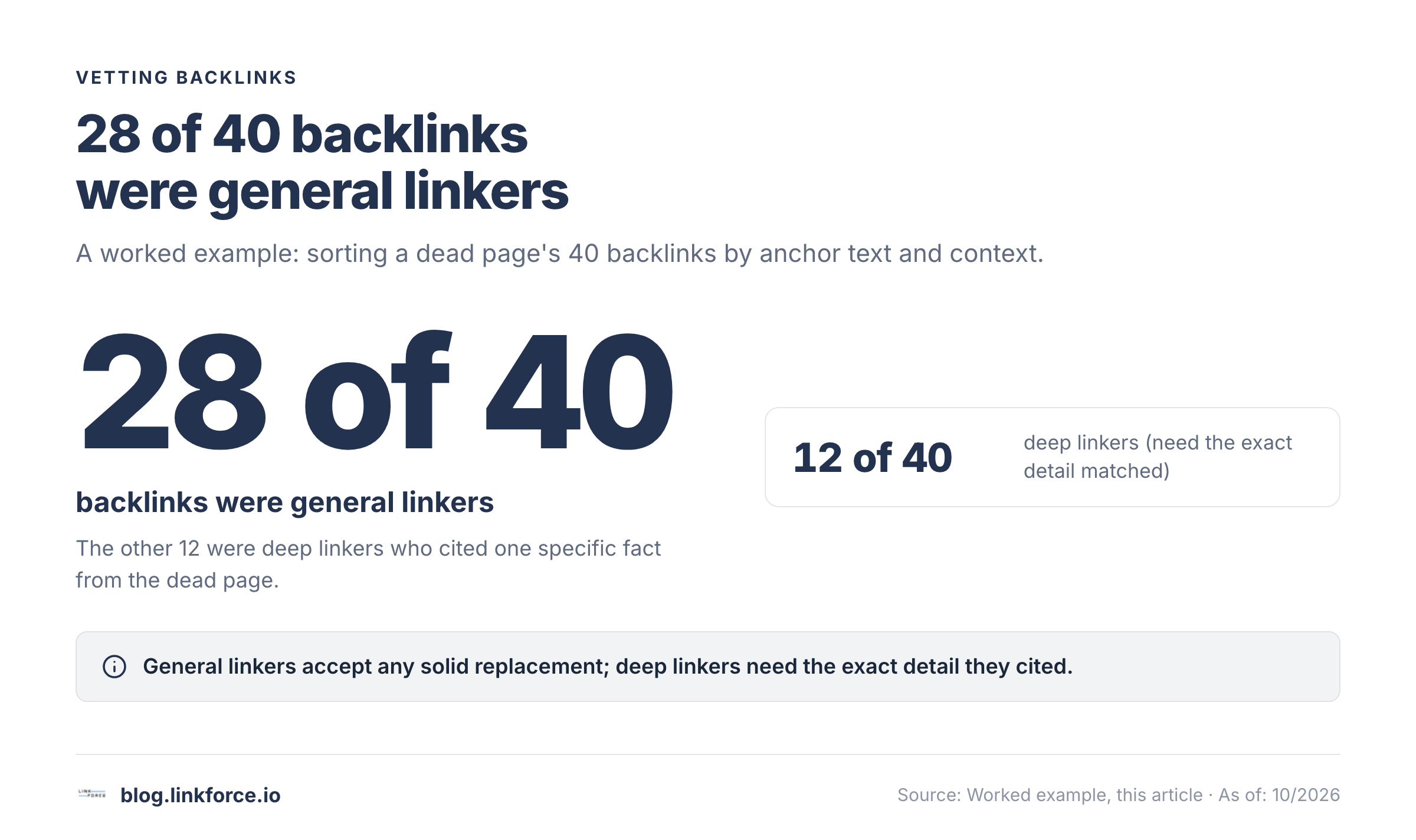
Not every backlink to a dead page was earned the same way, and that difference decides how specific your pitch needs to be. Export the anchor text and the surrounding sentence for each qualifying backlink, then sort them into two buckets before you write a single email. It's a ten-minute spreadsheet pass, not a deep audit.
Say the dead page was a password-manager comparison that got cited 40 times. Reading the anchor text in context splits those 40 links into two clear groups.
- 28 links use near-identical phrasing: "see this password manager comparison" or "for more on password managers, read this." The surrounding paragraph never mentions a specific product, feature, or number from the dead page. Nothing in the sentence would break if the link pointed somewhere else on the same topic.
- 12 links quote something specific: a named pricing tier, a particular security feature, a comparison table result ("the comparison found Bitwarden's free tier covers unlimited devices"). The sentence depends on that exact detail being present in whatever it links to.
The 28 are general linkers. Any solid, current replacement on the same topic satisfies them, so you're pitching on overall quality and relevance. The 12 are deep linkers: your replacement has to contain the specific fact they cited, or the pitch fails on inspection, because they will check.
Here's a practical cutoff: if three or more backlinks quote the same specific detail, your replacement needs that detail covered explicitly, not just the general topic. Pull the dead page from the Wayback Machine to see exactly what the cited detail was before you commit to a pitch angle, and build deep-linker pitches around that detail by name. A generic "we cover this topic too" won't land with someone who cited something specific.
Skip These Opportunities
Pass on these immediately: sites with no new content in the past 2+ years; pages where dozens of broken links exist throughout (the owner has clearly abandoned maintenance); pages with no organic traffic; broken links in nofollow contexts or inside ad blocks; and any prospect where the backlink profile of the dead page shows anchor text patterns suggesting prior link scheme participation: over-reliance on exact-match commercial anchors, irrelevant keyword stuffing, or a high volume of low-quality inbound links all indicate the original page was earning links artificially.
Also skip a dead page whose backlinks exist for a reason you cannot realistically reproduce, most often original, proprietary research: a large-scale study, a unique dataset, or survey results nobody else ran. Unless you commission or already have an equivalent piece of original research, a generic replacement won't convert deep linkers who cited that specific study, no matter how well-written it is.
How to Create Your Replacement Page
Before you send a single email, your replacement content has to be genuinely better than the original, not just alive and vaguely relevant.
Understand What the Dead Page Offered
Use the Wayback Machine to retrieve the dead page. It won't take long. Enter the broken URL at archive.org and browse available snapshots, paying attention to three things.
- The format: was it a how-to guide, a stat page, a tool, a template, a checklist?
- The depth: quick overview or comprehensive reference?
- What made it linkable: original data, a unique framework, a downloadable resource?
Your replacement has to match the intent of the original page, since a long-form guide won't feel like an equivalent replacement to deep linkers if the dead page was a checklist.
Make Your Page Better Than the Original
Once you understand what the original offered, you can improve on it in four ways.
- Simplify. If the original was dense and hard to follow, make yours cleaner and more scannable, unlike the page it's replacing.
- Visualize. Add process diagrams, step-by-step visuals, or comparison tables the original lacked.
- Templatize. If the topic supports it, include a free template or worksheet, even if the original didn't have one. Downloadable assets increase the perceived value of the swap.
- Update. If the original had outdated statistics, old tool names, or stale examples, bring everything current, since that's often the easiest win.
The goal is to give webmasters a reason to make the swap, even when they weren't already planning to update the page. For more on content that earns links, see our guide to linkable assets.
How to Do Broken Link Building Outreach
Outreach quality decides whether broken link building generates links or just generates effort. The email must be short, specific, and genuinely helpful, not a mass-blast template.
What to Include in Every Pitch
- Name the specific broken link on their specific page. Don't make a vague claim about "your site having broken links."
- Show that you actually know what the dead page covered. This proves you actually looked, and it builds trust that your replacement is relevant.
- Offer your replacement as a natural match to what's missing, not as a self-serving request. It shouldn't read like a form letter.
- Keep it under 150 words, because long emails don't get read.
- Make only one ask, and that's the link swap.
- Include a screenshot or direct URL showing exactly where the broken link sits on their page. Webmasters shouldn't have to hunt for it. Removing that friction is the single easiest way to lift response rate.
For detailed outreach templates and subject line testing, see our guide to outreach emails.
800+ SaaS marketers swap partner, integration and content links. Free plan, no credit card.
Template 1: Deep Linker Pitch
Use this when the site linked to the dead page for a specific reason.
Subject: Broken link on [Page Title]
Hi [Name],
I was reading your article on [Topic] and noticed the link to [dead page title] is returning a 404 error.
Looks like that page covered [specific angle, e.g., the process for X / a guide to Y]. I have an updated guide on the same topic: [Your URL].
It includes [one concrete improvement, e.g., updated 2026 data / a step-by-step workflow / a free template].
Here's exactly where I found the broken link on your page: [screenshot]
Thought it might work as a replacement if you're updating the page. It's a quick swap either way.
[Your name]
Template 2: General Linker Pitch
Use this when the site linked as a general reference.
Subject: Dead link on [Page Title]
Hi [Name],
Your article on [Topic] has a broken link pointing to [dead URL]. It's returning a 404.
Here's where it appears on your page: [screenshot]
I recently published a guide on [Topic] that covers [2-3 key areas]. A few reasons it might work as a replacement:
- [Improvement 1]
- [Improvement 2]
Link: [Your URL]
Happy to send more context if helpful.
[Your name]
Follow-Up and Timing
Send one follow-up 5 to 7 business days after the original email if you haven't heard back. Keep it to two sentences: remind them of the broken link, restate the replacement offer. The follow-up earns its place: Backlinko and Pitchbox's study of 12 million outreach emails found that a single follow-up message lifted replies by 65.8% over a one-and-done email. One follow-up is appropriate; two or more becomes spam and damages your sender reputation.
Tip: One follow-up only. A second follow-up shifts the dynamic from "I'm doing you a favour" to "I need something from you", the opposite of the value-first frame you opened with. If there's no response after one follow-up, move on. The outreach volume of broken link building makes individual non-responses irrelevant; conversion happens at scale.
For full outreach sequencing and campaign strategy, see our guide to outreach strategy.
Tools for Broken Link Building
| Tool | Primary use | Free tier |
|---|---|---|
| Ahrefs Site Explorer | Find competitors' broken pages with backlinks; vet link quality in bulk via Batch Analysis | No |
| Ahrefs Content Explorer | Find dead pages by topic across the web | No |
| Ahrefs Broken Link Checker | Check any URL or domain for broken inbound and outbound links | Yes (limited) |
| SEMrush Backlink Audit | Find your own and competitors' broken backlinks; track outreach pipeline status | Limited |
| Screaming Frog SEO Spider | Crawl competitor sites for outgoing broken links; exports source URL, dead URL, anchor text to CSV | Free (up to 500 URLs) |
| Check My Links (Chrome) | Scan any open page for 404s; highlights broken links in red instantly | Yes |
| Wayback Machine (archive.org) | Retrieve deleted page content before writing your pitch | Yes |
| BrokenLinkCheck.com | Fast online scanner for broken links on any domain, no installation required | Yes |
| Hunter.io | Find contact email addresses for outreach targets | Yes (limited) |
For a full comparison of link building tools by use case, see our guide to the best link building software.
Broken Link Building vs. Other Link Building Tactics
| Tactic | Effort per link | Scalability | Relative conversion rate | Best suited for |
|---|---|---|---|---|
| Broken link building | Medium | Medium | Lower | Replacing dead resources with proven link demand |
| Resource page link building | Medium | Medium | Medium | Evergreen reference content on active resource pages |
| Skyscraper technique | High | Low | Variable | Competitive high-DR targets where you can clearly outperform |
| Guest posting | High | Medium | Higher if accepted | Building brand authority alongside editorial links |
| Link reclamation | Low | Low | Highest | Recovering links you've already earned but lost |
No public study breaks out exact conversion percentages per tactic, so the column above is relative, not a quoted statistic: link reclamation converts best because the site already agreed to link to you once, broken link building and resource page outreach sit in the middle because the admin still has to say yes to something new, and skyscraper outreach varies the most because it depends entirely on how much better your page is.
Broken link building sits in the middle of the effort-to-reward curve. The key differentiator versus most outreach tactics is prequalified demand: you're targeting pages that already demonstrated willingness to link to content like yours. The broken link is evidence that the link intent exists; you just need to provide a working replacement.
Related: Resource Page Link Building | The SEO Skyscraper Technique | Backlink Outreach
Is Broken Link Building Worth It?
Yes, broken link building is worth it when the conditions are right. If you have strong replacement content and are targeting pages with DR 40+ and real traffic, broken link building delivers quality editorial links at a realistic outreach volume.
Broken link building is worth prioritizing in these cases.
- You have existing content that could replace dead pages without new creation effort
- Your niche has older resource pages and guide archives with accumulated dead links
- You need topically relevant editorial links (not directories or aggregators)
- You want to complement resource page outreach and link reclamation on the same prospect pool
Deprioritize broken link building in these cases.
- You don't have content to replace what's been deleted, and creating new pages just for this is your only option
- Your niche has very few older reference sites with established link history
- Your existing outreach is already converting at better rates with less effort
Realistic output: a batch of targeted, personalized outreach emails yields a small, steady trickle of placed links rather than a large share of the list. Combined with resource page outreach and link reclamation, broken link building contributes meaningfully to a diversified link building program. For real campaign numbers, see our link building case study. Ecommerce stores get an above-average return here, since category pages sit on older resource-style URLs that accumulate dead outbound links over time; see ecommerce link building for how broken-link replacement fits alongside the other tactics that work for product and category pages.
Frequently Asked Questions
What response rate should I expect from broken link building outreach? No public study reports a response rate specific to broken link building. The closest verified benchmark is Backlinko and Pitchbox's analysis of 12 million outreach emails across all outreach types, which found an 8.5% average reply rate and a 65.8% lift from a single follow-up message. Expect a similar order of magnitude for broken link pitches, improving with specific personalization, stronger replacement content, and targeting resource pages over generic blog posts.
Do I need to create new content for every broken link opportunity? No. If you already have relevant content that matches what the dead page covered, pitch it directly. You only need to create new content when the dead page covered a specific angle you don't yet have, or when your existing page clearly doesn't match the original content's intent.
Is broken link building risky from an SEO perspective? It's one of the lower-risk link building tactics. The outreach is transparent, the value exchange is genuine, and links earned are editorial. The main risk is execution failure: mass-blasting impersonal templates can damage your sender domain's reputation, and offering a weak or loosely related replacement page results in rejection. Done with proper personalization and topically matched content, there's no meaningful penalty risk. Unlike link exchanges or guest post networks, broken link building requires no reciprocal obligation, so there's no link scheme footprint to create.
Can broken link building work for SaaS or B2B companies? Yes. B2B and SaaS niches (marketing, SEO, HR, finance, project management) have deep archives of older blog content and resource pages with accumulated dead links. B2B sites frequently link to vendor documentation, industry studies, and third-party tools that eventually change or break, creating high-authority opportunities. A particularly effective SaaS angle is finding pages that previously linked to a competitor's deprecated feature page, integration guide, or API docs, and offering your equivalent resource as the replacement. SaaS companies that have pivoted or rebranded often leave behind deprecated subdomain pages that third-party guides continue linking to, representing high-value opportunities unavailable to most other link building tactics.