

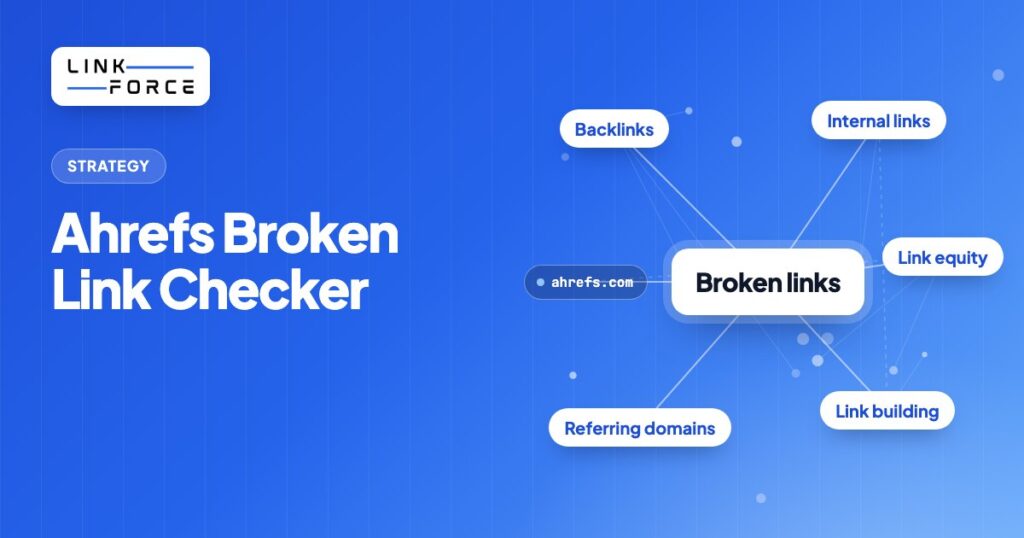
The Ahrefs Broken Link Checker is a set of tools within the Ahrefs platform that identifies links returning a 404, 410, or other non-200 status on any website. It's got three entry points: a free public tool that scans any URL for broken outbound links without login, Site Audit which crawls your own domain for internal and outgoing broken links, and Site Explorer which surfaces broken backlinks pointing to dead pages on your or any competitor site. The tool serves two distinct goals: cleaning up your own site's broken links to protect crawl efficiency and link equity, and finding dead pages on competitor sites that still attract backlinks so you can pitch replacement content as part of a broken link building campaign.
What Is the Ahrefs Broken Link Checker?
The Ahrefs Broken Link Checker identifies any hyperlink that points to a page or resource returning a non-200 HTTP response, most commonly a 404 Not Found or 410 Gone status. The tool draws on a database of 493 billion indexed pages, 28 trillion internal backlinks, 285 million domains, and 35 trillion external backlinks on historical record, refreshed every 15 to 30 minutes by Ahrefs' crawler, the second most active after Google. Within the Ahrefs suite, this capability surfaces across three tools depending on access level and use case.
The free public tool at ahrefs.com/broken-link-checker accepts any URL and returns the broken outbound links found on that page, with no account required. Ahrefs Webmaster Tools, available at no cost to verified site owners, adds site-wide crawling through Site Audit, covering up to 5,000 pages per month on the free tier. Site Explorer itself is included starting on Ahrefs' entry-level paid plan, but the Broken Backlinks and Broken Links reports specifically, the ones that power competitor prospecting and backlink recovery, are only listed from the Standard plan up. You'll find the exact breakdown in the pricing section below.
Here's what the tool finds in each mode:
- Broken outbound links from your pages to external sites returning 4xx or 5xx
- Broken internal links between your own pages
- Broken backlinks: external links from other sites pointing to dead pages on your domain
- Broken redirects: redirect chains or redirect targets that themselves return an error
Why Broken Links Hurt Your SEO
Broken links are a technical SEO problem, not just a usability annoyance. They're responsible for three measurable negative effects on larger sites, plus one structural problem that persists regardless of site size.
Wasted Crawl Budget
Google's crawler allocates a fixed crawl budget to each domain based on authority and crawl demand. When Googlebot follows a link to a 404 page, it spends crawl capacity on a dead end rather than discovering and indexing live content. For sites under roughly 200 pages, that's rarely a significant problem. Above 1,000 pages, though, a high volume of broken internal links can push important new content further back in the crawl queue, and that'll slow how quickly new pages get indexed and ranked.
Lost Link Equity
Every external link pointing to a dead page on your domain passes zero equity to the rest of your site. The page's gone, the PageRank stops there, and none of it flows to the content you actually want ranked. Implementing a 301 redirect from the dead URL to the best-match live page recovers that equity flow. Recreating the deleted page restores it entirely, and for pages with five or more referring domains, a 301 redirect's almost always the faster option.
Poor User Experience
Visitors who click a broken link land on a 404 page and typically leave the site immediately. High 404 rates, particularly on internal links, correlate with elevated bounce rates and shorter session durations. Google hasn't confirmed a direct ranking penalty for high 404 rates, but poor user engagement signals from those sessions still affect how pages are evaluated over time.
Broken Internal Link Architecture
Internal links are how PageRank distributes across your own site, and a broken internal link severs that distribution path entirely. When a page that was collecting authority from your homepage or pillar pages gets deleted without redirects, every page that linked to it now hosts a dead-end signal that doesn't contribute to the cluster's equity pool anymore.
The Two Modes of the Ahrefs Broken Link Checker
Ahrefs offers a free instant URL check for one-off lookups, plus two full audit tools for site-wide analysis, and each one's built for a different type of broken link problem.
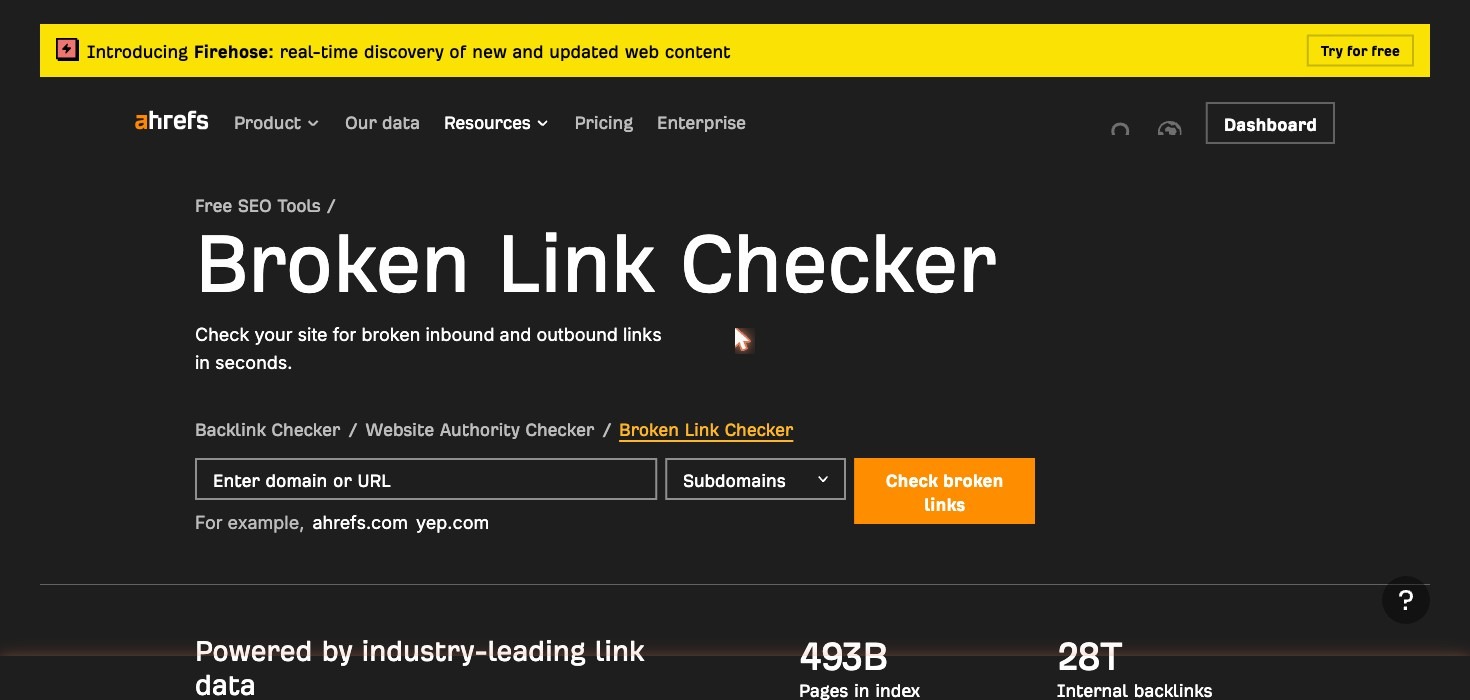
Free Tool: Check Any URL for Broken Outbound Links
The free tool at ahrefs.com/broken-link-checker scans a single URL and returns the broken external links found on that page. No Ahrefs account is required. Results appear in seconds and include the destination URL, the HTTP status code returned, and the anchor text of the broken link. The referring page's URL Rating (UR) is also displayed, so you'll know which fixes to prioritize on pages with higher authority.
Limitations of the free version:
- Scans a single URL at a time; doesn't crawl the full site
- Doesn't show broken internal links
- Doesn't show broken backlinks pointing to your domain from external sites
- Limited to one URL at a time with no scheduling or monitoring
This version works well for a quick spot-check on a single page or for verifying a specific URL before linking to it. It isn't a substitute for a full site audit, but it requires no signup and returns results immediately, which is useful for checking a competitor's resource page for broken outgoing links before a broken link building campaign.
Site Audit: Find Broken Internal Links Across Your Whole Site
Site Audit is the tool you'll want for internal broken link detection. It crawls your entire domain and reports every internal link returning a 4xx or 5xx status, every broken outgoing link to external sites, and every broken redirect. Results are organized by page, so you can quickly see which URLs are generating the most link errors. For each broken link, the report shows the source page URL, the broken destination URL, the anchor text, and the HTTP response code.
Here's how to run a Site Audit crawl:
- Log in to Ahrefs and navigate to Site Audit under the main menu
- Create a new project and verify your domain through DNS or HTML file verification
- Configure the crawl scope (you can limit to specific subdirectories or include the full domain)
- Run the crawl and wait for completion, typically a few minutes for small sites
- Navigate to the Issues tab and filter for "Broken links (internal)" and "Broken outgoing links"
- Export the results or click through individual issues to see the source page and destination URL for each broken link
Site Audit is available in Ahrefs Webmaster Tools for verified site owners at no cost, up to 5,000 pages per month on the free tier. Paid plans increase crawl credit allowances significantly, and there's one setting that catches broken links the default crawl misses: "Check HTTP status of external links" is off by default in the crawl settings, and without it, Site Audit only reports internal broken links, not the outbound ones. Turn it on before you run the crawl if you'd like both in one pass. Documentation for setting up your first crawl is available at help.ahrefs.com.
Site Explorer: Find Broken Backlinks to Your Site
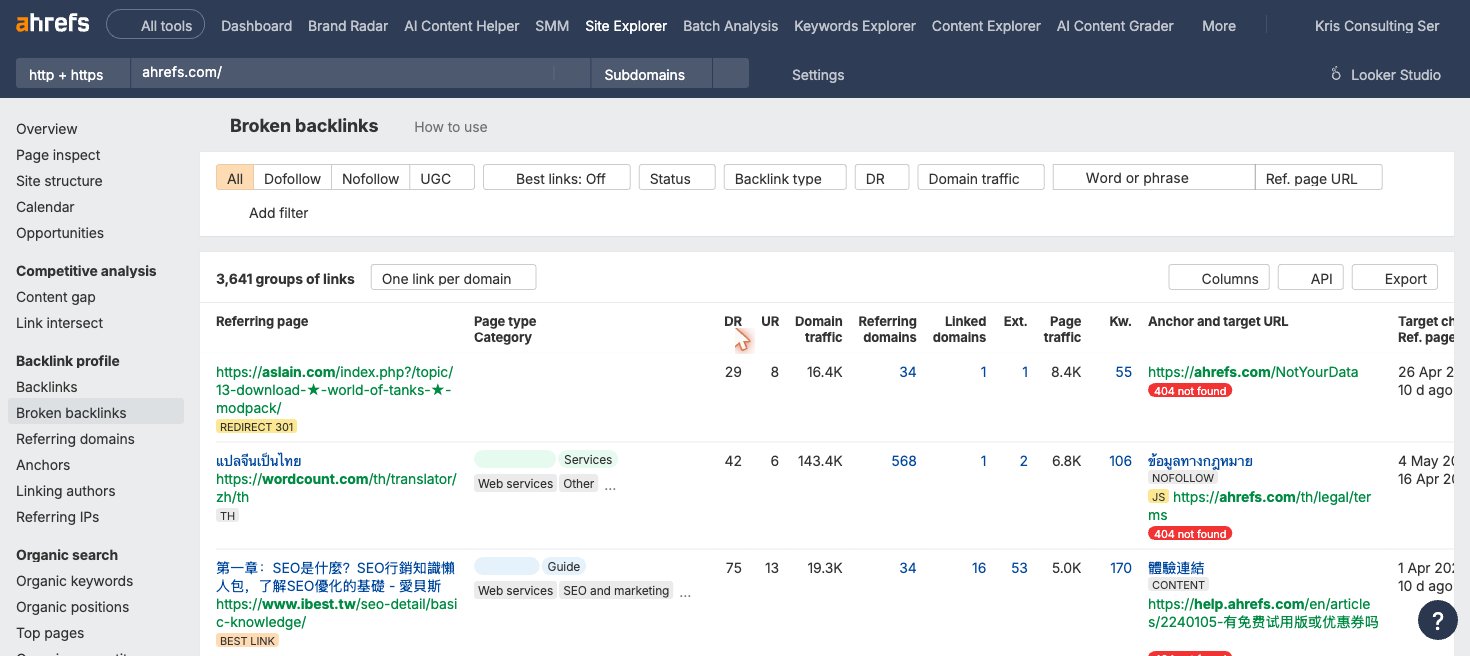
Site Explorer locates broken pages on your domain that still have external backlinks pointing to them. These are the most valuable broken links to fix because recovering them restores actual link equity you have already earned. For each dead page, the report shows the referring domains, the Domain Rating (DR) of each linking site, the anchor text used, and the specific URL returning 404. One caveat is worth knowing here. Site Explorer only surfaces what Ahrefs' own crawler has already indexed, so a page that broke very recently, or one Ahrefs never crawled a backlink to, won't show up until the database catches up.
Here's how to find broken backlinks using Site Explorer:
- Enter your domain in the Site Explorer search bar
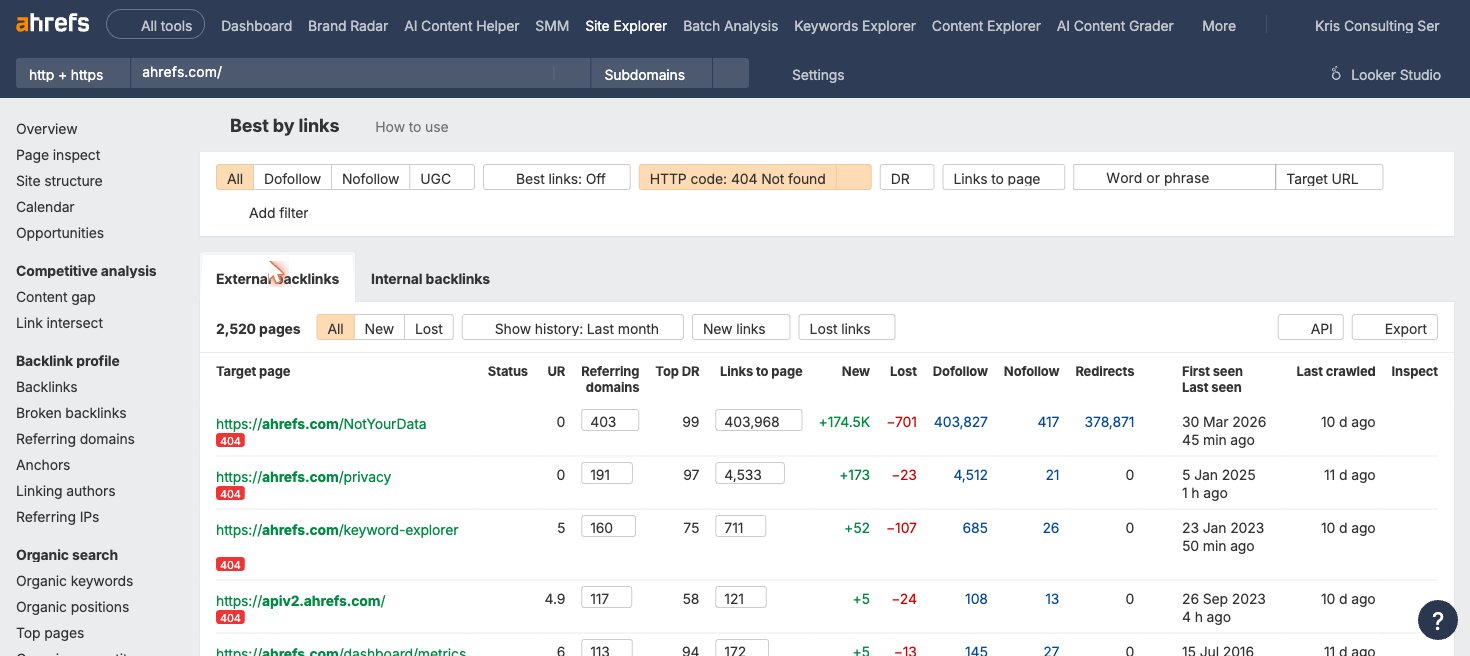
- Navigate to Pages and then Best by Links
- Add the HTTP code filter and select "404 not found"
- Sort by referring domains to find the dead pages attracting the most external links
- For each dead page with meaningful referring domains, decide on a fix: implement a 301 redirect to the most relevant live page, recreate the page if the content was valuable, or contact each linking site and ask them to update the URL
Run that same Site Explorer workflow on a competitor domain instead of your own, and you've got the starting point for broken link building outreach.
How to Use Ahrefs to Find and Fix Broken Links (Step by Step)
The most efficient broken link audit combines Site Audit for your internal issues and Site Explorer for your lost backlink equity, and it's best when you run them together in a single session.
- Run a Site Audit crawl on your domain. Use Ahrefs Webmaster Tools or a paid plan. Schedule it to run weekly or monthly depending on how frequently your site changes.
- Review the Issues tab and filter for broken links. Look at "Broken links (internal)" to find pages on your site linking to dead internal URLs, and "Broken outgoing links" to find external destinations that have gone offline.
- Fix each broken link on the source page. Update the link to the correct live URL, remove it if the destination doesn't have a replacement anymore, or swap in an updated source. Export the issue list to a spreadsheet so you can track fixes systematically.
- Switch to Site Explorer and pull your broken backlinks. Enter your domain, go to Best by Links, and filter for HTTP 404. Sort by referring domains, and you'll see the dead pages attracting the most link equity rise to the top.
- Fix broken backlinks based on referring domain count and Domain Rating. Sort by DR to see which linking sites carry the most authority. For pages with five or more referring domains, implement a 301 redirect to the most topically relevant live page. For pages with one or two referring domains, contact the linking site directly if the link's from a high-DR source. For pages with zero referring domains, the 404 isn't a priority.
- Schedule ongoing monitoring. In Site Audit, set a recurring crawl schedule so new broken links get flagged automatically instead of sitting undiscovered for months.
Build Google search operator queries for link prospecting with the free Search Operator Generator.
Using the Ahrefs Broken Link Checker for Link Building
Ahrefs is also the primary tool for finding broken link building opportunities on competitor sites. The process starts in Site Explorer. You identify dead pages on a competitor's domain that still receive backlinks from external sites, and you build an outreach list from those backlink profiles. You'll use those existing backlinks as your prospect list for outreach.
Here's the step-by-step for broken link building prospecting:
- Enter a competitor's domain in Site Explorer
- Navigate to Pages and then Best by Links
- Set the HTTP code filter to "404 not found"
- Sort by referring domains to surface the most link-rich dead pages first
- Focus on dead pages with 10 or more referring domains as your highest-value targets
- Click through each dead page's referring domains report to see every external site linking to it
- Export the list of linking sites as a CSV outreach prospect file
- Create or identify existing content on your site that covers what the dead page offered
- Send personalized outreach to each linking site, alerting them to the broken link and offering your replacement
The broken link building prospecting workflow above scales across multiple competitor domains. Run the same query on five to ten competitors in your niche and you'll typically surface 20 to 50 unique link opportunities worth pursuing; it fits naturally into a broader link prospecting process alongside other sourcing methods. If you'd like a full breakdown of how to vet those opportunities and write effective outreach, see our guide to broken link building, along with our resources on backlink outreach and building a repeatable outreach strategy.
800+ SaaS marketers swap partner, integration and content links. Free plan, no credit card.
Ahrefs Broken Link Checker Pricing
No, you don't need to pay for the basic version. The free public tool at ahrefs.com/broken-link-checker requires no login and is available to anyone, and Ahrefs Webmaster Tools, which includes Site Audit for full-site internal link auditing, is free for verified site owners. Where cost enters the picture is the Broken Backlinks and Broken Links reports inside Site Explorer, the ones used for competitor prospecting and backlink recovery: those are only listed from the Standard plan up, not from the cheapest paid tier.
Ahrefs restructured its plan lineup in 2026, so if you're comparing against an older bookmark or screenshot, that's why the tier names have changed. Prices below are current as of September 2026, in USD on monthly billing; annual billing saves roughly 17%, and Ahrefs shows EUR or other local pricing depending on your region, so treat the figures as a guide and check ahrefs.com/pricing for the exact current rate in your currency.
| Plan | Monthly Price (USD) | Broken-Link Reports Included | Broken Link Use Case |
|---|---|---|---|
| Ahrefs Free | $0 | No (limited Site Explorer for your own verified site only) | Free public checker tool + basic Site Audit |
| Starter | $29 | Not confirmed by Ahrefs | General Site Explorer access, 200 credits/month; don't rely on this tier for broken-backlink analysis until you have confirmed the report is included |
| Lite | $129 | No | Entry paid tier; Site Explorer is included but the Broken Backlinks/Broken Links reports aren't |
| Standard | $249 | Yes | Verified minimum tier for broken backlink analysis and competitor prospecting |
| Advanced | $399 | Yes | Large-site audits; multi-user; API access for custom workflows |
| Enterprise | $999 | Yes | Uncapped crawl credits and API access for agencies managing many domains |
When a paid plan becomes necessary:
- Your site's got more than 5,000 pages and exceeds the Webmaster Tools crawl limit
- You need the Broken Backlinks or Broken Links report to analyze your own site or a competitor domain, which requires Standard or higher
- You're managing multiple client sites under one account
- You'd like to integrate broken link data with keyword research or rank tracking workflows already running in Ahrefs
For most link building teams, the Standard plan is the practical starting point: it's the lowest tier that confirms both Site Audit crawl credits and the Broken Backlinks/Broken Links reports needed for competitor prospecting. Check out our breakdown of link building software if you'd like to see how Ahrefs compares against other platforms.
Limitations of the Ahrefs Broken Link Checker
Ahrefs is a strong broken link detection tool, but it's got five practical constraints worth knowing before you rely on it as your only audit solution.
- Crawl credit limits on lower tiers. Starter (200 credits/month), Webmaster Tools, and Lite plans have fixed monthly crawl credit allocations. If your site's got hundreds of thousands of pages, you can exhaust those credits before completing a full audit, and that leaves parts of the site unchecked until the next billing cycle.
- Data lag for recently broken links. Backlink data is updated every 15 minutes, which is fast for a third-party database. But Site Audit results depend on your crawl schedule: if you run monthly audits and a page breaks in week two, it won't appear in your broken link report until the next scheduled crawl.
- False positives. The tool can report links as broken that aren't actually broken, typically because the target server blocks crawlers, returns an error during a temporary outage, or enforces rate limits. It's worth a manual spot-check before you bulk-fix any broken link list, since you don't want to remove links that still work fine.
- No built-in redirect management. Ahrefs identifies broken redirects and the pages that need 301s, but it doesn't push those fixes to your CMS or hosting provider. You'll implement all redirects manually or through a separate plugin or server configuration.
- Learning curve for new users. The free tool is instant and needs no setup. Site Audit and Site Explorer take some familiarity with Ahrefs' project structure, filter logic, and report navigation, though, so don't expect to master them in five minutes. First-time users typically need 30 to 60 minutes to understand the workflow before running a clean audit.
Ahrefs vs. Alternatives for Broken Link Checking
Ahrefs isn't the only broken link tool worth knowing, and the right choice depends on whether you need backlink data, crawl scale, or just internal link coverage. Here's how it stacks up against the alternatives.
| Tool | Internal Links | Broken Backlinks | Competitor Analysis | Best For |
|---|---|---|---|---|
| Ahrefs | Yes (Site Audit) | Yes (Site Explorer) | Yes | Link building teams needing backlink data + crawl in one platform |
| Screaming Frog | Yes | No | No | Technical SEOs needing deep crawl on large sites; fixed annual license |
| Semrush Site Audit | Yes | Limited | Limited | Teams already using Semrush; smaller backlink database than Ahrefs |
| Google Search Console | No | No | No | Checking which of your pages Google has flagged as 404; free |
| Free crawlers (Dead Link Checker, W3C) | Yes (small sites) | No | No | Quick single-page or small-site checks; no backlink data |
Ahrefs is, without question, the strongest all-in-one option when you need internal link auditing, broken backlink recovery, and competitor prospecting in the same platform. If you only need technical crawl accuracy on very large sites without backlink requirements, though, Screaming Frog is a cost-effective alternative. If you'd like a broader comparison of prospecting and audit tools, see our guide to linkbuilding tools.
Is the Ahrefs Broken Link Checker Worth It?
If you already use Ahrefs for keyword research or backlink analysis, the broken link checker adds significant value at no extra cost, since it's bundled into the same plan. The Site Explorer broken backlink workflow and the competitor prospecting process are the primary reasons link builders choose Ahrefs over dedicated crawl tools.
- Best fit: SEO professionals managing multiple sites, link building teams using broken link building as a core tactic, and agencies that need scheduled monitoring with backlink-level data. Since you can sort broken backlinks by Domain Rating (DR), you'll be able to prioritize the highest-authority recovery opportunities first.
- May not need it: Small blogs with simple internal link structures, where a free crawler handles all audit needs, or teams whose work is entirely internal-link focused and don't need competitor backlink prospecting.
If you're evaluating whether to add Ahrefs to your stack, the key decision point is Site Explorer: if you need to prospect competitor domains for broken link building opportunities, no free tool provides equivalent backlink data, no question. If your use case is internal link auditing only, though, Screaming Frog or a free crawler might cover what you need at a lower cost.
Frequently Asked Questions
Is the Ahrefs broken link checker free?
Yes, the basic checker is free: the public tool at ahrefs.com/broken-link-checker scans any URL for broken outbound links with no account required, and Ahrefs Webmaster Tools, which includes Site Audit for full-site internal link auditing, is also free for verified site owners. The Broken Backlinks and Broken Links reports inside Site Explorer, the ones used for competitor prospecting, are only confirmed from the Standard plan ($249/month) up as of September 2026; Ahrefs' cheaper Starter plan ($29/month) gives general Site Explorer access but doesn't clearly document whether those specific reports are included.
How accurate is the Ahrefs broken link checker?
Accuracy's high for backlink data, since Ahrefs' crawler indexes 35 trillion external backlinks on historical record and refreshes every 15 minutes. For internal site audits, accuracy depends on your crawl schedule; if a page breaks between scheduled crawls, the error won't appear until the next audit run. Running weekly crawls closes that gap for active sites. And remember that false positives can happen when target servers block crawlers or hit a temporary outage, so spot-check any bulk fix list before you act on it.
Can Ahrefs find broken internal links?
Yes, Ahrefs finds broken internal links through Site Audit. After you run a crawl on your domain, the Issues tab shows every internal link returning a 4xx or 5xx status code, along with the source page URL, broken destination URL, and anchor text. It's available in Ahrefs Webmaster Tools for free for verified site owners.
What's the difference between Site Audit and Site Explorer for broken links?
Site Audit crawls your own site and finds broken links within it: internal links pointing to dead pages and outgoing links to external URLs that don't resolve anymore. Site Explorer analyzes backlink profiles and finds broken pages on your domain (or any domain) that still receive inbound links from other sites. You'll use Site Audit to fix your own site, and you'll use Site Explorer to recover lost link equity and find broken link building opportunities on competitor sites.
Can I use Ahrefs to find broken link building opportunities?
Yes, Ahrefs is one of the primary tools for finding broken link building opportunities on competitor sites. Enter any competitor domain in Site Explorer, navigate to Best by Links, and filter for HTTP 404. That returns every dead page on that domain sorted by referring domains, and pages with 10 or more referring domains are the most valuable targets. Export the referring domains for each dead page to build your outreach prospect list. Our full broken link building guide covers the complete campaign workflow.
Does Ahrefs detect broken redirects?
Yes, Ahrefs detects broken redirects through Site Audit, which flags redirect chains and redirect targets that themselves return an error as a distinct issue type. These are reported under redirect-related issues in the audit report, separate from standard broken links. Fixing broken redirects recovers the PageRank that stops at the broken redirect destination.