

The Ahrefs Broken Link Checker is a set of tools within the Ahrefs platform that identifies links returning a 404, 410, or other non-200 status on any website. It operates through three entry points: a free public tool that scans any URL for broken outbound links without login, Site Audit which crawls your own domain for internal and outgoing broken links, and Site Explorer which surfaces broken backlinks pointing to dead pages on your or any competitor site. The tool serves two distinct goals: cleaning up your own site’s broken links to protect crawl efficiency and link equity, and finding dead pages on competitor sites that still attract backlinks so you can pitch replacement content as part of a broken link building campaign.
What Is the Ahrefs Broken Link Checker?
The Ahrefs Broken Link Checker identifies any hyperlink that points to a page or resource returning a non-200 HTTP response, most commonly a 404 Not Found or 410 Gone status. The tool draws on a database of 35 trillion external backlinks and 493 billion indexed pages, refreshed every 15 minutes by Ahrefs’ crawler, the second most active after Google. Within the Ahrefs suite, this capability surfaces across three tools depending on access level and use case.
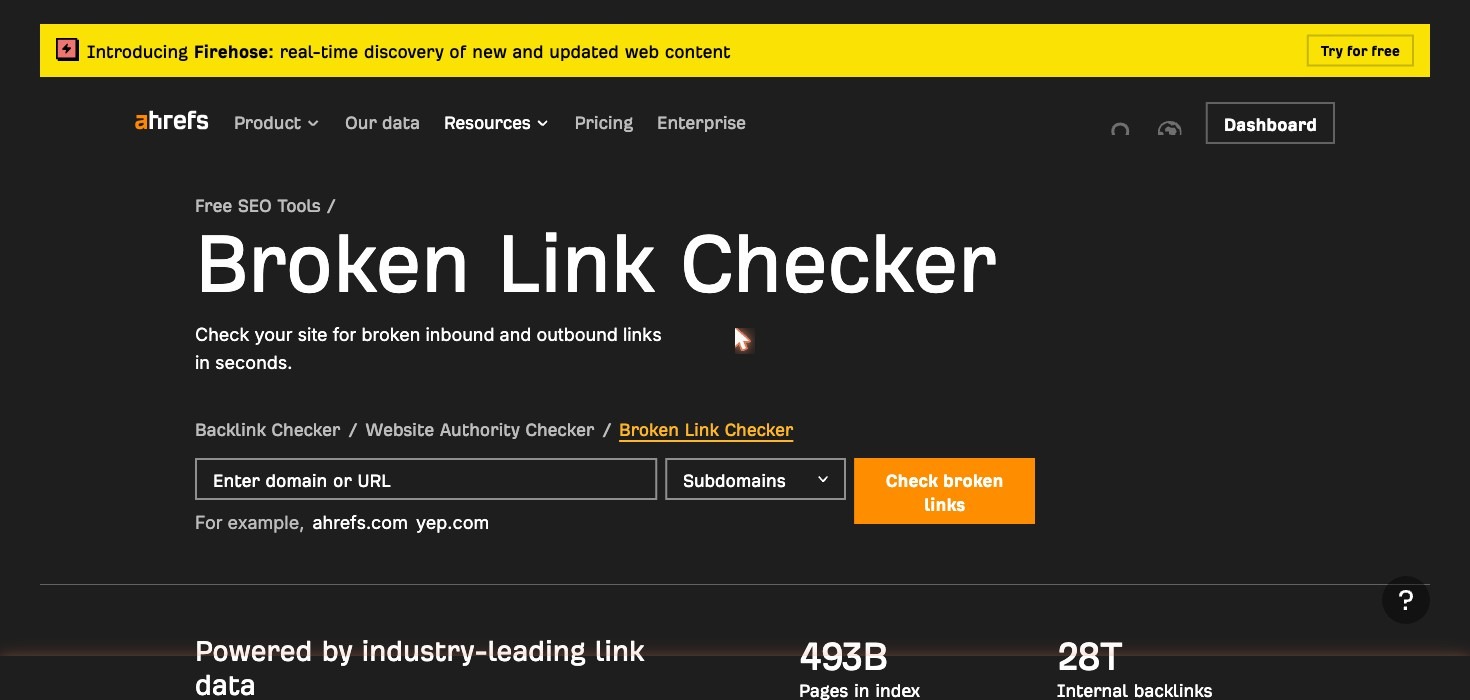
The free public tool at ahrefs.com/broken-link-checker accepts any URL and returns the broken outbound links found on that page, with no account required. Ahrefs Webmaster Tools, available at no cost to verified site owners, adds site-wide crawling through Site Audit, covering up to 5,000 pages per month on the free tier. Paid plan subscribers also access Site Explorer, which can run broken link analysis on any domain including competitor sites.
What the tool finds in each mode:
- Broken outbound links from your pages to external sites returning 4xx or 5xx
- Broken internal links between your own pages
- Broken backlinks: external links from other sites pointing to dead pages on your domain
- Broken redirects: redirect chains or redirect targets that themselves return an error
Why Broken Links Hurt Your SEO
Broken links are a technical SEO problem, not just a usability annoyance. They produce three measurable negative effects on larger sites and one structural problem that persists regardless of site size.
Wasted Crawl Budget
Google’s crawler allocates a fixed crawl budget to each domain based on authority and crawl demand. When Googlebot follows a link to a 404 page, it spends crawl capacity on a dead end rather than discovering and indexing live content. For sites under roughly 200 pages this is rarely a significant problem. Above 1,000 pages, a high volume of broken internal links can push important new content further back in the crawl queue, slowing how quickly new pages get indexed and ranked.
Lost Link Equity
Every external link pointing to a dead page on your domain passes zero equity to the rest of your site. The page is gone, the PageRank stops there, and none of it flows to the content you actually want ranked. Implementing a 301 redirect from the dead URL to the best-match live page recovers that equity flow. Recreating the deleted page restores it entirely, and for pages with five or more referring domains a 301 redirect is almost always the faster option.
Poor User Experience
Visitors who click a broken link land on a 404 page and typically leave the site immediately. High 404 rates, particularly on internal links, correlate with elevated bounce rates and shorter session durations. While Google has not confirmed a direct ranking penalty for high 404 rates, poor user engagement signals from those sessions affect how pages are evaluated over time.
Broken Internal Link Architecture
Internal links are how PageRank distributes across your own site. A broken internal link severs that distribution path entirely. When a page that was collecting authority from your homepage or pillar pages is deleted without redirects, every page that linked to it now hosts a dead-end signal that no longer contributes to the cluster’s equity pool.
The Two Modes of the Ahrefs Broken Link Checker
Ahrefs offers a free instant URL check for one-off lookups and two full audit tools for site-wide analysis, each covering a different type of broken link problem.
Free Tool: Check Any URL for Broken Outbound Links
The free tool at ahrefs.com/broken-link-checker scans a single URL and returns the broken external links found on that page. No Ahrefs account is required. Results appear in seconds and include the destination URL, the HTTP status code returned, and the anchor text of the broken link. The referring page’s URL Rating (UR) is also displayed, allowing you to prioritize fixes on pages with higher authority.
Limitations of the free version:
- Scans a single URL at a time; does not crawl the full site
- Does not show broken internal links
- Does not show broken backlinks pointing to your domain from external sites
- Limited to one URL at a time with no scheduling or monitoring
This version works well for a quick spot-check on a single page or for verifying a specific URL before linking to it. It is not a substitute for a full site audit, but it requires no signup and returns results immediately, which is useful for checking a competitor’s resource page for broken outgoing links before a broken link building campaign.
Site Audit: Find Broken Internal Links Across Your Whole Site
Site Audit is the tool for internal broken link detection. It crawls your entire domain and reports every internal link returning a 4xx or 5xx status, every broken outgoing link to external sites, and every broken redirect. Results are organized by page so you can identify which URLs are generating the most link errors. For each broken link, the report shows the source page URL, the broken destination URL, the anchor text, and the HTTP response code.
To run a Site Audit crawl:
- Log in to Ahrefs and navigate to Site Audit under the main menu
- Create a new project and verify your domain through DNS or HTML file verification
- Configure the crawl scope (you can limit to specific subdirectories or include the full domain)
- Run the crawl and wait for completion, typically a few minutes for small sites
- Navigate to the Issues tab and filter for “Broken links (internal)” and “Broken outgoing links”
- Export the results or click through individual issues to see the source page and destination URL for each broken link
Site Audit is available in Ahrefs Webmaster Tools for verified site owners at no cost, up to 5,000 pages per month on the free tier. Paid plans increase crawl credit allowances significantly. Documentation for setting up your first crawl is available at help.ahrefs.com.
Site Explorer: Find Broken Backlinks to Your Site
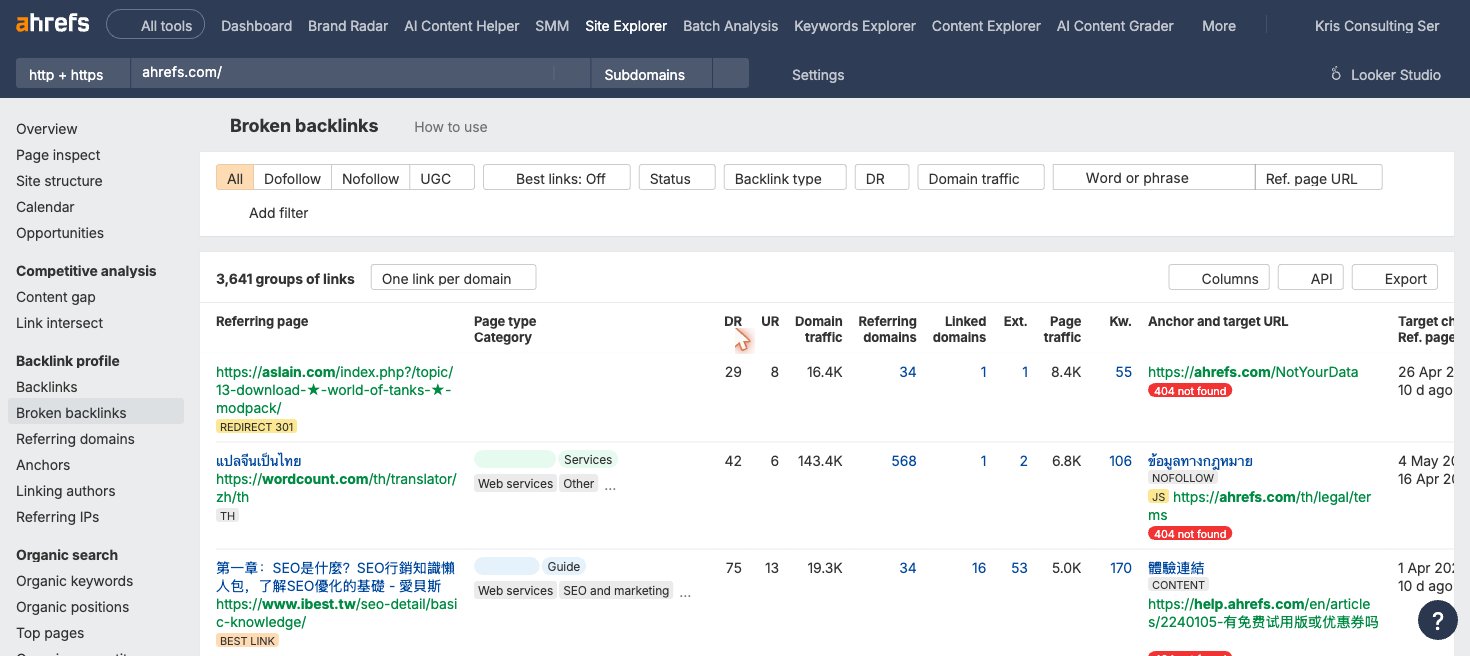
Site Explorer locates broken pages on your domain that still have external backlinks pointing to them. These are the most valuable broken links to fix because recovering them restores actual link equity you have already earned. For each dead page, the report shows the referring domains, the Domain Rating (DR) of each linking site, the anchor text used, and the specific URL returning 404.
To find broken backlinks using Site Explorer:
- Enter your domain in the Site Explorer search bar
- Navigate to Pages and then Best by Links
- Add the HTTP code filter and select “404 not found”
- Sort by referring domains to find the dead pages attracting the most external links
- For each dead page with meaningful referring domains, decide on a fix: implement a 301 redirect to the most relevant live page, recreate the page if the content was valuable, or contact each linking site and ask them to update the URL
The same Site Explorer workflow on a competitor domain instead of your own is the starting point for broken link building outreach.
How to Use Ahrefs to Find and Fix Broken Links (Step by Step)
The most efficient broken link audit combines Site Audit for your internal issues and Site Explorer for your lost backlink equity, run together in a single session.
- Run a Site Audit crawl on your domain. Use Ahrefs Webmaster Tools or a paid plan. Schedule it to run weekly or monthly depending on how frequently your site changes.
- Review the Issues tab and filter for broken links. Look at “Broken links (internal)” to find pages on your site linking to dead internal URLs, and “Broken outgoing links” to find external destinations that have gone offline.
- Fix each broken link on the source page. Update the link to the correct live URL, remove the link if the destination no longer has a replacement, or swap in an updated source. Export the issue list to a spreadsheet to track fixes systematically.
- Switch to Site Explorer and pull your broken backlinks. Enter your domain, go to Best by Links, and filter for HTTP 404. Sort by referring domains to prioritize the dead pages attracting the most link equity.
- Fix broken backlinks based on referring domain count and Domain Rating. Sort by DR to identify which linking sites carry the most authority. For pages with five or more referring domains, implement a 301 redirect to the most topically relevant live page. For pages with one or two referring domains, contact the linking site directly if the link is from a high-DR source. For pages with zero referring domains, the 404 is low priority.
- Schedule ongoing monitoring. In Site Audit, set a recurring crawl schedule so new broken links are flagged automatically rather than discovered months later.
Using the Ahrefs Broken Link Checker for Link Building
Ahrefs is also the primary tool for finding broken link building opportunities on competitor sites. The workflow uses Site Explorer on a competitor’s domain to identify dead pages that still receive backlinks from external sites, then builds an outreach list from those backlink profiles.
Step-by-step for broken link building prospecting:
- Enter a competitor’s domain in Site Explorer
- Navigate to Pages and then Best by Links
- Set the HTTP code filter to “404 not found”
- Sort by referring domains to surface the most link-rich dead pages first
- Focus on dead pages with 10 or more referring domains as your highest-value targets
- Click through each dead page’s referring domains report to see every external site linking to it
- Export the list of linking sites as a CSV outreach prospect file
- Create or identify existing content on your site that covers what the dead page offered
- Send personalized outreach to each linking site, alerting them to the broken link and offering your replacement
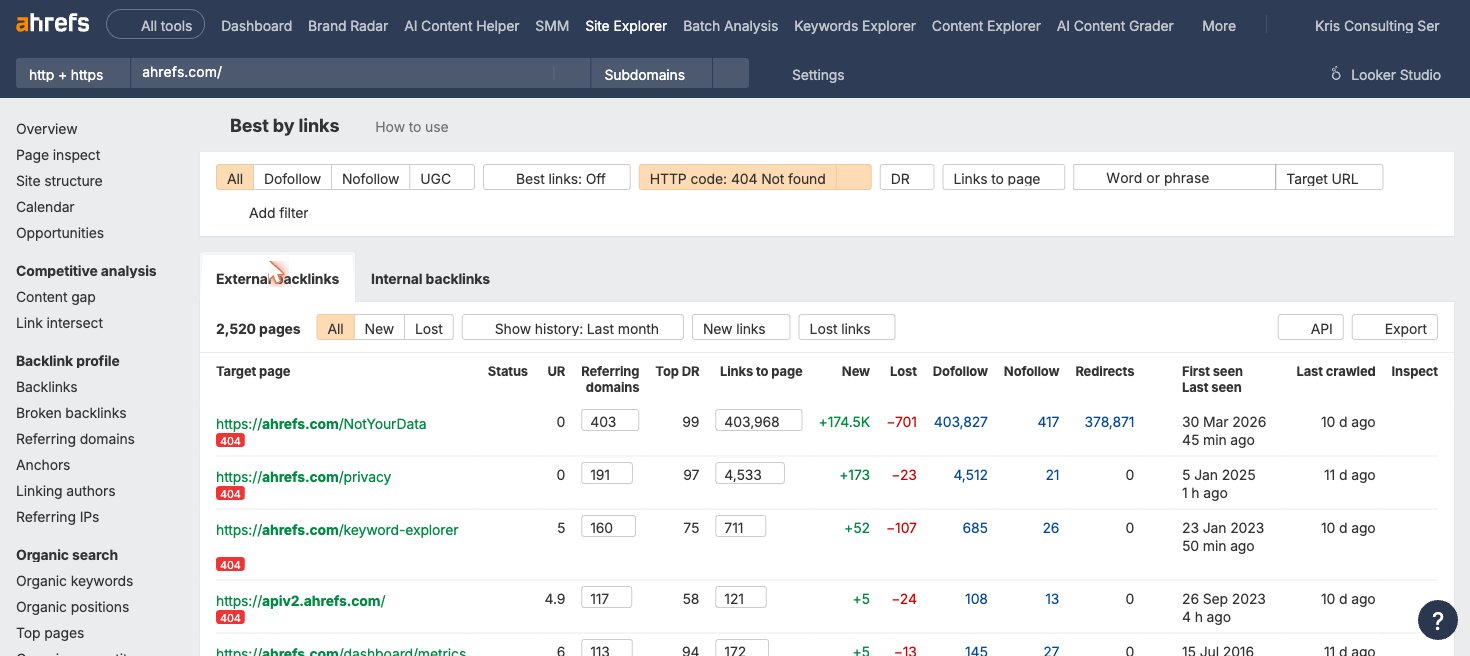
This workflow scales across multiple competitor domains. Running the same query on five to ten competitors in your niche typically surfaces 20 to 50 unique link opportunities worth pursuing. For a full breakdown of how to vet those opportunities and write effective outreach, see our guide to broken link building, along with our resources on backlink outreach and building a repeatable outreach strategy.
Ahrefs Broken Link Checker Pricing
Yes, the Ahrefs broken link checker has a free version available without any account. The free public tool at ahrefs.com/broken-link-checker requires no login and is available to anyone. Ahrefs Webmaster Tools, which includes Site Audit for full-site internal link auditing, is also free for verified site owners.
For Site Explorer access, which is required for broken backlink analysis and competitor prospecting, a paid Ahrefs plan is needed. Approximate plan tiers at the time of writing are shown below. Check ahrefs.com/pricing for current rates, as these change periodically.
| Plan | Approximate Monthly Price | Broken Link Use Case |
|---|---|---|
| Free / Webmaster Tools | $0 | Free URL checker + Site Audit up to 5,000 pages/month for your own site |
| Starter | ~$29/mo | Site Explorer access for broken backlink analysis and competitor prospecting |
| Standard | ~$179/mo | Higher crawl credit limits; suitable for most link building teams |
| Advanced | ~$399/mo | Large-site audits; multi-user; API access for custom workflows |
When a paid plan becomes necessary:
- Your site has more than 5,000 pages and exceeds the Webmaster Tools crawl limit
- You need Site Explorer to analyze broken backlinks or competitor domains
- You are managing multiple client sites under one account
- You want to integrate broken link data with keyword research or rank tracking workflows already running in Ahrefs
For most link building teams, the Standard plan provides sufficient crawl credits and Site Explorer access to run both site audits and competitor prospecting. See our breakdown of link building software options for a comparison of Ahrefs against other platforms.
Limitations of the Ahrefs Broken Link Checker
Ahrefs is a strong broken link detection tool but it has five practical constraints worth knowing before relying on it as your only audit solution.
- Crawl credit limits on lower tiers. Starter and Webmaster Tools plans have fixed monthly crawl credit allocations. Large sites with hundreds of thousands of pages can exhaust those credits before completing a full audit, leaving parts of the site unchecked until the next billing cycle.
- Data lag for recently broken links. Backlink data is updated every 15 minutes, which is fast for a third-party database. But Site Audit results depend on your crawl schedule: if you run monthly audits and a page breaks in week two, it won’t appear in your broken link report until the next scheduled crawl.
- False positives. The tool can report links as broken that are actually working, typically because the target server blocks crawlers, returns an error during a temporary outage, or enforces rate limits. Manual spot-checking is recommended before bulk-fixing any broken link list.
- No built-in redirect management. Ahrefs identifies broken redirects and the pages that need 301s, but it does not push those fixes to your CMS or hosting provider. All redirects are implemented manually or through a separate plugin or server configuration.
- Learning curve for new users. The free tool is instant and requires no setup. Site Audit and Site Explorer require familiarity with Ahrefs’ project structure, filter logic, and report navigation. First-time users typically need 30 to 60 minutes to understand the workflow before running a clean audit.
Ahrefs vs. Alternatives for Broken Link Checking
Ahrefs is not the only broken link tool worth knowing. The right choice depends on whether you need backlink data, crawl scale, or just internal link coverage.
| Tool | Internal Links | Broken Backlinks | Competitor Analysis | Best For |
|---|---|---|---|---|
| Ahrefs | Yes (Site Audit) | Yes (Site Explorer) | Yes | Link building teams needing backlink data + crawl in one platform |
| Screaming Frog | Yes | No | No | Technical SEOs needing deep crawl on large sites; fixed annual license |
| Semrush Site Audit | Yes | Limited | Limited | Teams already using Semrush; smaller backlink database than Ahrefs |
| Google Search Console | No | No | No | Checking which of your pages Google has flagged as 404; free |
| Free crawlers (Dead Link Checker, W3C) | Yes (small sites) | No | No | Quick single-page or small-site checks; no backlink data |
Ahrefs is the strongest all-in-one option when you need internal link auditing, broken backlink recovery, and competitor prospecting in the same platform. If you only need technical crawl accuracy on very large sites without backlink requirements, Screaming Frog is a cost-effective alternative. For a broader comparison of prospecting and audit tools, see our guide to linkbuilding tools.
Is the Ahrefs Broken Link Checker Worth It?
For link building teams and SEO practitioners who already use Ahrefs for keyword research or backlink analysis, the broken link checker adds significant value at no extra cost. The Site Explorer broken backlink workflow and the competitor prospecting process are the primary reasons link builders choose Ahrefs over dedicated crawl tools.
- Best fit: SEO professionals managing multiple sites, link building teams using broken link building as a core tactic, and agencies that need scheduled monitoring with backlink-level data. The ability to sort broken backlinks by Domain Rating (DR) means teams can prioritize the highest-authority recovery opportunities first.
- May not need it: Small blogs with simple internal link structures where a free crawler handles all audit needs, or teams whose work is entirely internal-link focused with no need for competitor backlink prospecting.
If you are evaluating whether to add Ahrefs to your stack, the key decision point is Site Explorer: if you need to prospect competitor domains for broken link building opportunities, no free tool provides equivalent backlink data. If your use case is internal link auditing only, Screaming Frog or a free crawler may cover the need at lower cost.
Frequently Asked Questions
Is the Ahrefs broken link checker free?
Yes. The free public tool at ahrefs.com/broken-link-checker scans any URL for broken outbound links with no account required. Ahrefs Webmaster Tools, which includes Site Audit for full-site internal link auditing, is also free for verified site owners. Site Explorer, needed for broken backlink analysis and competitor prospecting, requires a paid plan starting at approximately $29 per month.
How accurate is the Ahrefs broken link checker?
Accuracy is high for backlink data because Ahrefs’ crawler indexes 35 trillion external backlinks and refreshes every 15 minutes. For internal site audits, accuracy depends on your crawl schedule. If a page breaks between scheduled crawls, the error won’t appear until the next audit run. Running weekly crawls reduces the gap for active sites. Note that false positives can occur when target servers block crawlers or experience temporary outages, so spot-check any bulk fix list before acting on it.
Can Ahrefs find broken internal links?
Yes, through Site Audit. After running a crawl on your domain, the Issues tab shows every internal link returning a 4xx or 5xx status code, along with the source page URL, broken destination URL, and anchor text. This is available in Ahrefs Webmaster Tools for free for verified site owners.
What is the difference between Site Audit and Site Explorer for broken links?
Site Audit crawls your own site and finds broken links within it: internal links pointing to dead pages and outgoing links to external URLs that have gone offline. Site Explorer analyzes backlink profiles and finds broken pages on your domain (or any domain) that still receive inbound links from other sites. Use Site Audit to fix your site. Use Site Explorer to recover lost link equity and to find broken link building opportunities on competitor sites.
Can I use Ahrefs to find broken link building opportunities?
Yes. Enter any competitor domain in Site Explorer, navigate to Best by Links, and filter for HTTP 404. This returns every dead page on that domain sorted by referring domains. Pages with 10 or more referring domains are the most valuable targets. Export the referring domains for each dead page to build your outreach prospect list. See our full broken link building guide for the complete campaign workflow.
Does Ahrefs detect broken redirects?
Yes. Site Audit flags redirect chains and redirect targets that themselves return an error as a distinct issue type. These are reported under redirect-related issues in the audit report, separate from standard broken links. Fixing broken redirects recovers the PageRank that stops at the broken redirect destination.