
Twelve ready-to-use cold email templates follow below, organized by scenario (referral, quick question, partnership, link outreach, and more), and each one carries a realistic reply-rate band instead of a vague promise. Log whichever one you send in your CRM so you can compare your own results against these bands after a few weeks, not just trust them on faith.
What Is a Cold Email Template (And When Should You Use One)?
A cold email template is a reusable email structure, built around a specific scenario (a referral, a shared event, a partnership ask) rather than a generic “introducing myself” message. You’ll fill in the recipient-specific details: their name, their company, the one fact that proves you did your homework, and the exact ask. A good template saves you from rebuilding the same email logic every time, while still leaving enough blank space that the finished message reads as genuinely, truly written for one person, not blasted to a thousand.
Use a template when you’re sending outreach at any volume where writing every email from a blank page would be too slow, but you still care about reply rate more than send volume. This is especially true once you’re sending more than a handful of emails a week. If you’re sending a single, high-stakes email to one specific decision-maker, a template is still useful as a structural checklist, even if you rewrite most of the copy by hand.
Anatomy of a High-Reply-Rate Cold Email (Why Most Templates Get Ignored)
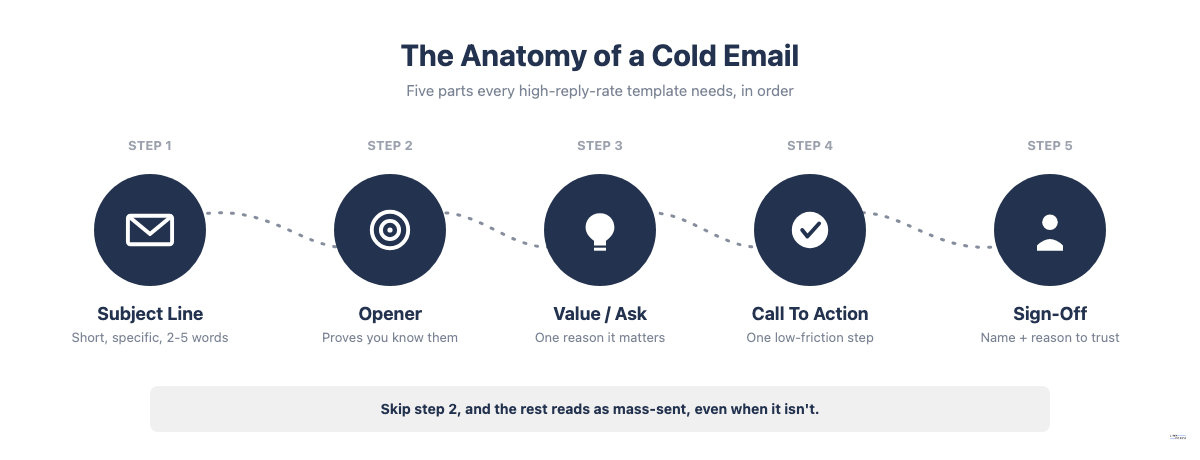
Every cold email that gets a reply shares the same five parts: a subject line, an opener, a value statement or ask, a call to action, and a sign-off. If you’ve used the AIDA copywriting framework (Attention, Interest, Desire, Action), this is the same logic adapted for a one-to-one inbox message instead of an ad. Strip any one of the five parts out, or get one badly wrong, and the email reads as mass-sent even if it wasn’t.
- Subject line: short and specific, not a mini pitch.
- Opener: one sentence proving you know who they are.
- Value or ask: the one reason this email is worth their time.
- Call to action: a single, low-friction next step.
- Sign-off: your name and a reason to trust you.
Most templates really do get ignored for a specific, fixable reason: they skip step 2 and jump straight from a generic opener to the pitch, so the recipient can’t tell the message apart from the dozens of others sitting in their inbox. According to Belkins’ analysis of 5.5 million B2B cold emails, two-to-four-word subject lines get the highest open rate of any length tested, at 46 percent, and since roughly 81 percent of email opens now happen on mobile, where subject lines truncate at around 33 to 41 characters, front-loading the most specific detail (a name, a company, a number) into the first 30 characters matters more than hitting any particular word count.
Length matters less than most senders assume, but it’s clearly not irrelevant. Hunter.io’s analysis of 34 million cold emails sent between 2022 and 2024 found that messages of 20 to 39 words had the highest average reply rate in the dataset, at 4.5 percent, with emails under 100 words averaging 3.9 percent versus 3.7 percent for longer ones. The gap is real but modest, and the study’s own author cautions that word count alone really isn’t a silver bullet. For templates meant to be filled in and actually used, a range of roughly 50 to 150 words gives enough room for one proof point and a clear ask without drifting into the long, over-explained emails that reliably underperform.
Why generic templates get ignored:
- No specific trigger: nothing in the email ties it to something true about the recipient right now, so it doesn’t land.
- No clear ask: the reader finishes the email unsure what you actually want them to do, and that’s an easy way to lose a reply.
- A subject line that reads as mass-sent: generic greetings like “Hello” or vague pitches instead of a specific, short line.
One shorthand some sales teams use for weighting the three parts above is the “30/30/50 rule”: roughly 30% of the email’s effort on personalization (proving you know the recipient), 30% on the value proposition (why this matters to them specifically), and 50% on a single, unambiguous call to action. Definitions of this split vary by source, and it’s a rough allocation guide rather than a strict word-count formula, but the underlying point holds across every version: most senders under-invest in the ask and over-invest in the pitch, which isn’t how it should work if replies are the goal.
Opening lines follow the same logic. The best-performing openers are not clever; they’re specific. “Saw {{company}} just launched {{specific_thing}}” beats “I hope this email finds you well” because it proves, in one sentence, that this email was not sent to a thousand other people. A generic opener has no real limitation beyond being safe and forgettable; a specific one risks being wrong if the research’s sloppy, so double-check the detail before you send it.
12 Cold Email Templates (With Reply-Rate Bands and When to Use Each)
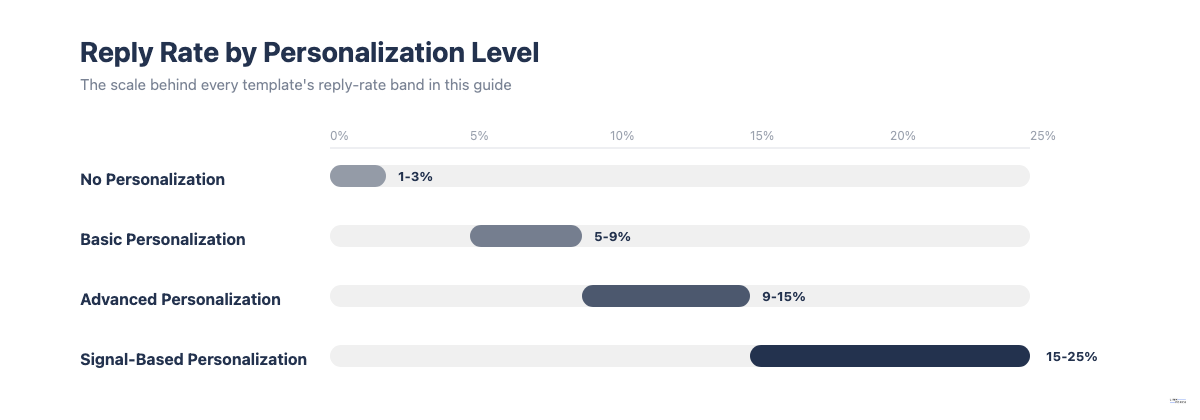
The reply-rate bands below aren’t single-decimal promises; they’re directional ranges built from the personalization-tier pattern documented across current cold-email benchmark research: unpersonalized blasts typically land in the 1 to 3 percent range, basic personalization (first name, company) in the 5 to 9 percent range, advanced personalization in the 9 to 15 percent range, and highly specific, trigger-based personalization in the 15 to 25 percent range. Where a template sits on that scale depends on how much genuine, recipient-specific proof it forces you to include, not on the wording alone.
Quick-reference table
| Scenario | Template | Typical Reply-Rate Band (%) |
|---|---|---|
| You share a mutual connection | Referral / Mutual-Connection | 15-25% |
| You need a fast, low-friction opener | Quick-Question | 8-15% |
| You know someone who knows them | Third-Party-Connection | 10-18% |
| You have a strong, specific offer | Value-First | 6-12% |
| They have a known, provable pain point | Problem-Agitate-Solve | 8-14% |
| You can point to a similar, named customer | Case-Study / Social-Proof | 7-13% |
| You met at or follow the same event | Event-Follow-Up | 12-20% |
| You are pitching a partnership, not a sale | Partnership / Collaboration | 5-10% |
| You are doing link or guest-post outreach | Guest-Post / Link-Outreach | 4-9% |
| This is your final email in a sequence | Breakup / Last-Chance | 5-12% |
| You are nudging a cold thread back up | Re-Engagement / Bump | 3-7% |
| You are networking or requesting an informational interview | Networking / Informational-Interview | 10-20% |
Referral / Mutual-Connection Template
Subject: {{mutual_connection_name}} suggested I reach out
Hi {{first_name}},
{{mutual_connection_name}} mentioned you’re leading {{specific_initiative}} at {{company}} and thought we should connect. I work on {{your_specific_value}}, and {{mutual_connection_name}} felt it might be relevant given {{specific_reason}}.
Worth a 15-minute call this week?
{{your_name}}
Why It Works: A named mutual connection is honestly the single strongest trust signal you can put in a cold email, because it borrows credibility the recipient already has reason to believe.
Reply-Rate Band: 15-25%, the highest band of any template here, matching the “signal-based personalization” tier in current benchmark data.
When To Use It: Only when the mutual connection is real and has agreed you can use their name. Never imply a connection that doesn’t exist.
Quick-Question Template
Subject: Quick question about {{specific_topic}}
Hi {{first_name}},
Noticed {{company}} is {{specific_observation}}. Quick question: are you currently {{specific_pain_point_question}}?
If so, I’d like to show you how {{similar_company}} handled it in under {{timeframe}}.
{{your_name}}
Why It Works: A single, specific question is low-friction to answer, and frankly, it signals you did real homework instead of sending a mass template.
Reply-Rate Band: 8-15%, assuming the observation is genuinely specific to that company, not a generic industry comment.
When To Use It: As a first-touch email when you don’t yet have a referral or shared event to lean on, but you do have one concrete, researched detail about the recipient.
Third-Party-Connection Template
Subject: {{shared_context}} connection
Hi {{first_name}},
I noticed we’re both connected to {{shared_context, e.g. a company, community, or group}}. I’ve been working on {{specific_value}} for teams like {{company}}, and given {{specific_reason}}, I thought it was worth a quick note.
Open to a short call?
{{your_name}}
Why It Works: It borrows a weaker but still real form of social proof (shared network, shared group, shared employer history) when you don’t have a direct mutual contact willing to be named.
Reply-Rate Band: 10-18%, lower than a true named referral but still well above a cold, unconnected opener.
When To Use It: When you share a verifiable connection point (same alumni network, same LinkedIn group, same past employer) but no individual person has personally introduced you.
Value-First Template
Subject: Built this for {{company}}, figured you’d want it
Hi {{first_name}},
{{specific_public_signal}} caught my eye, so I put together a quick {{specific_resource, e.g. audit, benchmark, teardown}} specific to {{company}} rather than sending a generic pitch. It’s yours either way, no call required.
If it turns out useful, happy to walk through how {{similar_company}} used something similar.
{{your_name}}
Why It Works: Leading with something genuinely useful, before making any ask, lowers the recipient’s guard and gives them a reason to reply even if they’re not ready to buy.
Reply-Rate Band: 6-12%, and it rises toward the top of that band when the resource is specific to the recipient’s company rather than a generic template attachment.
When To Use It: When you can realistically produce a short, specific piece of value (a mini audit, a relevant data point) before the first send, not as a generic claim with nothing behind it.
Problem-Agitate-Solve Template
Subject: {{specific_problem}} at {{company}}?
Hi {{first_name}},
Most {{role/industry}} teams I talk to are dealing with {{specific_problem}}, and it usually costs them {{specific_cost, e.g. time, money, leads}}. {{specific_evidence_or_example}}.
We built {{solution}} specifically for this. Worth a quick look?
{{your_name}}
Why It Works: Naming a real, provable problem the recipient likely has, then immediately offering a specific fix, keeps the email outcome-focused instead of feature-focused.
Reply-Rate Band: 8-14%, provided the problem and cost are specific and credible, not a generic industry complaint.
When To Use It: When you have real evidence (a statistic, a pattern from similar customers) behind the problem you’re naming, not just an assumption about what the recipient struggles with.
Case-Study / Social-Proof Template
Subject: How {{similar_company}} solved {{specific_problem}}
Hi {{first_name}},
{{similar_company}}, who’s in a similar spot to {{company}}, was dealing with {{specific_problem}} before working with us. They saw {{specific_result}} within {{timeframe}}.
Given {{specific_reason_this_applies}}, thought it was worth sharing. Open to a quick call?
{{your_name}}
Why It Works: A named, similar company with a specific, time-bound result is far more convincing than an unnamed claim, and it lets the recipient picture the outcome for their own situation.
Reply-Rate Band: 7-13%, and it depends heavily on how comparable the named case study actually is to the recipient’s company or role.
When To Use It: When you have a real, nameable customer result to point to; don’t substitute a vague or invented result for the specific company and number, since that’s exactly the kind of claim a skeptical reader will quietly discount.
Event-Follow-Up Template
Subject: Following up from {{event_name}}
Hi {{first_name}},
{{We met at / I saw your talk at / I followed the discussion around}} {{event_name}}, and {{specific_detail_from_the_event}} stuck with me. Wanted to follow up on {{specific_topic_discussed}}.
Would it make sense to continue that conversation this week?
{{your_name}}
Why It Works: Shared, recent, real-world context (a conference, a webinar, a panel) is one of the strongest openers because it’s inherently specific and hard to fake.
Reply-Rate Band: 12-20%, among the higher bands here, since the shared-event framing supplies genuine personalization almost automatically.
When To Use It: Only when the shared event detail is true and specific. A vague “great meeting you at the conference” with no real detail performs closer to a generic cold open, so it’s worth the extra ten seconds to add a specific detail.
Partnership / Collaboration Template
Subject: Partnership idea for {{company}} and {{your_company}}
Hi {{first_name}},
{{your_company}} and {{company}} serve a similar audience in {{specific_overlap}}. I think there’s a specific partnership opportunity around {{specific_idea, e.g. a co-branded resource, a cross-promotion, a joint webinar}}.
Would you be open to a short call to explore it?
{{your_name}}
Why It Works: Framing the email as a mutual-benefit proposal rather than a sale changes how the recipient reads the ask, since they’re being invited to shape the idea, not just approve a purchase.
Reply-Rate Band: 5-10%, a realistic range for a genuine partnership pitch; it depends on how concrete and low-effort the proposed collaboration is for the recipient.
When To Use It: For true partnership, co-marketing, or collaboration proposals between two businesses, not as a disguised sales pitch, which recipients spot quickly. This is a distinct intent from a general sales cold email and should be written to make that distinction clear from the subject line onward. For a wider set of partnership-specific examples, see this collaboration email template guide.
Guest-Post / Link-Outreach Template
Subject: Small gap on {{specific_page_or_article}}
Hi {{first_name}},
Went through {{specific_page_or_article}} on {{company}}’s site today, solid piece overall. One thing stood out: {{specific_observation, e.g. a missing resource, an outdated stat, a related gap}}. I happen to have written {{your_resource}}, which fills exactly that gap, so flagging it in case it’s useful as a reference or a link.
Totally fine either way, just didn’t want to not mention it.
{{your_name}}
Why It Works: Leading with a specific, genuine observation about the exact page (not a generic “I love your blog” opener) is what separates link-outreach emails that get a reply from the ones that get deleted on sight.
Reply-Rate Band: 4-9%, the lowest band in this set; link and guest-post outreach reply rates run structurally lower than sales outreach because the ask benefits the sender more directly than the recipient.
When To Use It: For SEO and content outreach (guest posts, resource link requests, partnership mentions). Keep the ask small and specific (a link or a mention, not a full guest post commitment) on the first email; it’s a lot easier to say yes to. For the full pitch-to-published workflow, see this guest post outreach guide.
Breakup / Last-Chance Template
Subject: Closing the loop on {{specific_topic}}
Hi {{first_name}},
I’ve reached out a couple of times about {{specific_topic}} and haven’t heard back, which is completely fine. I’ll stop following up after this one.
If the timing’s just off rather than a flat no, a quick reply either way would help me know whether to check back later.
{{your_name}}
Why It Works: The explicit “I’ll stop” framing creates light urgency and gives recipients who were simply busy, not uninterested, a low-effort reason to respond.
Reply-Rate Band: 5-12%, higher than a mid-sequence follow-up because the scarcity framing prompts replies even from people planning to decline.
When To Use It: As the final email in a sequence (typically email 3 or 4), never as a first-touch message.
Re-Engagement / Bump Template
Subject: Re: {{original_subject_line}}
Hi {{first_name}},
Wanted to bump this back to the top of your inbox in case it got buried. {{one_new_detail_or_reason_to_revisit}}.
Still worth a quick look?
{{your_name}}
Why It Works: It’s deliberately low-effort for both sides, which makes it a safe middle-of-sequence nudge that doesn’t ask the recipient to re-engage with the full original pitch.
Reply-Rate Band: 3-7%, the lowest non-outreach band here, since a plain bump with nothing new to add is close to the “basic personalization” tier rather than advanced.
When To Use It: As an early or middle follow-up (typically email 2), and only when paired with at least one small new detail so it doesn’t read as a content-free nudge.
Networking / Informational-Interview Template
Subject: {{field}} question from a {{your_context, e.g. student, career-switcher}}
Hi {{first_name}},
Your work on {{specific_project_or_role}} is part of why I got interested in {{field}} in the first place. I’m {{your_context}} right now, and I’m trying to learn from people who’ve actually done this rather than guessing. Would you have 15-20 minutes sometime in the next couple of weeks for a few questions about how you got there?
No pressure if the timing’s bad, I know inboxes get full.
{{your_name}}
Why It Works: A small, specific, time-boxed ask (15-20 minutes, a few questions) combined with genuine, specific interest in the recipient’s actual work performs well because it’s easy to say yes to.
Reply-Rate Band: 10-20%, reflecting that most professionals are more willing to help with a small, flattering, low-stakes request than to engage with a sales pitch.
When To Use It: For students, career-switchers, and early-career outreach such as job or internship inquiries and informational interviews. This is a secondary use case versus the sales and partnership templates above, but the same anatomy rules apply.
Frequently Asked Questions About Cold Email Templates
Is Cold Email Still Effective in 2026?
Yes, but effectiveness now depends almost entirely on personalization and targeting, not volume. Platform-wide average reply rates sit around 3.43% according to Woodpecker’s 2026 cold email benchmark data, while advanced, signal-based personalization pushes that toward 15-25%. Generic, unpersonalized blasts increasingly underperform, but well-targeted, specific cold email’s still one of the most direct ways to reach a decision-maker who hasn’t opted into any marketing list.
What Should a Cold Email Include?
A cold email should include five parts, and it’s worth memorizing them: a short, specific subject line; an opener that proves you know who the recipient is; a clear value statement or ask; a single, low-friction call to action; and a sign-off that gives a reason to trust you. See the anatomy breakdown above for the detail on each part.
How Many Follow-Ups Should You Send?
A practical baseline is 3 to 4 follow-ups after the initial email, and that’s genuinely enough for most sequences, per Lemlist’s analysis of cold outreach follow-up sequences. Reply likelihood declines with each message in a sequence, but most of the value still comes from the first one or two follow-ups; going well beyond 4 total emails also raises the risk of spam complaints, so more isn’t automatically better.
Can You Use a Cold Email Template for a Job or Internship Application?
Yes. The Networking / Informational-Interview template above is built for this case: a small, specific, time-boxed ask combined with genuine interest in the recipient’s actual work. Keep the same anatomy rules (specific opener, clear ask, short length) even though you’re aiming for a conversation rather than a sale. If your first email goes unanswered, pair it with the approach in this follow-up email guide rather than repeating the same message.