

Analyzing backlinks means pulling every external website that links to a domain or page, then reading what those links say about authority, risk, and opportunity. Tools like Ahrefs, Semrush, Majestic, and Moz build the databases; Google Search Console shows what Google itself has already recorded. The output is a list of referring domains, anchor text labels, and link quality signals. Search engines and AI answer engines both weigh those signals when deciding which sites to trust and cite.
You analyze backlinks to understand your own authority, diagnose gaps in your strategy, or map out exactly where your competitors earn their rankings. This guide covers how to pull the data, what the numbers actually mean and what to do once you have them.
For a broader look at evaluating link profiles, see our complete guide to backlinks analysis.
Why You Need to Analyze Backlinks
Backlinks remain one of Google’s most consistent ranking signals. In a 2016 interview, Google’s Search Quality Senior Strategist Andrey Lipattsev confirmed that content and links into your site are the top two ranking factors. That has not meaningfully changed in the years since.
The count alone tells you very little, though. A domain with 500 backlinks from five spammy directories is weaker than one with 50 links from relevant, high-authority sites. Analyzing your backlinks gives you the full picture:
- Find ranking gaps. Pages that should rank but do not often lack referring domains compared to competitors. A backlink search shows exactly how big that gap is.
- Protect your site from toxic links. Spammy or paid link schemes can attract Google penalties. Searching your backlinks lets you spot low-quality links before they cause harm.
- Monitor your link building campaigns. After outreach or guest posting, you need to verify that the promised links actually appeared and point to the right pages.
- Recover lost backlinks. Referring sites update their content and remove links. A regular backlink search surfaces links that dropped since your last check, giving you a shortlist of recovery targets.
- Identify link building opportunities. When you search a competitor’s backlinks, you see every domain that trusts them enough to link. Those are proven prospects for your own outreach.
- Build AI search authority. Backlinks serve as trust signals not just for Google’s traditional algorithm but also for AI-powered search and citation systems. A stronger link profile improves the likelihood that AI overviews and answer engines reference your content.
How to Search Backlinks for Free
The most accessible free starting point is Google Search Console for your own site, followed by the free tiers of third-party tools for any domain.
Method 1: Google Search Console (Your Own Site Only)
Google Search Console is the only backlink source that shows links exactly as Google has recorded them. Unlike third-party tools, the data here reflects what Google’s own crawler has found and attributed to your domain.
To access it:
- Go to search.google.com/search-console and select your property.
- Click Links in the left sidebar.
- Under External links, click More below “Top linking sites” to see the full list of referring domains.
- Click any referring domain to see which of your pages it links to.
- Click Top linked pages to see which pages on your site have the most incoming external links.
- Use the Export button (top right) to download a CSV for offline analysis.
What GSC shows: referring domain list, top linked pages on your site, top linking text (anchor text summary), and the approximate count of links from each domain.
What GSC does not show: DR or any authority metric, individual link-level data, competitor backlinks, historical change data, or links that Google has not yet crawled. For all of those, you need a third-party tool.
Method 2: Free Backlink Checkers for Any Domain
When you need to search backlinks for a competitor’s domain or you want a third-party view of your own site, free tiers of major tools provide a limited but useful snapshot.
Ahrefs Free Backlink Checker (ahrefs.com/backlink-checker): Enter any domain and get the top 100 backlinks sorted by Domain Rating of the referring domain. No account required. Shows DR, URL Rating, anchor text, link type (dofollow/nofollow), and whether the link is still live. The free version is a reliable quick-check for spotting the highest-authority links pointing to any site.
Semrush Free Backlink Checker (semrush.com/analytics/backlinks/): Shows the first 100 referring domains with Authority Score, total backlinks, and dofollow percentage. Requires a free account. Useful for a fast authority overview and for checking whether a recently built link has been indexed.
Limitations of free tiers: You see only a fraction of the full link database. Pagination is locked, historical data is hidden, and filters are restricted. For a thorough backlink search, especially for competitive research, a paid subscription is necessary.
How to Search Backlinks with Paid Tools
Paid tools give you access to the full backlink database for any domain. This includes historical link data, lost and new links, complete anchor text distribution, and all the filtering capabilities you need to find meaningful patterns.
Ahrefs Site Explorer
Ahrefs is widely regarded as having one of the most comprehensive backlink databases, updated every 15 minutes from its own web crawler.
Steps to search backlinks in Ahrefs:
- Go to Ahrefs and open Site Explorer.
- Enter the domain or URL you want to research. Use the dropdown to choose between domain, subdomain, or exact URL.
- In the left sidebar, click Backlinks to see every individual link. Or click Referring domains for a consolidated view by domain (usually more useful).
- Use the DR filter to narrow results (e.g., DR 30 or above) to focus on higher-authority links.
- Filter by Dofollow to see only links that pass equity.
- Click Anchors in the sidebar to see the full anchor text breakdown for the domain.
- Use New and Lost tabs under Referring domains or Backlinks to track link changes over time.
- Export any report to CSV for prospecting or reporting.
Key Ahrefs metrics: Domain Rating (DR), URL Rating (UR), referring domains count, dofollow/nofollow split, anchor text, first seen / last seen dates, HTTP status of the linking page.
Semrush Backlink Analytics
Semrush draws from a database it reports at 43 trillion backlinks, with hourly index updates. Its interface is well-suited to strategic use cases like gap analysis.
Steps to search backlinks in Semrush:
- Open Backlink Analytics from the main menu.
- Enter the target domain in the search bar and click Analyze.
- The Overview tab shows Authority Score, total backlinks, referring domains, monthly visits to linking pages, and IPs.
- Click the Backlinks tab for individual links with source page, anchor text, and link attributes.
- Click the Referring Domains tab to see each domain with its Authority Score, linking pages count, and follow/nofollow status.
- Use the Anchors tab for anchor text distribution.
- Use Backlink Gap (under Link Building in the sidebar) to compare your domain against up to four competitors and see which domains link to them but not to you.
Key Semrush metrics: Authority Score (0-100), backlinks count, referring domains, dofollow ratio, active vs lost link status.
Majestic Site Explorer
Majestic uses its own proprietary metrics and is particularly useful for trust-focused link analysis.
Steps to search backlinks in Majestic:
- Go to majestic.com and enter the domain in the Site Explorer search.
- The Summary tab shows Trust Flow (TF), Citation Flow (CF), referring domains, and total external backlinks.
- Click Backlink History to see how the link profile has grown or shrunk over time.
- Click Referring Domains to see each domain with its own TF and CF scores.
- Use the Anchor Text tab to see the full distribution.
- Switch between the Fresh Index (links from the last 90 days) and the Historic Index (all links ever crawled) for different research needs.
Key Majestic metrics: Trust Flow (TF, 0-100, measures link trust), Citation Flow (CF, 0-100, measures link volume), TF:CF ratio (a healthy profile is TF close to or above half of CF).
Moz Link Explorer
Moz Link Explorer (moz.com/link-explorer) provides similar functionality with its own Domain Authority (DA) and Page Authority (PA) metrics. It is useful as a cross-check when verifying link quality, since DA is the metric that many publishers and journalists refer to when evaluating link requests.
Steps: Enter the domain, click Inbound Links for individual links, or Linking Domains for a domain-level view. Filter by Follow or NoFollow. Check the Anchor Text tab for distribution.
Tool Comparison
| Tool | Free Tier | Database Size | Update Frequency | Key Metric |
|---|---|---|---|---|
| Ahrefs | Top 100 backlinks (no login) | Very large (proprietary) | Every 15 minutes | Domain Rating (DR) |
| Semrush | 100 referring domains (free account) | 43 trillion+ backlinks | Hourly | Authority Score |
| Majestic | 10 backlinks | Large (Fresh + Historic indexes) | Weekly (Historic) | Trust Flow / Citation Flow |
| Moz | 10 links per query | Large | Periodic | Domain Authority (DA) |
| Google Search Console | Full (your site only) | Google’s own index | As crawled | None (first-party data) |
How to Read Backlink Data
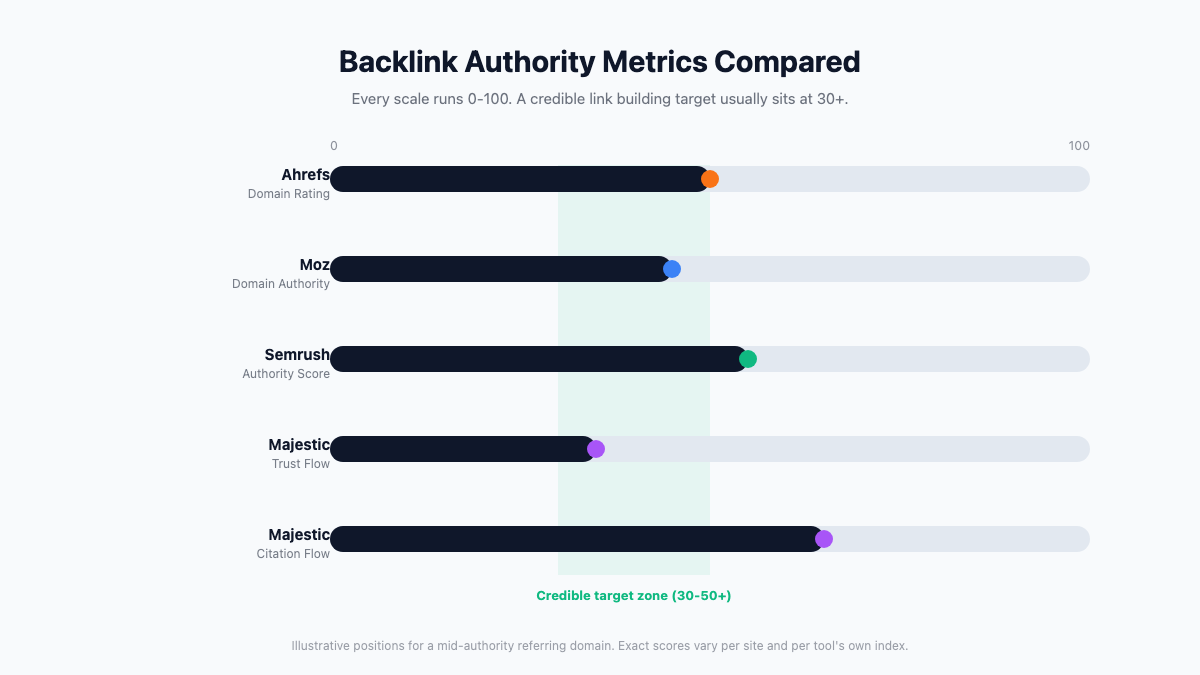
A backlink report is only as useful as your ability to read it. Five things determine whether a link actually helps you: the referring domain’s authority score, its anchor text, whether it passes equity (dofollow) or not, how relevant the linking site is to your niche, and whether the link is still live.
Domain Metrics: DR, DA, and Authority Score
Every major backlink tool uses its own proprietary authority score. These metrics are not interchangeable, but they all measure the same underlying concept: how strong is this domain’s own link profile?
Domain Rating (DR) is Ahrefs’ metric on a 0-100 logarithmic scale. A DR 40 site has meaningfully more link equity than a DR 30 site, but the gap between DR 70 and DR 80 is enormous. DR measures the strength of a domain’s backlink profile relative to all other sites in the Ahrefs database.
Domain Authority (DA) is Moz’s equivalent, also 0-100. DA is the metric most commonly referenced in link building outreach because it has been available the longest. It does not perfectly correlate with Google rankings, but it is a practical proxy for domain strength that most publishers understand.
Authority Score is Semrush’s metric, also 0-100. It incorporates backlink quality, organic search traffic, and spam signals. A site with many backlinks but very low traffic may score lower on Authority Score than on DR alone.
Trust Flow and Citation Flow are Majestic’s pair of metrics. Trust Flow measures how trustworthy a site’s link neighborhood is (is it linked from other trusted sites?). Citation Flow measures raw link volume. A healthy site has TF roughly equal to half of CF or higher. A site with CF 40 and TF 5 is likely a link farm.
For most link building campaigns, a referring domain with DR 30+ (or DA 30+) is a credible target. In competitive verticals like finance, insurance, or health, DR 50+ is a more realistic baseline. In niche B2B or local sectors, a topically relevant DR 20 site may outperform a generic DR 50 site. Links from .edu and .gov domains are worth flagging separately: they carry no automatic ranking boost, but their editorial standards make them a useful proxy for genuine authority, and most backlink tools let you filter for them specifically.
Anchor Text Types and What They Mean
Anchor text is the clickable text of a link. Its distribution tells you how natural or optimized a site’s link profile looks.
- Branded anchors (e.g., “Linkforce”, “Ahrefs”): the healthiest and most common type on authoritative sites. A profile dominated by branded anchors is a good sign.
- Naked URL anchors (e.g., “linkforce.io”): neutral and typical in editorial citations and press coverage.
- Generic anchors (e.g., “click here”, “read more”): add no topical signal but indicate natural, non-optimized linking behavior.
- Exact-match anchors (e.g., “search backlinks”): pass the strongest topical signal to the linked page, but in excess they trigger over-optimization warnings. A profile dominated by exact-match anchors on a single money keyword looks manipulative.
- Partial-match anchors (e.g., “free backlink search tool”): include the keyword phrase in a more natural context and are a reasonable target in link building outreach.
A healthy link profile has a majority of branded and naked URL anchors, with topical anchors distributed across a range of phrases. If you find a competitor site with 70-80% exact-match anchors on a keyword, that is a signal of a potentially risky link scheme.
Dofollow vs Nofollow: Which Links Count
Dofollow links (the default for any link with no special attribute) pass link equity from the linking page to your site. These are the links that directly influence PageRank and rankings.
Nofollow links (marked with rel=”nofollow”) tell Google not to pass link equity. Google introduced nofollow in 2005 for user-generated content and sponsored links. Since 2019, Google has treated nofollow as a “hint” rather than a hard instruction, meaning some equity may still pass.
Sponsored links (rel=”sponsored”) are the correct attribute for paid placements. Using dofollow on a paid link violates Google’s guidelines and can result in a manual penalty.
UGC links (rel=”ugc”) are used for user-generated content such as forum posts or comment sections.
For building link equity, dofollow links from relevant, high-DR domains are the primary target. Nofollow links still drive referral traffic and contribute to a natural-looking anchor text profile, but they should not be the sole focus of outreach efforts.
Turn Backlink Data Into Strategy
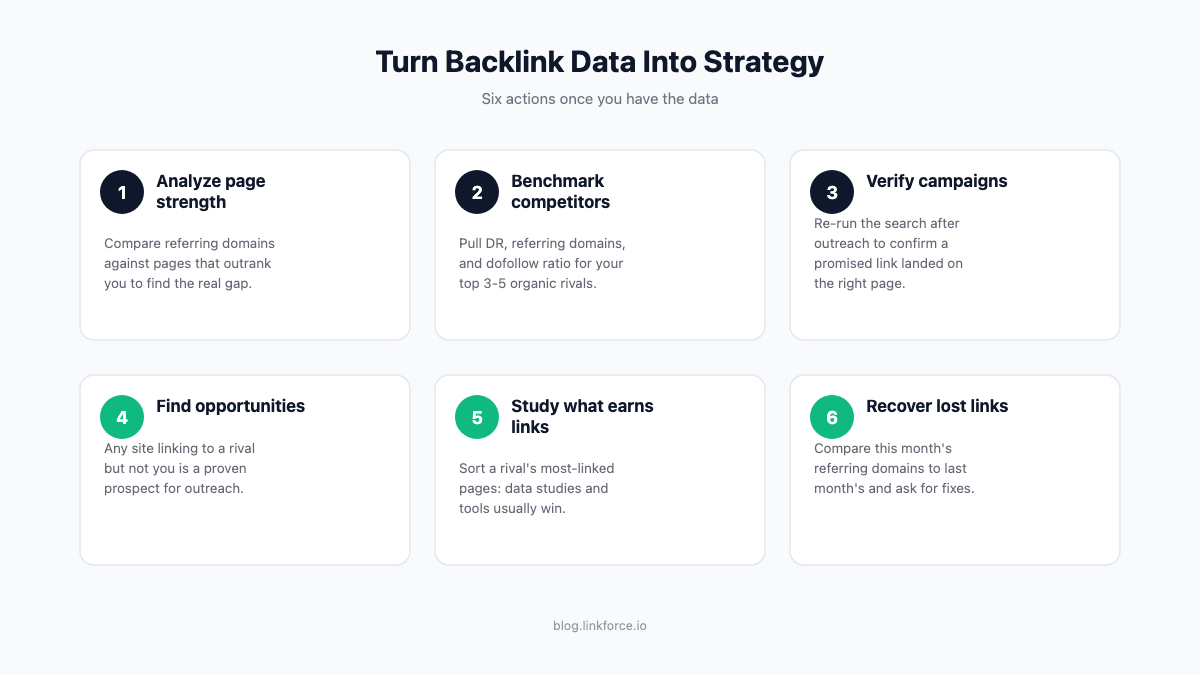
Pulling a backlink report is only useful if it changes what you do next. Once you have the data from any of the tools above, here is how to put it to work:
- Analyze the strength of your key pages. If a page that should rank well has far fewer referring domains than the pages outranking it, that gap is usually the reason. Prioritize link building toward that specific URL, not just the domain as a whole.
- Benchmark your profile against competitors. Pull the same metrics (DR, referring domains, dofollow ratio) for your top 3-5 organic competitors and compare side by side. A large gap in referring domains tells you how much ground you need to make up.
- Verify that your link building campaigns actually landed. After outreach or guest posting, re-run the search on the target page and confirm the promised link appears, points to the right URL, and uses a reasonable anchor.
- Find opportunities your competitors already proved out. Every domain linking to a competitor but not to you is a prospect that has already shown it links to sites in your niche. This is the fastest way to build a realistic outreach list.
- Study what content earns the most links. Sort a competitor’s most-linked-to pages and look for a pattern. Data studies, free tools, and comprehensive guides consistently outperform product pages for organic link acquisition.
- Recover links that quietly disappeared. Compare this month’s referring domains against last month’s. A dropped link from a still-active site is often just a broken redirect or a content update you can ask the site owner to fix.
Why Backlink Counts Differ Between Tools
Ahrefs, Semrush, Majestic, and Google Search Console will each report a different number of backlinks and referring domains for the same site. This is not a bug in any one tool. Each service runs its own independent web crawler and builds its own database, so no two tools have ever indexed exactly the same set of pages.
Crawl budget explains most of the gap. Every crawler prioritizes popular, frequently updated sites and revisits them faster than small or rarely updated ones. Ahrefs refreshes its index for high-traffic pages roughly every 15 minutes but can take days or weeks to recrawl a low-traffic page. Semrush updates its index hourly. Google Search Console sits apart from both: it only reflects links Google’s own crawler has found and chosen to attribute to your site, which can take anywhere from a few days to several weeks and sometimes omits links Google has decided to discount entirely.
The practical takeaway is not to chase a single “true” backlink count. Use GSC as your first-party source of record for your own site, then cross-check with one or two third-party tools when you need competitor data or a broader view. Treat discrepancies between tools as normal rather than a sign that one tool is wrong.
Using Backlink Search for Competitive Analysis
Searching a competitor’s backlinks is one of the highest-leverage activities in link building. Every domain that links to your competitor is a site that has already shown willingness to reference content in your niche.
Here is a four-step process for competitive backlink research:
- Identify your top 3-5 organic competitors. These are the pages that outrank you for your priority keywords. Use your backlink tool’s “organic competitors” report or search your primary keyword and note the top results.
- Run a backlink gap analysis. In Ahrefs, use the Link Intersect tool under Competitive Analysis. Enter your domain and up to ten competitors. Filter for “links to all competitors but not to you” to find the highest-priority prospects. In Semrush, use Backlink Gap under Link Building. Sort results by Authority Score or DR to find the strongest domains.
- Filter and qualify prospects. Remove domains below DR 20 (unless highly relevant). Remove off-niche domains that link to your competitor for unrelated content. Look for trade publications, industry blogs, resource pages, and content hubs that regularly link out editorially.
- Map content formats to link sources. For each qualified prospect, check what page on your competitor’s site they linked to. This tells you what content type earns links from that domain – a data study, a how-to guide, a tool. Create or improve content in that format to earn a link.
This maps competitor backlink data directly to outreach targets. Linkforce covers the full outreach and link building workflow across our other guides.
Frequently Asked Questions
How do I search backlinks for free?
The best free option for your own site is Google Search Console. Go to Links in the left sidebar, then External links to see all referring domains Google has indexed. For competitor domains, use the free Ahrefs Backlink Checker (top 100 links with DR and anchor text, no account required) or Semrush’s free checker (top 100 referring domains with Authority Score, free account required).
What is the difference between referring domains and backlinks?
Referring domains is a count of unique websites that link to you. Backlinks (or total backlinks) is the count of individual link instances, including multiple links from the same domain. A single website with 50 internal pages all linking to yours counts as 1 referring domain but 50 backlinks. Referring domains is the more meaningful metric for evaluating link profile strength, since one strong domain adding 50 links does not carry 50 times the value.
Does Google Search Console show all my backlinks?
No. Google Search Console shows the links that Google’s crawler has found and attributed to your site, but it is not a complete record. Google deliberately omits links it has chosen to ignore or discount. Third-party tools like Ahrefs and Semrush crawl the web independently and often show links absent from GSC, and vice versa. Use GSC for a verified first-party view; use third-party tools for comprehensive coverage.
How long does it take for a new backlink to appear in tools?
It depends on the tool’s crawl frequency and the linking domain’s crawl priority. Ahrefs refreshes its index for high-traffic pages every 15 minutes, but low-traffic pages can take days or weeks to be re-crawled. Semrush updates its index hourly. Google Search Console can take from a few days to several weeks to register a new link, particularly if the linking page is new or infrequently crawled. Wait at least two to four weeks after a link goes live before concluding it has not been indexed.
What is a good Domain Rating for a backlink?
DR 30+ is a common working threshold for links that meaningfully contribute to SEO in most niches. In competitive verticals like finance, law, or health, DR 50+ is a more realistic target for impactful links. Relevance and editorial context matter alongside authority. A topically relevant DR 20 site in a niche B2B sector can outperform a generic DR 50 directory listing.
Can I search backlinks for a competitor’s site?
Yes. All major backlink tools – Ahrefs, Semrush, Majestic, and Moz – allow you to enter any domain and view its backlinks, referring domains, and anchor text. This is one of the primary use cases for these tools. Free tiers return limited results; a paid subscription gives you the full picture including historical data, new and lost link tracking, and full filter controls.
Why do different tools show different backlink counts for the same site?
Each tool runs its own independent crawler and database, so no two ever index the same set of pages at the same time. See “Why Backlink Counts Differ Between Tools” above for the full explanation and what to do about it. As a quick rule: discrepancies are largest for smaller or newer sites, and running searches across two tools gives a more complete picture than relying on a single database.