


Disavowing backlinks means asking Google to ignore specific links pointing to your site when it evaluates your rankings. It is a narrow fix for a narrow problem: links you cannot get removed that are causing, or are likely to cause, real ranking harm. Google has said plainly that most sites never need to use the tool, and that using it carelessly can hurt a site that didn't need it in the first place.
That caution matters more than most guides let on. If you only use Ahrefs to pull a disavow list and upload it, you can skip straight past the question this article is built around: should you be disavowing anything at all. Below is the current, Google-sourced version of that decision, followed by the exact mechanics once you've decided yes.
What is disavowing backlinks?
Disavowing a backlink means telling Google, through a plain text file uploaded in Search Console, to disregard that link when it assesses your site. The link itself still exists; it still shows up if someone checks who links to you. Google simply stops counting it, good or bad, as a signal about your site. Google's own guidance frames this as a targeted exception, not a general cleanup tool: it's meant for links you've tried and failed to get removed at the source, not a first resort for every link you're unsure about.
Do
- You have a manual action for unnatural links and can't get them removed at the source
- You confirm a PBN, bulk paid links, or another self-built link scheme you want to undo
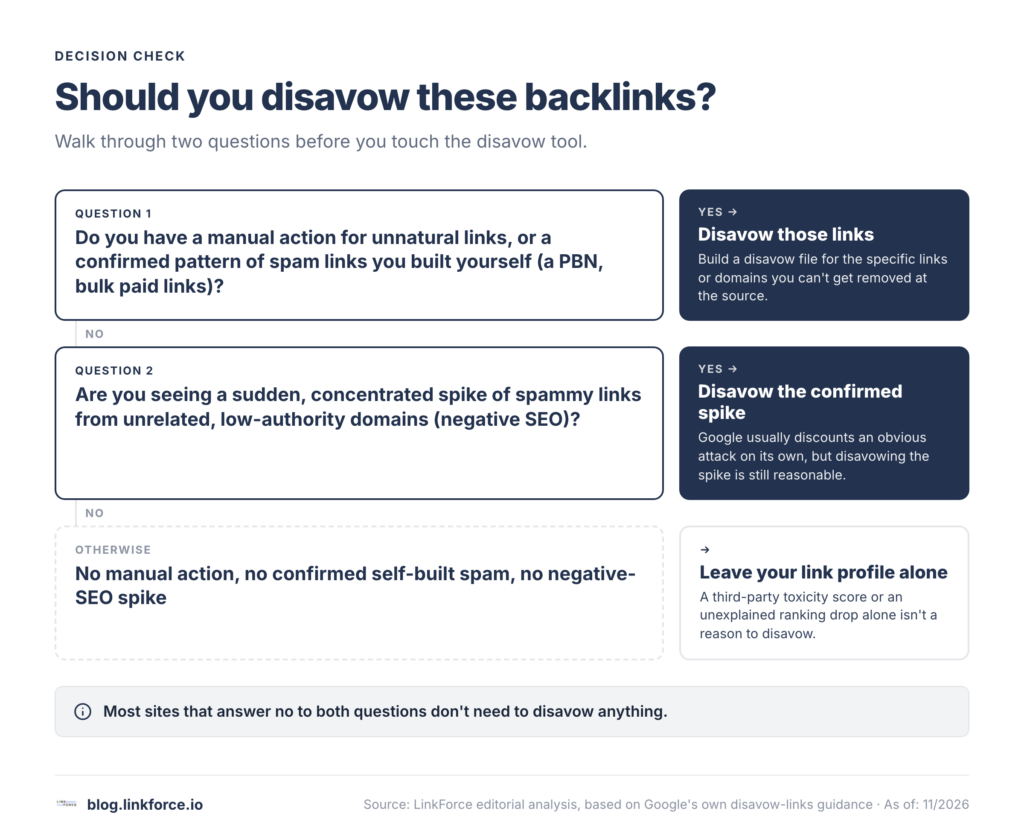
- You see a sudden, concentrated spike of spammy links with no legitimate referral pattern (negative SEO)
- You're simply unsure and want certainty either way
Don't
- A third-party toxicity score flagged links you don't otherwise have reason to distrust
- You have no manual action, no confirmed spam history, and no negative-SEO pattern
- Rankings dropped and you're looking for something to blame without checking Search Console first
- Do not aim the domain: operator at a domain you haven't fully verified is harmful
What makes a backlink worth disavowing
A backlink becomes worth disavowing when it matches what Google calls a link scheme: any link created mainly to manipulate rankings rather than to help a real reader. That definition covers both links pointing to your site and links you place on other sites. A handful of patterns show up again and again in the links site owners end up disavowing.
Paid and exchanged links
Buying or selling links that pass ranking credit is a link scheme by Google's own definition, whether the payment is cash, a product sent in exchange for a write-up, or a reciprocal "link to me and I'll link to you" arrangement. Excessive link exchanges and partner pages that exist only to cross-link fall into the same category. None of this is automatically catastrophic on its own, but a concentrated pattern of it is a classic disavow candidate.
Private blog networks and low-quality directories
A private blog network (PBN) is a set of sites built or acquired specifically to host outbound links to a target site, with little or no real audience of their own. Low-quality directory and bookmark-site links sit in the same bucket: links added automatically, with no editorial review and no topical connection to your site.
Forum, comment and widget spam
Forum comments and blog comments with an optimized link stuffed into the post or the signature, and keyword-rich links embedded in widgets or templates that get copied across many sites, are both named explicitly in Google's spam policies. These accumulate quietly, often without the site owner doing anything to cause them.
Negative SEO attacks
Occasionally the spammy links aren't yours at all. A competitor, or someone with a grudge, can point a batch of obviously manipulative links at your site hoping Google will penalize you for them. Google says its systems are generally good at recognizing this pattern and not holding it against the target site, which is itself one of the reasons disavowing is needed less often than many site owners assume.
None of this is a reason to chase a "toxicity score" from a third-party tool, whether it comes from Ahrefs, Semrush, or any other backlink checker. John Mueller, who works on Google's Search Relations team, has repeatedly said that toxic-link scores from SEO vendors aren't a metric Google uses, and has described the broader idea of toxic links as something invented so that a tool can sell you a subscription to fix it. Treat vendor scores as a starting point for your own judgment, never as the reason to disavow; the only authority on whether a link is actually hurting you is Google Search Console itself.
When does disavowing actually help?
Google's own guidance narrows this to a specific, two-part condition: you should disavow when you have a considerable number of spammy, artificial or low-quality links pointing to your site, and those links have already triggered, or are genuinely likely to trigger, a manual action. Outside that condition, Google says it can usually tell on its own which links to trust.
A few concrete situations call for disavowing.
- You've received a manual action in Search Console tied to unnatural links, and you can't get the offending links removed at the source.
- You can trace a confirmed pattern of links you built yourself, such as a PBN or a bulk paid-link campaign, that you now want to walk back.
- You're seeing a clear, concentrated negative-SEO attack, usually a sudden spike in low-quality links from unrelated, low-authority domains that match no legitimate referral pattern.
When does disavowing hurt instead of help?
This is the part most older guides skip, and it's the part Google has been the most vocal about in 2026. In March 2026, John Mueller wrote that disavow files are "a tool, not a religion," and that "most sites don't need it, but that's not all sites." Google's help documentation goes further, warning that the disavow tool is an advanced feature, and that using it incorrectly "can potentially harm your site's performance in Google Search results" by stripping out links that were actually helping you.
Several common triggers don't actually justify disavowing.
- A third-party toxicity score flagged links you don't otherwise have reason to distrust. Those scores are a vendor estimate, not Google's own assessment, and Mueller has said they don't reflect anything Google itself measures. Uploading a full, unreviewed export from an audit tool is the fastest way to disavow domains that were quietly passing you real value.
- You have no manual action, no confirmed history of buying or building spammy links, and no clear negative-SEO pattern. Without one of those three, Google's own guidance effectively points to leaving your link profile alone. Every site accumulates some baseline of low-quality, unrelated links over time, from scrapers, random foreign-language directories, and sites that scrape content automatically; that background noise is normal and isn't, by itself, a reason to act.
- Rankings dropped and you're looking for something to blame. In a September 2026 exchange, Mueller said the disavow tool "does have effects" and "has its place & time," but when asked about a specific ranking drop, he pointed the site owner toward other likely causes rather than confirming the disavow file was responsible. Before assuming a drop is link-related, check whether it lines up with a known algorithm update or a message in Search Console; a drop with neither is rarely fixed by disavowing.
One operator deserves extra caution: domain: disavows every link from that entire domain, including ones you haven't seen yet. If you aim it at a domain that turns out to be a reputable directory, a news outlet, or a niche blog that happens to mention you, you cut off all current and future credit from that source, not just the one link you were worried about.
Disavow or don't: a quick decision check

| Your backlink situation | Disavow, or leave it alone |
|---|---|
| You have a manual action for unnatural links and can't get them removed at the source | Disavow |
| You confirm a PBN, bulk paid links, or another self-built link scheme you want to undo | Disavow |
| You see a sudden, concentrated spike of spammy links with no legitimate referral pattern (negative SEO) | Disavow the confirmed spike; Google usually discounts these on its own regardless |
| A third-party "toxicity score" flags links, but you have no manual action and no confirmed spam history | Leave it alone |
| Rankings dropped and you're not sure why | Investigate the actual cause first; don't disavow as a guess |
| You're simply unsure and want certainty either way | Fine to set up a file; Mueller has said it's "totally fine" to use one even when conflicted |
How do you create and submit a disavow file?
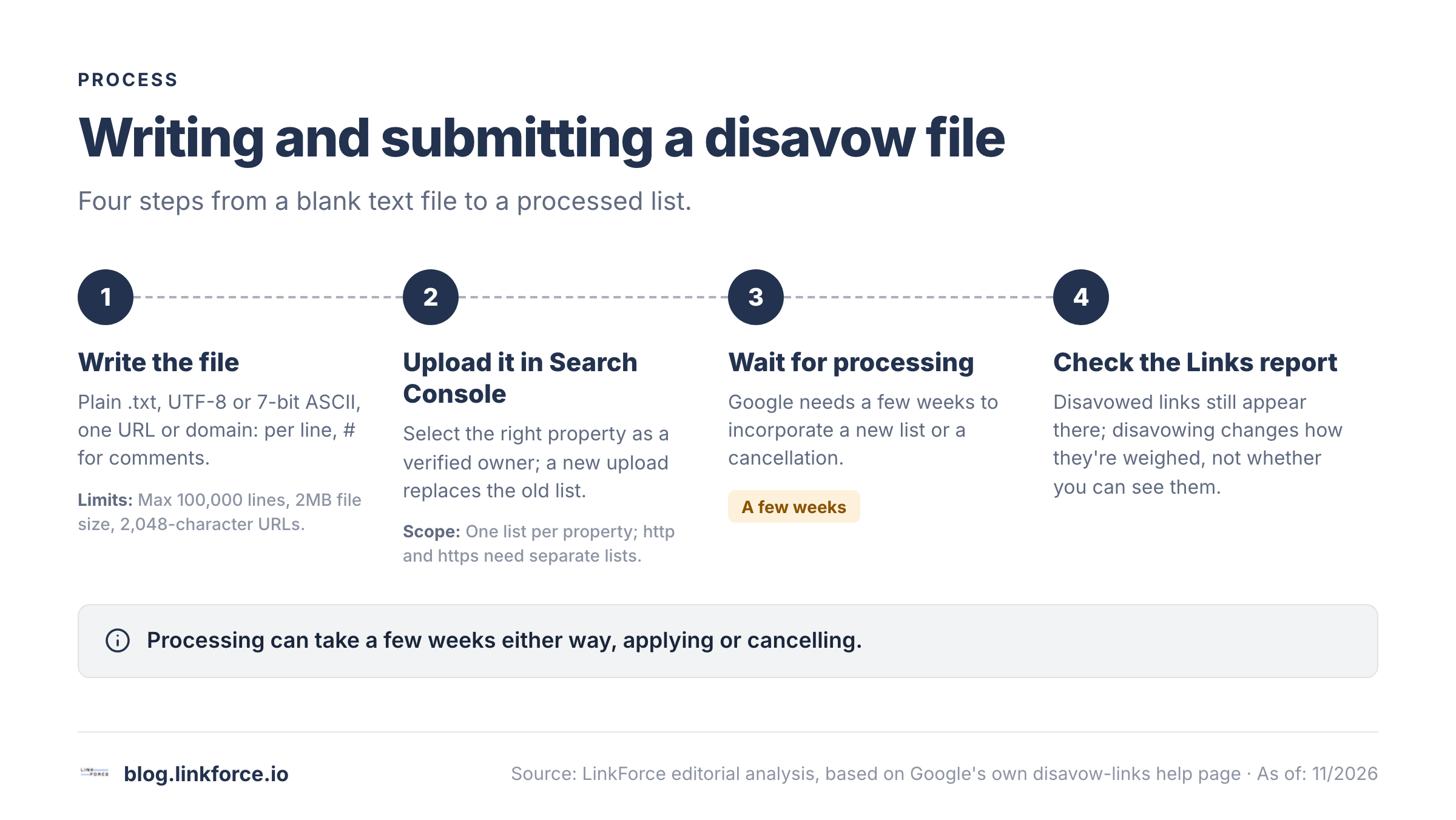
Once your situation matches one of the "disavow" rows above, the mechanics are straightforward. As of 2026, Google's limits are specific enough to plan around before you start.
Writing the file
A disavow file is a plain .txt file encoded in UTF-8 or 7-bit ASCII. Google currently caps it at 100,000 lines (including blank and comment lines) and 2MB, with a maximum URL length of 2,048 characters. One URL or domain goes on each line. Use the domain: prefix to disavow an entire domain or subdomain rather than a single page; you cannot disavow just one subpath, such as example.com/blog/. Lines starting with # are comments Google ignores, which is useful for labeling why each entry is there.
# Two pages to disavow
http://spam.example.com/stuff/comments.html
http://spam.example.com/stuff/paid-links.html

# One domain to disavow
domain:shadyseo.com
If most of your bad links cluster on a handful of top-level domains, Mueller confirmed in March 2026 that disavowing an entire TLD at once is possible, though he called it "a big hammer" and said Google probably shouldn't formally document the technique. Treat it as a last resort for a genuinely concentrated problem, not a default move.
If you want help assembling candidate URLs rather than building the list from a raw export, our guide to disavowing backlinks in Ahrefs walks through pulling and formatting a list with that tool specifically.
Uploading it in Search Console
Open the disavow links tool directly, select the property the links point to, and upload your file. You need to be a verified owner of that property. Each property can hold exactly one disavow list; uploading a new file replaces the old one entirely, it doesn't add to it. The tool doesn't support Domain-level Search Console properties, so you may need to set up and disavow separately for each protocol and subdomain variant if your traffic is split across them.
The free Disavow File Generator formats domains and URLs for Google Search Console.
What happens after you submit the file?
A few things are worth knowing before you upload, so nothing after looks like a malfunction.
- Processing isn't instant. Google says it can take a few weeks to incorporate a new list, and a similar few weeks to process a cancellation.
- Disavowed links don't disappear from your reports. They still show up in the Links report in Search Console; disavowing only changes how Google weighs them, not whether you can see them.
- A list applies to the property you uploaded it to and that property's child properties, but http and https versions need their own separate lists.
- To undo a disavow entirely, select the property and choose Cancel Disavowals, rather than uploading an empty file.
800+ SaaS marketers swap partner, integration and content links on LinkForce.
Frequently Asked Questions
Do I need to disavow links before asking a site to remove them?
No. Google's own guidance is to try removal at the source first. Disavowing is for links you've tried and failed to get taken down, not a substitute for asking.
Will disavowing bad links improve my rankings?
Only if those links were actually suppressing you, which Google says is rare outside a manual action or a confirmed spam history. For most sites with no manual action, Google's systems are already discounting low-quality links without any action from you.
Can disavowing hurt my site?
Yes, if you disavow links that were actually helping you. Google explicitly warns that incorrect use of the tool can hurt your search performance, which is exactly why the tool is scoped to specific situations rather than routine maintenance.
How do I know if I have a manual action?
Open the Manual Actions report in Google Search Console; Google flags an active manual action there and in the Search Console message center, rather than leaving you to guess. The report also tells you whether the action, such as "unnatural links to your site," covers specific URL patterns or the whole site, which matters for how broad your fix needs to be. If the report shows a green check and no message, you don't have one, and that removes the strongest reason to disavow anything. A ranking or traffic drop with no message in that report is more likely an algorithmic effect than a manual action.