

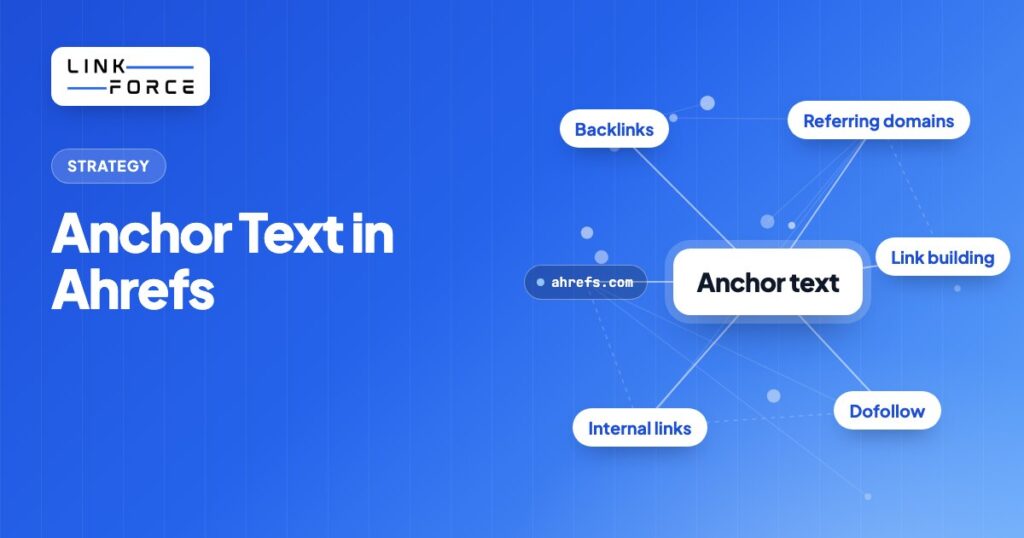
Anchor text is the visible, clickable text of a hyperlink: the words wrapped in an HTML <a> tag. Search engines use anchor texts to understand what linked pages are about. In Ahrefs, you find anchor texts under Site Explorer > Anchors: a full report of every anchor text phrase linking to a page or domain, sorted by referring domains. Understanding what your anchor texts look like (and what your competitors' anchor texts look like) is one of the more direct diagnostic tasks Ahrefs makes easy.
What Is Anchor Text?
Anchor text is the visible, clickable text inside a hyperlink. When a website links to another page, the words the reader sees and clicks are the anchor text. Google uses anchor texts to better understand the content of the linked page and which queries it should rank for.
In HTML, anchor texts look like this:
<a href="https://example.com/link-building">link building strategies</a>Here, "link building strategies" is the anchor text. Search engines read anchor texts as a signal about what the destination page covers.
When many external sites link to your page using similar anchor phrases, Google draws a topical association between those phrases and your content. A page that has accumulated hundreds of anchor texts like "best accounting software" is strongly associated with that phrase in Google's understanding.
Ahrefs surfaces this data in the Anchors report inside Site Explorer, making it straightforward to see the full distribution of anchor texts pointing to any URL or domain.
Types of Anchor Text
Not all anchor text is equal. The type of anchor text used, intentionally or by chance, sends different signals to search engines and carries different risk profiles.
| Type | Description | Example |
|---|---|---|
| Exact match | Matches the target keyword exactly | Linking to a "backlink analysis" page with the anchor "backlink analysis" |
| Partial match | Contains the target keyword plus additional words | "best backlink analysis tools for beginners" |
| Branded | Uses your brand name only | "Linkforce" or "linkforce.io" |
| Compound (brand + keyword) | Combines brand with descriptive context | "Linkforce link building service" |
| Contextual / semantic | Uses synonyms or topically related phrases | "backlink acquisition" for a link building page |
| Naked URL | The raw URL used as anchor | "https://linkforce.io" |
| Generic | Non-specific phrases | "click here", "read more", "this article" |
| Image / alt text | When an image is a link, its alt text serves as the anchor | Always add descriptive alt text to linked images |
| Article / page title | Exact post title as anchor | "Anchor Text in Ahrefs" linking to this page |
A healthy link profile contains a mix of these anchor text types. The exact distribution varies by niche and competitive environment. There is no universal formula.
The free Anchor Text Analyzer shows distribution and ratios at a glance.
How Anchor Text Affects SEO Rankings
Google has used anchor text as a relevance signal since its founding. The original 1998 PageRank paper described anchor text as a way for search engines to understand what a linked page is about, even without crawling it.
For years, exact-match anchor text was weighted heavily. Sites that acquired many links with exact keyword anchors often ranked well. This created a systematic incentive to over-optimize by building large volumes of links using precise keyword phrases.
Google's Penguin algorithm, launched in April 2012, targeted over-optimized anchor text profiles specifically. Sites with disproportionate shares of exact-match and keyword-rich anchors were algorithmically penalized. Penguin is now part of Google's core algorithm and runs continuously.
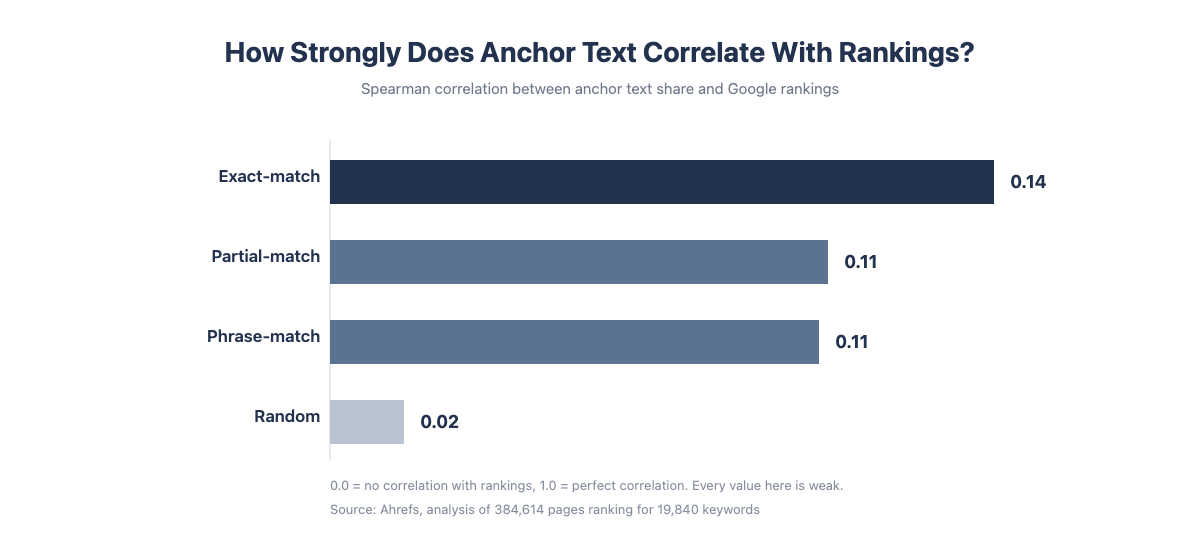
John Mueller from Google has confirmed that anchor text provides context about the linked page and does matter for SEO. However, research consistently shows the effect is more nuanced than early SEO assumptions:
- An Ahrefs study analyzing 19,840 keywords found that exact-match anchors correlate with rankings but the correlation is weak, not decisive
- Ahrefs data shows that on average, only ~22% of traffic to any page comes from its primary target keyword, suggesting topical breadth matters far more than exact-match anchor accumulation
- The surrounding link text (the words appearing near a link, not just the anchor itself) also carries relevance signal
The practical implication: anchor text is a real signal, but optimizing aggressively for it is risky and delivers diminishing returns. The goal is a natural-looking, diverse anchor text profile, not a targeted anchor ratio.
How to Find Anchor Text in Ahrefs
Ahrefs makes it straightforward to see the full anchor text distribution for any domain or URL. The Anchors report inside Ahrefs Site Explorer is the primary tool for this.
Opening the Anchors Report
- Go to Ahrefs Site Explorer
- Enter a domain (yourdomain.com) or a specific URL (yourdomain.com/page)
- In the left sidebar, click Anchors
- The report loads showing every anchor text phrase that links to that target, with columns for backlinks (total links using that anchor) and referring domains (number of unique domains)
Reading the Anchors Report
When reading the Anchors report:
- Filter by dofollow to focus on value-passing links. Nofollow anchor texts matter less for ranking purposes and skew the distribution.
- Sort by referring domains, not backlinks. A single domain that links 50 times with the same anchor will inflate the backlink count but represents one source. Referring domains gives you a truer picture of how many independent sites chose each anchor phrase.
- Scan the top 10-20 rows. These are the anchor texts that most frequently describe your page to search engines. They reveal how the web perceives your page's topic.
Exporting Anchor Data
Click the export button (top right of the report) to download anchor texts as a CSV. This is the starting point for a proper audit. The export includes each anchor phrase, its backlink count, and referring domain count, enough to categorize and calculate percentage shares.
Three Ways to Use the Ahrefs Anchors Report
Pulling up the Anchors report without a specific goal will show you data without telling you what to do with it. These three use cases cover the most common reasons to open the report.
Check Your Own Anchor Text Profile for Over-Optimization
Enter your domain in Site Explorer, open the Anchors report, and filter by dofollow. Look at what percentage of your referring domains use exact-match anchors.
Watch for these red flags in your anchor text profile.
- More than 15-20% of dofollow referring domains using the same exact keyword phrase
- Clusters of nearly identical anchor text variants ("best link building", "best link building service", "best link building agency") all pointing to the same page
- A top anchor text that does not match any branded or URL-based phrase, meaning all those links were likely placed intentionally
If your anchor text profile looks over-optimized, the fix is not to remove existing links (usually risky and slow). In upcoming placements, prioritize branded, naked URL, and contextual anchor texts until the share of exact-match drops to a natural range.
Monitor for Negative SEO
Negative SEO through spammy backlinks is less common than it was, but it still occurs. Enter your domain, sort by recently added links, and scan the anchor text column for irrelevant or spammy phrases.
Watch for these patterns in your anchor texts.
- Pharmaceutical terms, casino or gambling phrases, adult content keywords
- Foreign-language exact-match anchor texts unrelated to your site's topic
- Exact URLs of low-quality sites used as anchor texts (common in automated link spam)
If you see a clear pattern of spammy anchor texts that appeared in a short window, create a disavow file and submit it through Google Search Console. Ahrefs does not submit disavow files directly, but the Anchors report makes it easy to compile the list of suspect domains.
Analyze Competitor Anchor Texts
Enter a competing URL in Site Explorer and open its Anchors report. This tells you:
- Which anchor texts that page has accumulated the most links with
- Whether competitors are running keyword-heavy profiles or primarily branded profiles
- What anchor text patterns align with the rankings they hold
Cross-referencing a competitor's top anchor texts with their rankings in Ahrefs Keywords Explorer tells you how aggressively they are using exact-match anchors relative to their performance. If the top-ranking page for your target keyword has a largely branded anchor text profile, that signals ranking there does not require keyword-rich anchors.
Building a Healthy Anchor Text Strategy
Anchor text strategy is one of the areas in SEO where practitioners have historically given overly precise advice ("use 5% exact match, 30% branded, 20% partial") that does not reflect how Google actually evaluates link profiles. A better approach is diagnostic and context-dependent.
Reverse-Engineer the SERP First
Before building links for a target keyword, open Ahrefs and pull the Anchors report for the top 5 ranking pages. Compare these three things across those pages.
- The rough share of exact-match vs. branded vs. contextual anchor texts
- Whether any pages have notably aggressive exact-match profiles and whether that correlates with their position
- The typical DR range of sites linking in with keyword-rich anchor texts
This gives you a SERP-calibrated baseline. If the top pages all have predominantly branded anchor text profiles, that niche is not one where exact-match anchor texts appear to be a ranking lever. If the top pages have moderately keyword-rich profiles, there may be more room. This SERP-first approach is the foundation of any solid link building outreach campaign.
800+ SaaS marketers swap partner, integration and content links. Free plan, no credit card.
The Authority-Aggression Scale
A useful principle: the higher the authority (DR) of a linking domain, the more room there is for keyword-rich anchor text.
- A DR 80 editorial link from a major publication using an exact-match anchor: relatively safe, and potentially valuable
- A DR 20 guest post site using an exact-match anchor: one of several such links is fine, but building volume here with aggressive anchor texts is a clear footprint
Match anchor text aggression to the quality of the linking source. Low-quality links with high-keyword anchor texts is the combination spam detection is built to catch. Anchor text is only one of several signals worth checking before you accept or pursue a link; see our guide on what makes a good backlink for the rest.
Internal Links: Where You Have Full Control
Internal link anchor text is 100% under your control and carries no Penguin risk. For your own internal links, using descriptive partial-match or exact-match anchor texts is good practice: it helps Google understand your site's topical structure.
You can audit your internal anchor texts in Ahrefs: Site Explorer > Anchors > set the "Link type" filter to "Internal". This shows how you are describing each page to Google through your own link structure.
How to Audit Your Anchor Text Profile with Ahrefs
A systematic anchor text audit takes 30-60 minutes for most sites and should be done before any link building campaign and periodically during ongoing campaigns. This is a core part of any thorough backlinks analysis.
- Open Ahrefs Site Explorer for your target domain or URL
- Go to the Anchors report and set the filter to dofollow
- Export the full list to CSV
- In the exported file, add a column and categorize each anchor text into: exact match, partial match, branded, generic, naked URL, contextual, or image/blank
- Calculate the percentage share of referring domains for each anchor text category
- Compare to the SERP benchmarks you pulled for your target keywords
- Flag any exact-match or partial-match anchor texts appearing across more than 5-10 referring domains. Are these intentional placements or organic?
- Flag any anchor texts that appear spammy, unrelated to your niche, or suspiciously repetitive
- Build a dilution plan: assign anchor text types to upcoming link placements to balance any over-represented categories
The output is an anchor text health snapshot: you know what your profile looks like today, where it deviates from competitors, and what anchor text types to prioritize in upcoming placements.
Common Anchor Text Mistakes (and How to Spot Them in Ahrefs)
- Over-optimized exact-match anchor text profile. Building too many links with the same keyword phrase is the most common issue. In Ahrefs, filter the Anchors report by dofollow and check if any single anchor text phrase appears across more than 15-20% of referring domains. If it does, and it is an exact-match keyword rather than your brand name, that is a flag.
- Anchor text uniformity across many links. Using the same three or four anchor text variations across dozens of link placements makes a profile look manufactured. In Ahrefs, look for clusters in the top anchor texts. If your top 5 anchor texts are all slight variations of the same keyword, the distribution is unnatural. Real editorial links use varied phrasing.
- Aggressive anchor texts on weak linking domains. Exact-match anchor texts from low-DR sites is the combination spam detection is designed to catch. In Ahrefs, click through to the Backlinks report filtered to any exact-match anchor text you are concerned about, and check the DR distribution of the linking domains.
- Blank or generic image alt text. When images link to your pages and the alt text is empty, the topical signal those links would otherwise carry is lost. In Ahrefs, blank alt text typically appears as "[image]" in the Anchors report. Any linked image should have a descriptive alt attribute.
Frequently Asked Questions
Is anchor text a ranking factor?
Yes, anchor text is a ranking factor because Google uses it to understand what a linked page is about, a point John Mueller has confirmed directly. The effect of exact-match anchor texts specifically is real but modest: topical relevance and domain authority matter more than anchor text precision.
How many exact-match anchor texts are too many?
There is no universal threshold, but practitioner consensus and Ahrefs data suggest keeping exact-match anchor texts below roughly 15-20% of your dofollow referring domain anchor text profile in most niches. Competitive niches may tolerate more; niches where branded anchor text profiles dominate the SERP suggest you need less.
Do images have anchor text?
Yes, images have anchor text too: when an image is used as a link, its alt text serves as the anchor text. If the alt text is blank or missing, the link passes authority but no topical signal.
Can anchor text hurt your rankings?
Yes, anchor text can hurt your rankings, because Google's Penguin algorithm (part of core since 2016, running continuously) specifically targets over-optimized anchor text profiles. A high concentration of exact-match keyword anchor texts, particularly from low-quality or clearly purchased links, is an established penalty risk.
Where is the Anchors report in Ahrefs?
The Anchors report sits inside Ahrefs Site Explorer: enter your domain or URL, then click "Anchors" in the left navigation sidebar to see the full anchor text distribution.