
You’ve just taken on a new client. Rankings dropped three months ago, nobody can explain why, and the previous SEO left a gap where the link data should be. In both situations the move is the same. Run a backlink audit first.
An SEO backlink audit gives you a complete picture of every external link pointing at a site, whether those links contribute to rankings or harm them and what the data requires you to do next. This guide covers the tools worth paying for (and the one that’s free), then walks through the full process in five concrete steps, with a printable checklist and real-world finding examples at the end.
What Is an SEO Backlink Audit?
A backlink audit is a systematic review of all external links pointing to a website, assessing each one for quality, relevance and risk. Simple concept. The execution has layers. That’s where most audits fail.
The goal is to identify patterns that support rankings, isolate problems that undermine them and surface link opportunities that haven’t been exploited yet. A complete audit produces four types of findings:
- Toxic or spammy links that are likely suppressing rankings
- Anchor text imbalances that put the site at risk of a manual penalty
- Lost referring domains that were passing equity but stopped doing so
- Competitive gaps where rival sites hold links yours doesn’t
Disavowal isn’t the point of a backlink audit. Most sites that run thorough audits discover that the primary action is building, reclaiming or prospecting for links, with disavowal reserved for a small subset of genuinely problematic domains that can’t be removed through direct outreach.
Tools You Need for a Backlink Audit
One crawl-based backlink tool plus Google Search Console covers the full audit. Here is which one to open first, depending on what you’re trying to do.
- Google Search Console: free and pulls straight from Google’s own crawl data, so it’s the tool to cross-reference before any disavow decision, though its link data is only a partial sample.
- Ahrefs (Site Explorer): the strongest pick when competitor comparison and link-velocity trend data matter, thanks to a large, frequently refreshed link index; access requires a paid plan, with a free Webmaster Tools tier for verified site owners.
- Semrush (Backlink Audit tool): the fastest route to a cleanup list, since it scores toxicity automatically and ships an outreach workflow built in; also a paid plan.
- Moz Link Explorer: a reasonable middle ground when Domain Authority is the metric your reporting already standardizes on, with a limited free tier and paid plans above it.
Google Search Console isn’t optional even when you have Ahrefs or Semrush. GSC data comes from Google’s crawl, which means it reflects what Google has actually seen and indexed. Third-party tools have large indexes but they’re still approximations. Use both.
Verify ownership in GSC for the domain you’re auditing before starting. Some manual action details and link-level data are only visible to verified owners, so it’s worth doing before anything else.
Time expectations: sites with under 5,000 referring domains take 30 to 90 minutes for a first complete audit. Sites with larger profiles, known penalty histories or complex redirect structures can take two to four hours. Subsequent audits on the same domain run faster because the baseline already exists. Budget for the longer first pass.
When to Run a Backlink Audit (and How Often)
Some events should trigger an audit immediately regardless of when you last ran one:
- Taking over a new client or domain
- A drop in organic traffic or rankings with no clear technical cause
- A manual action notification in Google Search Console
- Significant rank changes following a core algorithm update
- Acquiring a domain and needing to understand its historical link profile
For routine maintenance, quarterly’s the standard. Monthly makes sense for competitive niches and sectors that tend to attract negative SEO attempts, including finance, health and gambling-adjacent content.
Lightweight is enough for monthly reviews. Pull only the new referring domains from the last 30 days, filter for obvious spam and flag anything that needs attention. Under 15 minutes once you’ve got the data flow set up. A light monthly check means problems get caught before they accumulate into a situation that requires a full remediation cycle.
Step 1: Get a High-Level View of Your Backlink Profile
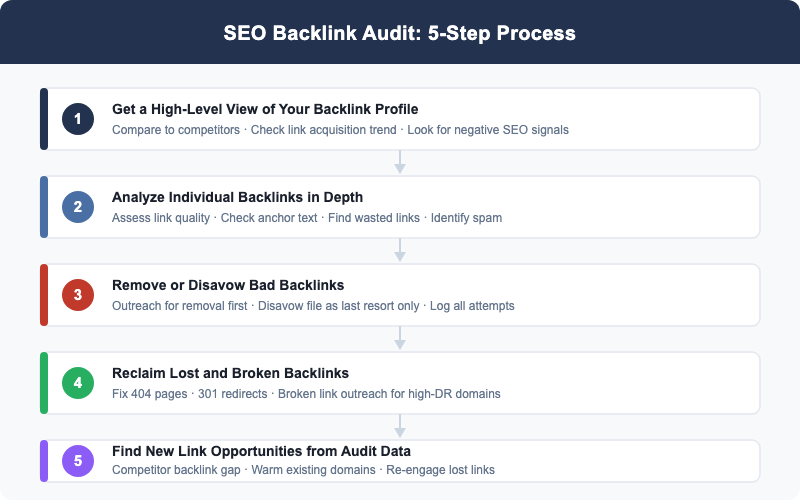
Don’t start with individual links. Start at the portfolio level. A high-level view tells you whether the profile’s healthy or troubled, and that context shapes every decision you make in the detailed analysis phase.
Compare Your Profile to Competitors
Pull three numbers for your site and your top three organic competitors: total referring domains, Domain Rating (Ahrefs) or Authority Score (Semrush) and link velocity over the past six months.
If your site has 180 referring domains and the sites ranking above you have 900, 1,400 and 2,100, you’ve identified the primary SEO constraint before touching a single link. That’s a link gap problem. The audit still matters, but the action plan skews toward acquisition rather than cleanup. Knowing this early stops you from spending three hours on disavowal when prospecting is what the site actually needs.
Metrics that matter at this stage:
- Referring domain count (not raw backlink count; multiple links from one domain count as one referring domain in most tools)
- Domain Rating or equivalent authority metric from your chosen tool
- Monthly rate of new versus lost referring domains over the prior six months
The velocity comparison is underused. A site losing five referring domains per month while a competitor gains twenty is losing ground even when the absolute numbers look acceptable. That’s the trap in reading raw totals alone.
Check Your Link Acquisition Trend
Pull a 12-month chart of new versus lost referring domains. Healthy growth looks like steady organic gains with normal churn. Red flags don’t.
A sudden spike is the most obvious signal. Three hundred new referring domains in seven days, when the prior pace was five per week, demands an investigation before you proceed to individual link analysis. It might be the result of a viral piece. It might be the beginning of a negative SEO attack. The chart alone can’t tell you which, but it tells you to look.
A sustained decline in referring domains without a corresponding change in publishing or outreach is a quieter but equally important signal. Penalty effects sometimes show up as other sites removing links. Gradual domain attrition, where previously acquired links disappear as the source sites close, produces this pattern too. Both warrant attention, even though neither one’s dramatic.
Look for Negative SEO Signals
Negative SEO attacks are less common than many SEOs assume. They do happen, and the evidence shows up in the acquisition trend before it shows up anywhere else. That’s the tell worth watching for.
Signs worth flagging:
- A high volume of new links compressed into hours or days rather than weeks
- Links from casino, pharma or adult-content domains with no topical relationship to the target site
- Exact-match keyword anchors appearing at scale from clearly unrelated sites
- Multiple links sharing the same C-class IP block, a footprint common to PBN attacks
Add flagged domains to your disavowal queue without investigating each one. Speed matters here more than precision, since a slow response won’t help. A large spam attack requires a fast response, not a link-by-link audit. Move fast, review later.
Step 2: Analyze Individual Backlinks in Depth
The high-level view is done. Now go into the actual links. The objective is to sort referring domains into three buckets: clearly valuable, problematic and requires closer review. You won’t manually evaluate every domain in a profile with thousands of referring domains. Filtering handles the volume.
Assess Link Quality
Three signals determine whether a referring domain carries real value:
- Domain quality. Is the linking site a real, active property with its own organic search traffic? A DR 45 domain with 12,000 monthly visitors operates completely differently from a DR 45 domain with zero organic traffic; the second is a link farm or an inflated property built specifically to sell links. The DR is the same. The value isn’t.
- Topical relevance. Does the linking site cover the same or an adjacent topic? A link from a technology blog to a SaaS company is contextually sound. A link from a fishing gear review site to that same company isn’t, regardless of the domain’s authority score. Relevance affects both the value of the link and the risk profile.
- Link placement. Was the link placed naturally in editorial content, or does it appear in a footer, sidebar or clearly paid section? Editorial placement carries more weight and less risk, and it’s usually easy to tell which one you’re looking at. Footer and sitewide links often aren’t worth what they appear to be.
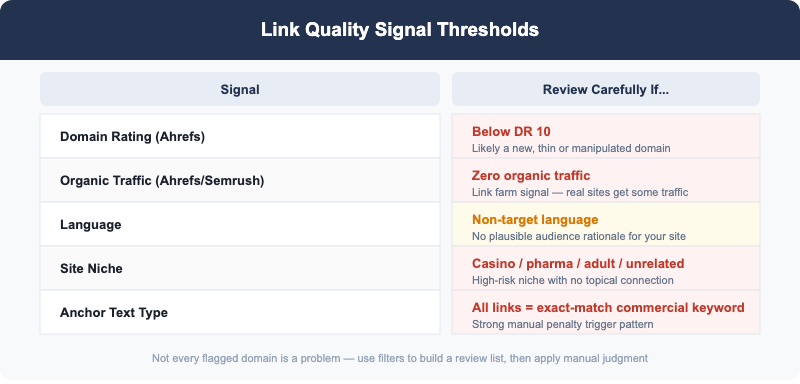
Thresholds to filter for manual review:
| Signal | Flag If |
|---|---|
| Domain Rating | Below DR 10 |
| Organic traffic | Zero traffic in Ahrefs or Semrush |
| Language | Non-target language with no plausible audience rationale |
| Niche | Casino, pharma, adult content or unrelated sectors |
| Anchor text | Exact-match commercial keyword on every link from this domain |
Not every flagged domain is a problem. The filter creates a manageable review list; manual judgment decides what to do with each one. That’s the point of filtering first.
Check Your Anchor Text Distribution

Natural anchor text looks like mostly branded references, bare URLs and generic phrases, with a smaller share of partial-match and exact-match keyword anchors. The exact ratio varies by site, niche and how link acquisition’s been handled over time.
Over-optimization is the problem. An anchor text profile where a large percentage of links share the same exact-match keyword phrase is a clear trigger for a manual review by Google’s spam team. Twenty links all carrying the anchor “best link building service” from unrelated sites isn’t natural. It’s a footprint.
Signs that an anchor text profile is over-optimized:
- More than 15 to 20 percent of total links sharing a single exact-match keyword anchor
- A batch of new links from unrelated domains arriving with identical anchor text
- Exact-match anchors concentrated on the lowest-quality placements in the profile
The fix is almost never disavowal. Building new links with branded, URL and generic anchors to dilute the over-optimized share is safer and more durable. Disavowing a few over-optimized anchors typically doesn’t move the needle.
Which Backlinks Actually Count in This Audit
Dofollow links pass ranking signal and nofollow links usually don’t, though a nofollow attribute alone doesn’t make a link worthless. Links tagged rel="nofollow", rel="ugc" or rel="sponsored" still send referral traffic and can still expose the page to real readers, so they belong in your profile review even when you exclude them from any dofollow-based scoring.
Treat the two categories differently in the audit. Count dofollow links toward Domain Rating comparisons, anchor text ratios and disavowal decisions. Track nofollow, UGC and sponsored links separately as a traffic and brand-visibility signal, not as part of the link-equity calculation.
Find Wasted Backlinks (Broken and Redirected)
Wasted backlinks exist. Every site with a content history has them. These are links pointing at your domain where the equity can’t actually reach its destination because the page no longer works or the redirect path bleeds authority along the way. That’s equity you already earned once.
Three wasted link patterns appear repeatedly:
- Links landing on 404 pages: the target page was removed without a redirect, and any equity that link was passing evaporates
- Links passing through multi-hop redirects: equity decreases at each hop before reaching the final destination, and chains of three or more redirects can dissipate most of the passing value
- Links pointing to pages with canonical tags redirecting authority elsewhere: the linked page receives the visit, but the canonical tag sends the equity to a different URL
Export all referring domains pointing to 404 pages. Sort the list by referring domain DR. Anything above DR 40 pointing to a dead page is a priority fix in the reclamation step. Don’t let those sit.
Identify Spam and Toxic Links
Individual domain quality is one layer of analysis. Structural spam patterns are another. Some link networks are built at a scale that makes individual domain review inefficient; you need to detect the pattern, not just the domain, because the domain-by-domain view won’t show it.
Three structural patterns to look for:
- CTLD concentration: an unusually high share of links from top-level domains associated with spam networks (.xyz, .top, .click, .men) with no legitimate reason for that concentration given your content or audience
- IP subnet clustering: multiple referring domains resolving to addresses in the same /24 subnet, a consistent footprint for private blog networks (PBNs)
- Shared footprint across domains: thin content, exact-match keyword domains, identical site templates and no real author presence, all appearing together across a cluster of linking sites
Two overlapping signals from one domain are a reliable removal trigger. Three signals and you add the domain to the disavowal list without further investigation. That’s the threshold, not a guideline.
Step 3: Remove or Disavow Bad Backlinks
Two stages. In that order. Skipping to disavowal first is the most common mistake in link remediation, and it’s an easy one to make when a client wants fast action.
Stage 1 is outreach. For any site that appears to be a real, active website, send a removal request to the site owner before doing anything else. Short email. No lengthy justification needed:
Subject: Link removal request: [YourDomain.com]
Hi,
I own [YourDomain.com] and would like to request removal of a link to my site from [TheirURL].
The link: [anchor text] pointing to [your URL]
Thank you.
Log the date, the URL and the response status for each outreach attempt, since you’ll need it for the reconsideration request later. Wait two to three weeks. Then move to stage 2 for any domains that haven’t responded or have refused. Don’t jump ahead of the wait window.
Stage 2 is disavowal. Google’s guidance is direct on this point: the Disavow Tool is a last resort for unnatural links that can’t be removed through outreach, not a proactive cleanup instrument. Google’s algorithms already ignore a substantial portion of low-quality links without any input from site owners. Filing a disavow list for links Google is already discounting produces no benefit and adds a file you have to maintain.
When disavowal is warranted, format the file correctly:
- One entry per line
- Use domain:example.com to disavow all links from a domain
- Use the full URL for a specific link rather than the entire domain
- Precede comments with #
Submit at: Google Search Console > Legacy tools > Disavow links.
If a manual action is already active, file a reconsideration request after the disavowal submission and outreach documentation are complete. Don’t skip that step either.
Step 4: Reclaim Lost and Broken Backlinks
Lost and broken backlinks are the fastest link wins available in any audit. The webmaster already decided to link to you once. You aren’t asking for a favor. You’re asking for a correction, and that’s a much easier email to write.
Priority targets, in the order you should work through them:
- High-DR referring domains pointing to 404 pages on your site. Restore the missing page or create a 301 redirect to the closest relevant live page. The equity transfers once the destination’s live again. No outreach required for the redirect fix, though a note to the linking site about the correction doesn’t hurt.
- Editorial links pointing to pages that moved to new URLs. Reach out to the linking site and ask for a href update. Keep it brief. Most editors are glad to fix a broken link because it improves their own page’s user experience, and they’ll usually turn it around within a day or two.
- Domains that previously pointed to a property you no longer own. If the domain is available and the link profile is strong enough to justify the cost, reacquiring it can restore the equity the links were passing. That’s a judgment call, not a rule.
For 404 reclamation outreach, shorter is better:
Subject: Quick question about a link on [TheirSite]
Hi,
A link on [TheirURL] points to [BrokenURL] on my site. The page has moved to [NewURL]. Same content, new address. Would you be open to updating the link?
Thanks.
Step 5: Use Your Audit to Find New Link Opportunities
A backlink audit does more than surface problems. It produces the most targeted link prospect list you can build, because every source in it has already demonstrated a willingness to link within your niche or an adjacent one. That’s a warmer list than any cold outreach batch.
Three opportunity sources the audit surfaces directly:
- Competitor backlink gap. Export referring domains that link to your top two competitors but not to your site. Filter by DR and organic traffic, then rank by topical relevance. This list’s more reliable than cold prospecting because the initial vetting is already done by the competitor’s link acquisition history.
- High-value domains already in your profile. Sites that linked once are warm prospects for a second link to a different page. Review referring domains above DR 40 and look for content gaps on their site where an additional editorial link to your content would fit naturally.
- Recently lost referring domains as re-engagement targets. Any domain that dropped your link in the last six months may be worth a message, specifically if the removal happened during a site redesign rather than from a deliberate editorial decision, since that’s rarely personal.
Prioritize using three factors together: Domain Rating, organic traffic volume and topical relevance. A DR 50 site with 30,000 monthly visitors in your exact niche’s a better target than a DR 70 site with no traffic in an unrelated category. High DR without traffic is a signal the domain may have been built primarily for link selling. That’s a red flag, not a bonus.
Examples of Backlink Audit Findings (and What to Do)
Real audits produce findings that look messier than the diagrams in textbooks, and that’s normal. Six common patterns, what they mean and what to do:
| Finding | What It Means | Action |
|---|---|---|
| 40 links from .xyz and .top domains with zero organic traffic | Link farm or spam network at scale | Add all to disavow list; send removal requests where contact info exists |
| 15 links to 404 pages from DR 60+ referring domains | Significant wasted equity across strong links | 301 redirect the dead pages or contact sites to update destination URLs |
| Exact-match anchors (“buy backlinks”) from 3 domains | Clear manual penalty trigger pattern | Contact all three for removal; disavow after two weeks without response |
| 200 referring domains vs. competitors’ 800, 1,200 and 1,600 | Link gap is the primary ranking constraint | Run competitor backlink gap analysis; build a structured prospecting list |
| Sudden +350 new referring domains in 5 days, all low quality | Likely negative SEO attack in progress | Disavow the entire batch immediately; file reconsideration if a manual action exists |
| 90% of anchors are exact-match “link building service” | Systematic anchor text over-optimization | Build 20+ new links with branded and generic anchors to dilute the ratio |
Present findings to clients in this table format. It converts a 10,000-row link export into a prioritized one-page action plan that a client can actually review. That’s the deliverable, not the raw export.
Build a Tracking Sheet for Your Findings
A spreadsheet’s what keeps the audit auditable after you close the tab, and that matters the first time a client asks why a specific domain was disavowed six months later. Use one row per referring domain and these columns:
- Linking domain and the exact URL
- Target page on your site
- Anchor text used
- Link attribute (dofollow, nofollow, UGC or sponsored)
- Domain Rating or Authority Score
- Organic traffic estimate
- Flag reason, if any (spam CTLD, zero traffic, over-optimized anchor and so on)
- Action taken and date
Color-code the flag column and split disavow candidates onto their own tab. That single change’s what makes the sheet usable by anyone else on the team, not just the person who ran the audit.
Backlink Audit Checklist
Eleven steps. Run them in order. Skip one and you’ll miss something downstream.

- Export the full backlink profile from Ahrefs, Semrush or Moz
- Pull link data from Google Search Console as a secondary cross-reference
- Compare referring domain count and DR against the top three organic competitors
- Pull a 12-month new-versus-lost referring domain chart and check for anomalies
- Filter links by: zero organic traffic, spam CTLDs, DR below 10, non-target language
- Review anchor text distribution and flag any keyword anchor exceeding 15 to 20 percent share
- Identify all 404 pages receiving inbound links and sort the list by referring domain DR
- Compile removal list; send outreach emails and log the date sent for each
- Build disavow file for non-responsive domains; submit via GSC after a two-to-three-week wait
- Run competitor backlink gap analysis and export a prioritized prospect list by DR, traffic and relevance
- Schedule the next audit: quarterly for most sites, monthly for high-risk niches or active acquisition campaigns
Frequently Asked Questions
How long does a backlink audit take?
For sites with under 5,000 referring domains, a thorough audit takes 30 to 90 minutes. Larger sites, or those with a known penalty history requiring individual link review, run two to four hours. The first audit on any domain always takes longer than subsequent ones; once a baseline exists, each review only covers what’s changed since the last one.
Do I need to disavow every bad link?
No, you don’t need to disavow every bad link, because Google’s algorithms already disregard most low-quality links automatically. Reserve disavowal for links where you have clear evidence of unnatural building that outreach has failed to remove, particularly in cases where a manual action was already issued. Disavowing links Google already ignores has no positive effect. It produces a file to maintain with no corresponding ranking benefit.
What is the best free tool for a backlink audit?
Google Search Console is the best free option, because it shows a sample of links Google has actually crawled, though its partial coverage makes it insufficient on its own. Ahrefs Webmaster Tools extends free access to verified site owners and adds the full backlink dataset at no cost. For competitor comparison data, trend charts and Moz’s Domain Authority metric, a paid Ahrefs, Semrush or Moz plan is what practitioners use instead.
How is a backlink audit different from a link profile analysis?
A link profile analysis is descriptive. It shows what the link profile looks like. A backlink audit is diagnostic and prescriptive. It identifies problems, assesses risk levels and produces a prioritized action list. Every backlink audit includes a link profile analysis as one of its phases, but that’s only step one; the output goes further: a removal list, a reclamation list and a new opportunity list are the deliverables. The analysis is the starting point, not the result, and that distinction is what a client’s actually paying for.
How often should I run a backlink audit?
Quarterly works for most sites, combined with a monthly lightweight review of new referring domains only. Sites in high-spam-risk niches, sites recovering from a penalty or sites running active link acquisition programs benefit from monthly full audits rather than quarterly ones. After any significant Google core update, run a 30-day retrospective on new referring domains before the next scheduled audit window, regardless of how recent the last one was. It’s a small extra check that catches most surprises early.