

Finding competitor backlinks is one of the highest-leverage activities in SEO. When you know which sites are linking to your competitors, you've a ready-made list of proven link prospects: sites that already cover your topic and have already demonstrated a willingness to link out to content like yours.
This guide walks through the full process: why competitor backlink research matters, which tools to use, step-by-step walkthroughs for the two most popular platforms, free options and what to actually do with the data you collect. It pairs well with our broader guide to SEO competitor research if you want a wider framework.
Which Competitor Backlink Checker Should You Use?
Ahrefs and Semrush lead the field for serious competitor backlink research. Both run large, frequently updated indexes and give you dedicated reports for pulling a rival's referring domains. Pick Semrush first if you need to compare several competitors at once, since its Backlink Gap tool compares your domain with up to four competitors in one pass. Pick Ahrefs first if you want the deepest single-domain backlink checker and plan to dig into anchor text and link-magnet pages. Moz Link Explorer is worth adding as a second opinion for cross-referencing, not as your primary tool, and Majestic is mainly useful when you need its Historic Index to surface older links other crawlers missed. If you aren't ready to pay for any of them, every option below has a free backlink checker tier that gets you a usable snapshot first.
| Tool | Free Tier | Key Metric | Best For |
|---|---|---|---|
| Ahrefs | Top 100 backlinks per domain | Domain Rating (DR) | Deepest single-domain backlink checker |
| Semrush | 10 domain searches/day | Authority Score | Comparing multiple competitors at once |
| Moz Link Explorer | 10 queries/month | Domain Authority (DA) | Cross-referencing Ahrefs or Semrush data |
| Ubersuggest | 3 reports/day | Domain Score | Occasional, budget-constrained checks |
| SE Ranking | Limited free trial | Domain Trust | Initial exploration before a paid plan |
| Majestic | No free tier | Trust Flow / Citation Flow | Historic Index research on older competitors |
Do
- Start with your 2-3 closest organic search competitors
- Qualify every prospect by relevance before authority
- Check that the competitor's linked page still exists
- Review anchor text patterns for structural content gaps
- Cross-reference two tools for a more complete view
Don't
- Do not judge competitors by link count instead of relevance
- Do not analyze 10 competitors at once
- Do not treat nofollow links as worthless
- Do not pitch a thin copy of the competitor's page
Why Finding Competitor Backlinks Matters
Before you can close the gap between your backlink profile and a competitor's, you need to know where the gap is. Finding competitor backlinks tells you several things that generic link building research can't:
- Which sites already link to content in your niche. These are warm prospects. They have covered the topic before, which means they're more likely to link again, and your outreach will be shorter because you aren't starting from cold.
- What type of content earns links. When you look at which of a competitor's pages attract the most referring domains, a pattern emerges: certain content formats (original research, comprehensive guides, free tools, data-driven posts) earn far more links than others. That pattern shapes your content strategy.
- Where your link gap is largest. A link gap analysis compares your referring domain profile against a competitor's and surfaces the sites that link to them but not to you. Those are your highest-priority targets.
- How much work you need to close the gap. If a competitor has 400 referring domains pointing to a page you want to outrank, and you've 40, that gap tells you something concrete about the investment required.
Competitor backlink research is also useful for identifying broken link opportunities: if a page your competitor links to no longer exists, you can create a replacement and pitch the linking site to update the reference.
Paste any domain into the free Domain Rating Checker by LinkForce.
The Best Tools to Find Competitor Backlinks
Ahrefs and Semrush do the heavy lifting for most competitor backlink research, and Moz and Majestic fill in specific gaps rather than serving as anyone's primary tool. Here is what distinguishes each option once you get past the free tier.
Ahrefs Site Explorer
Ahrefs runs one of the largest web crawlers in the world, second only to Google in active crawling frequency. The Site Explorer tool gives you a complete view of any domain's backlink profile: total referring domains, Domain Rating (DR) per linking site, link type (dofollow vs. nofollow), anchor text and organic traffic estimates for each linking page.
The Backlinks report inside Site Explorer is the primary destination for competitor research. The "Best by links" report is also useful: it shows which pages on a competitor's site attract the most backlinks, which tells you what types of content earn links in that niche.
SEMrush Backlink Analytics
SEMrush uses its own crawler and rates domains with an Authority Score metric (analogous to Ahrefs' Domain Rating). The Backlink Analytics tool shows referring domains, anchor text distribution, link type and page-level metrics.
SEMrush also has a Backlink Gap tool that lets you compare your domain with up to four competitors simultaneously and see which referring domains link to them but not to you, which is useful when you want to prioritize outreach at scale rather than running individual competitor analyses one at a time.
Moz Link Explorer
Moz Link Explorer is based on the DA (Domain Authority) and PA (Page Authority) metrics that many SEOs still use as a shorthand for link value. Link Explorer shows inbound links, anchor text and spam scores for any domain or URL. It's most useful for cross-referencing Ahrefs or SEMrush data, or for teams that already use Moz for keyword tracking.
Majestic SEO
Majestic focuses specifically on backlink data and invented the Trust Flow and Citation Flow metrics. Trust Flow measures link quality (how close the linking sites are to trusted seed domains); Citation Flow measures raw link volume. For competitive analysis, Majestic's "Historic Index" can surface links that other tools haven't yet crawled, which is useful for researching older, established competitors.
Free Alternatives at a Glance
| Tool | Free Tier | Key Metric | Best For |
|---|---|---|---|
| Ahrefs | Top 100 backlinks per domain | Domain Rating (DR) | Quick competitive snapshot |
| SEMrush | 10 domain searches/day | Authority Score | Backlink Gap comparison |
| Moz Link Explorer | 10 queries/month | Domain Authority (DA) | Cross-referencing other tools |
| Ubersuggest | 3 reports/day | Domain Score | Budget-constrained research |
| SE Ranking | Limited free trial | Domain Trust | Initial exploration |
How to Find Competitor Backlinks in Ahrefs (Step-by-Step)
Ahrefs is the tool most SEOs reach for first because its index is large, updated frequently and the DR metric is widely recognized as a proxy for link quality.
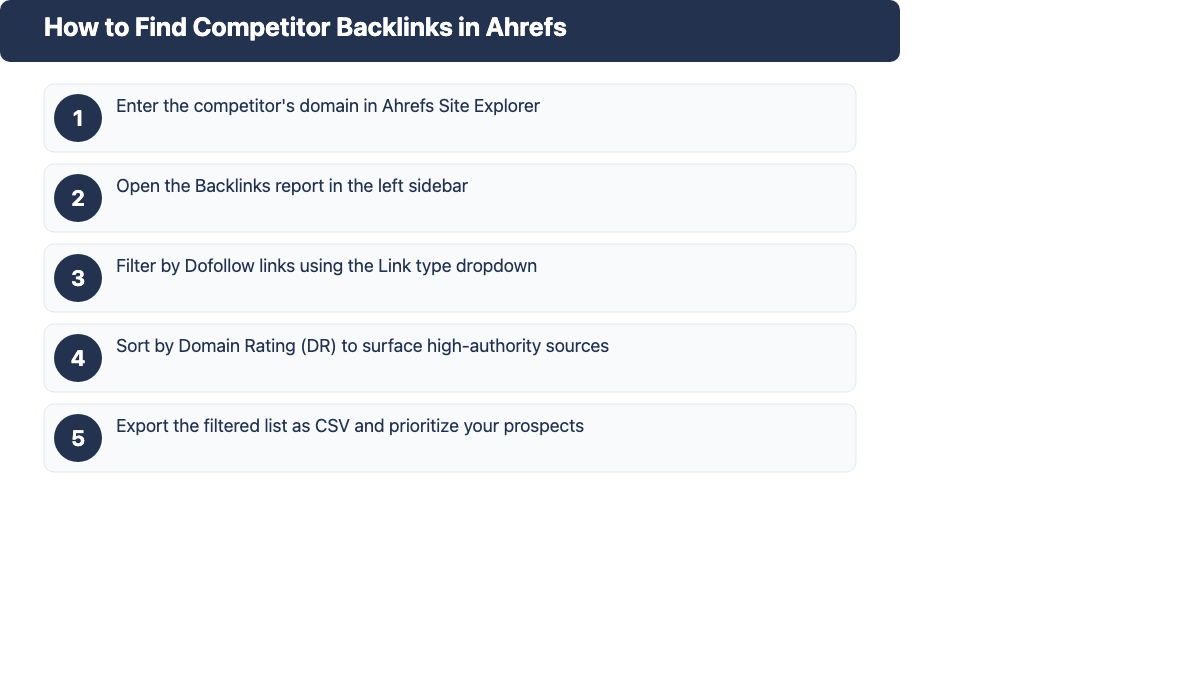
Step 1: Enter the Competitor's Domain in Site Explorer
Go to Ahrefs Site Explorer and enter your competitor's domain without a specific page path (e.g.,
example.comrather thanexample.com/page). This gives you a domain-wide view of all referring domains pointing to any page on their site. If you want to research a specific page's backlinks, enter the full URL instead.Step 2: Open the Backlinks Report
In the left sidebar, click Backlinks under the "Backlink profile" section. This opens the full backlinks report showing every individual link Ahrefs has found pointing to your competitor's domain, along with the linking page URL, anchor text, DR of the linking domain and the target URL on the competitor's site.
Step 3: Filter for Dofollow Links Only
By default, the report shows all links including nofollow. For most link building purposes, you want to focus on dofollow links, which pass PageRank. Use the Link type dropdown and select Dofollow to filter the report. This narrows the list to links that actually contribute to the competitor's rankings.
Step 4: Sort by Domain Rating to Surface High-Value Sources
Click the DR column header to sort the results from highest to lowest Domain Rating. This puts the highest-authority linking sites at the top. As a working threshold, most practitioners focus on links from domains with DR above 30, though this varies by niche. In competitive sectors, you may want to focus on DR above 50 or DR above 70.
To identify which of the competitor's pages earn the most links, switch to the Best by links report instead. This shows you the competitor's link magnets (the pages that attracted the most referring domains), which is useful for identifying what content formats work in your niche.
Step 5: Export and Organize Your Prospect List
Click the Export button in the top-right to download the filtered list as a CSV. Remove any linking domains that are irrelevant to your niche, already link to you, or are clearly low-quality (link farms, personal blogs with no audience). What remains is your prioritized prospect list for outreach.
Tip: Use the "Best by links" report to find competitor link magnets. If a specific page on your competitor's site has 50 or more referring domains pointing to it, that's a signal worth investigating: what made that page earn links, and can you create a better or more comprehensive version?
How to Find Competitor Backlinks in SEMrush
SEMrush's Backlink Analytics tool offers similar functionality to Ahrefs with a few useful additions, particularly the Backlink Gap tool.
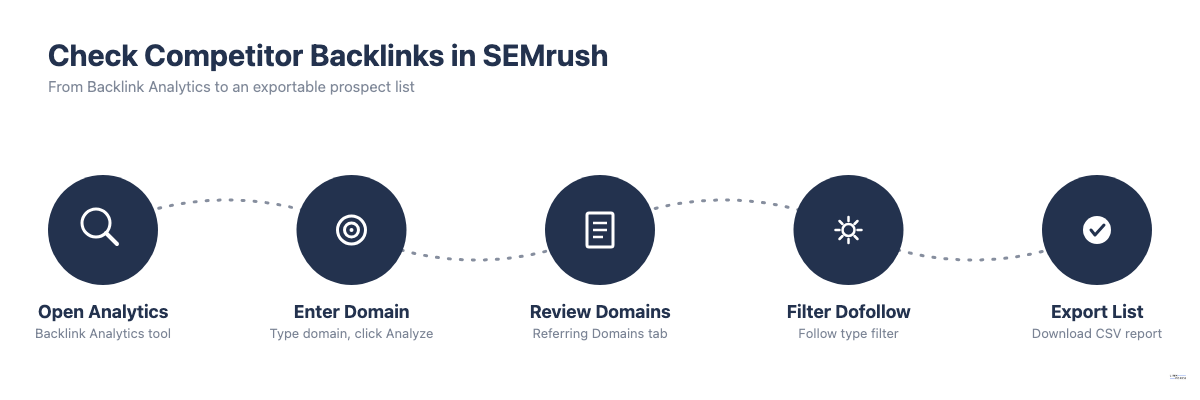
- Go to Backlink Analytics in the left sidebar (under "Link Building").
- Enter your competitor's domain and click Analyze.
- The overview page shows total backlinks, referring domains, Authority Score and the dofollow/nofollow split.
- Click Referring Domains to see every unique domain linking to the competitor, sorted by Authority Score by default.
- Use the Follow type filter to show only dofollow referring domains.
- Click Export to download the list.
Tip: Use the Backlink Gap Tool for Multi-Competitor Research. In SEMrush, go to Backlink Gap (under "Link Building"). Enter your domain and up to four competitors. SEMrush shows you which referring domains link to one or more competitors but not to you, sorted by the number of competitors they link to. This is the fastest way to build a prioritized prospect list when you want to research multiple competitors at once.
How to Find Competitor Backlinks for Free
Paid tools give you the most complete data, but you can get useful competitive intelligence without a subscription:
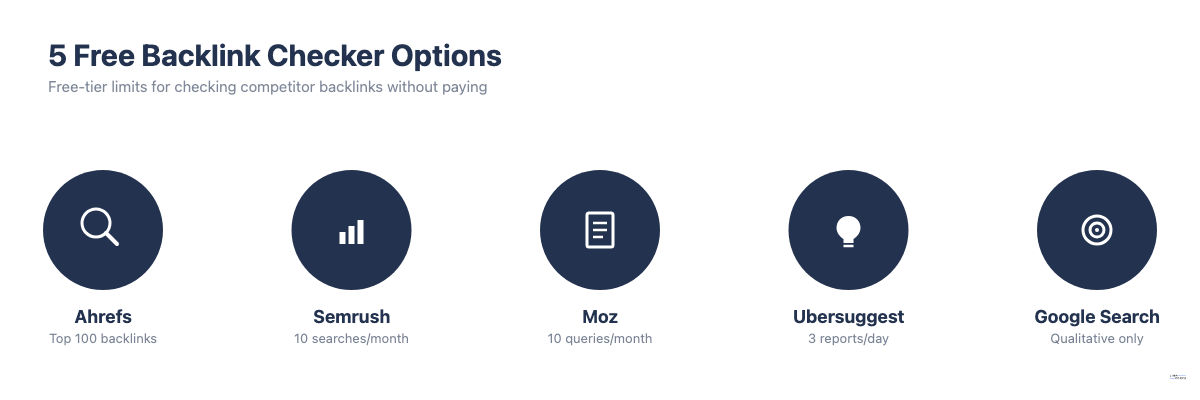
- Ahrefs Free Backlink Checker - Enter any domain at ahrefs.com/backlink-checker to see the top 100 backlinks. No account required. Limitation: only 100 results; no export; no domain-wide referring domain count. Useful for a quick competitive snapshot.
- SEMrush Free Account - SEMrush's free tier allows up to 10 domain searches per month with limited data per report. You can see a capped list of referring domains and use the Backlink Gap tool with limited functionality.
- Moz Link Explorer - Free Moz account includes 10 queries per month. Shows inbound links, top pages and anchor text with DA/PA scores.
- Ubersuggest - Neil Patel's tool offers 3 free reports per day including backlink data. Data isn't as deep as Ahrefs or SEMrush.
- Google Search Operators - Searching
link:example.comin Google no longer works as it once did. You can use niche-specific Google queries to find mentions qualitatively, but this isn't a data-backed method.
For most purposes, the free Ahrefs checker is, without question, the fastest way to get a quick read on a competitor's backlink profile without a paid subscription.
What to Do With Competitor Backlink Data
Collecting competitor backlinks is only step one. The value is in what you do next. This pairs directly with a solid link building outreach process.
Build a Prioritized Outreach List
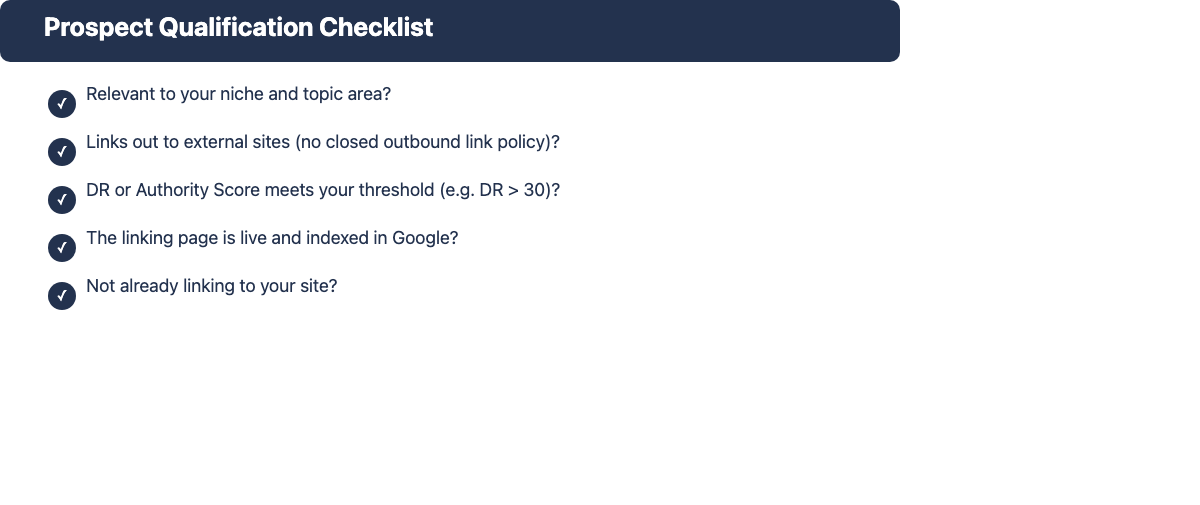
Once you've a list of referring domains, qualify each prospect before reaching out. Prioritize in this order:
- Relevance first - Does the linking site cover topics related to your niche? A DR 80 site that's entirely off-topic is flat-out a harder sell and a weaker link than a DR 35 site squarely in your space.
- Then DR or Authority Score - Within relevant sites, higher-authority links are worth more.
- Then organic traffic of the linking page - A link from a page that gets 5,000 monthly visitors drives referral traffic; a link from a page with zero organic traffic helps rankings but nothing else.
- Then outreach ease - Sites with active blogs, editorial teams or resource pages are easier to pitch than corporate homepages.
Prospect qualification checklist: (1) Relevant to your niche? (2) Links out to other sites? (3) DR or Authority Score meets your threshold? (4) The linking page is live and indexed? (5) Not already linking to you?
Identify Content That Earns Links
Before pitching, look at what the competitor's link magnet pages actually contain. Patterns to watch for: original data or research (surveys, studies, proprietary datasets), comprehensive guides that cover a topic more deeply than anything else ranking, free tools or calculators and curated resource pages that other sites want to reference.
If a competitor's page has 80 referring domains, your outreach pitch needs a comparable or superior page to point to. Publishing a brief, thin version of the same content and then pitching the same linking sites rarely works. You can dig further using an Ahrefs content gap analysis to find topic areas where competitors rank but you don't yet have content.
Close the Link Gap With Better Content
The link gap approach works when you can credibly claim that your content is better or more complete than what the competitor has. Before starting outreach, make sure:
- Your page covers the topic at least as thoroughly as the competitor's linked page
- It has something distinctive (more recent data, a different angle, a better visual)
- The page experience is at least as good (load speed, mobile formatting, readability)
If those conditions are met, your outreach message can be direct: "You linked to [competitor page] on [their topic]. We published [your page], which covers [additional angle or more recent data]. Would you consider adding it as a reference?"
Common Mistakes When Analyzing Competitor Backlinks
- Focusing on link count instead of relevance. A competitor with 500 referring domains in unrelated niches isn't a threat and not a useful benchmark. Focus on the topically relevant domains in their profile.
- Analyzing too many competitors at once. Starting with 10 competitors produces a sprawling list that's hard to prioritize. Start with your 2-3 closest organic search competitors for the specific pages you want to outrank.
- Ignoring whether the linked-to page still exists. Before you pitch a site that links to a competitor, verify that the competitor's page is still live and relevant. If it has been removed or changed significantly, the context for that link may no longer apply.
- Skipping anchor text patterns. Anchor text tells you how linking sites describe the competitor's content. If the dominant anchors are "free [keyword] tool" and you've no free tool, that gap is structural: it isn't just a content depth issue.
- Treating nofollow links as worthless. Nofollow links from major publications still drive brand awareness and referral traffic. Don't ignore them entirely, but weight them differently in your prioritization.
800+ SaaS marketers swap partner, integration and content links on LinkForce.
Frequently Asked Questions
How do I find all backlinks pointing to a competitor's website?
Enter the competitor's domain in a backlink tool like Ahrefs Site Explorer or SEMrush Backlink Analytics. Navigate to the Backlinks or Referring Domains report and filter by dofollow links. Export the data for analysis. No free tool gives you a complete picture. The major paid tools (Ahrefs, SEMrush, Majestic) all have gaps in their indexes, so cross-referencing two tools gives a more complete view.
Can I check competitor backlinks for free?
Yes, with limitations. Ahrefs' free backlink checker shows the top 100 backlinks for any domain. SEMrush's free account allows 10 domain searches per month. Moz Link Explorer provides 10 free queries per month. For a quick competitive snapshot these are sufficient; for deep research or ongoing monitoring, a paid tool is more practical.
How often should I analyze competitor backlinks?
Once per quarter for a structured review of your 2-3 main competitors is a reasonable cadence. Run a focused check when a competitor's rankings improve significantly or when you're preparing a new link building campaign targeting specific pages.
What's a backlink gap analysis?
A backlink gap analysis compares the referring domain profiles of your site and one or more competitors, then identifies domains that link to competitors but not to you. SEMrush's Backlink Gap tool automates this process. Ahrefs lets you do it manually by filtering a competitor's referring domains and removing any that already link to you.
How do I use competitor backlink data to build my own links?
Build a prospect list from the competitor's referring domains, qualify each site by relevance and authority, then identify which of the competitor's pages attracted those links. Create content that covers the same topic more thoroughly or from a different angle. Reach out to each qualifying site with a specific pitch pointing to your content as a relevant reference for their audience. For detailed outreach guidance, see our backlink outreach guide.
What's the best competitor backlink checker?
Ahrefs and Semrush are the strongest overall picks, backed by the largest indexes and the most detailed reports for pulling a rival's referring domains. Choose Semrush if you need to compare several competitors against your own domain in one view, and choose Ahrefs if you want the deepest single-domain backlink checker with anchor text and link-magnet detail. Moz Link Explorer and Ubersuggest are reasonable free-tier picks for occasional checks, but neither replaces Ahrefs or Semrush for ongoing competitive research.
Can I use a backlink checker to analyze competitors, not just my own site?
Yes, every major backlink checker, including Ahrefs, Semrush and Moz, lets you enter any public domain, not only your own, so you research a competitor's referring domains the same way you'd check your own site. Semrush's Backlink Gap tool takes this further by comparing several competitor domains against yours in a single report, which is faster than running one-off lookups for each rival.