

Someone just published an article that mentions your brand by name. No link. No credit. They wrote your company name or product into their content, their readers can see it, but your site gets zero link equity from it.
This is an unlinked brand mention. Ahrefs gives you three distinct tools to find every one of them: Content Explorer for bulk historical discovery, Alerts for real-time monitoring, and Batch Analysis for scale verification. This guide walks through all three methods, shows you how to decide which mentions are worth pursuing, and gives you the outreach framework to convert them into actual backlinks.
What Are Unlinked Mentions in Ahrefs?
An unlinked brand mention is when another website references your brand, product, domain, or company name in their content without hyperlinking back to your site. The mention exists. The attribution exists. The link does not.
Unlinked mentions matter for two reasons. First, they represent a direct link opportunity: the site has already demonstrated familiarity with your brand, which means a link request has context that cold outreach never has. Second, they contribute to entity recognition in search. Google's systems can associate your brand with topics and signals even without a hyperlink, though a link adds direct SEO value that a mention alone cannot provide.
Ahrefs is particularly effective for finding unlinked mentions because Content Explorer indexes tens of billions of pages across the web and lets you filter results by domain rating, organic traffic, and language in one interface. Google Alerts can monitor new mentions, but it surfaces far less volume and has no quality filtering. Ahrefs does both discovery and quality filtering in the same workflow.
For a broader overview of why brand mentions matter for SEO and how they fit into an authority-building strategy, see the Brand Mentions for SEO guide.
Three Ways Ahrefs Finds Unlinked Mentions
Ahrefs does not have a single "unlinked mentions" report. Instead, it offers three entry points that each serve a different purpose:
| Method | Best for | Volume | Real-time? | Effort |
|---|---|---|---|---|
| Content Explorer | Retrospective bulk discovery | High | No (indexed snapshot) | Medium |
| Ahrefs Alerts | Ongoing real-time monitoring | Ongoing stream | Yes | Low (set once) |
| Batch Analysis | Scale verification and misspelling variants | Medium | No | Low (after list exists) |
Use all three for full coverage. Content Explorer finds mentions that already exist in Ahrefs' index. Alerts catches new ones as they appear. Batch Analysis helps you verify a large list efficiently and surfaces mentions of brand name variations that Content Explorer alone might miss.
Build Google search operator queries for link prospecting with the free Search Operator Generator.
Method 1: Find Unlinked Mentions with Content Explorer
Content Explorer is the primary tool for bulk unlinked mention discovery. The key feature is the "Highlight Unlinked" filter, which marks any indexed page that mentions your brand but has no outbound link pointing to your domain.

Step 1: Search your brand name
Open Content Explorer and type your brand name in the search bar. Set the search mode to "In content" (not "Everywhere") to match pages where the name appears in the body text rather than just the URL or title.
Step 2: Apply the Highlight Unlinked filter
Click "Highlight Unlinked" and enter your root domain (example: yourdomain.com). Ahrefs checks whether any outbound link from that page points to your domain. Pages without a matching outbound link are flagged in the results.
One practical note: Highlight Unlinked checks the page's outbound links at the time of Ahrefs' last crawl, not the current live state of the page. If the page was updated after the crawl, your results may not reflect it. Always verify your top candidates manually before sending outreach.
Step 3: Apply quality filters
- Domain Rating: 30 minimum. Pages below DR 30 represent very low-authority sites where a link would have minimal impact and where editors are less likely to respond.
- Site Traffic: 5,000 minimum. A page on a site with no organic traffic means no readers will follow the link you earn. Sites with genuine traffic are worth the outreach effort.
- One article per domain: enable this filter. It prevents the same publisher appearing multiple times in your results. You want domain diversity, not the same site over and over.
- Language: set to your primary market language. This keeps results actionable and lets you write localized outreach.
Step 4: Sort and export
Sort by Domain Rating (descending) to surface the highest-value opportunities first. Review the top 20 to 30 results manually. Export the full filtered list to CSV for outreach tracking.
These filter values cut approximately 70% of low-quality noise from your results. Brands that skip the traffic filter often waste outreach time on sites that get no visitors and whose editors never update published content. The filters are conservative enough to keep genuine opportunities while removing the long tail that rarely converts.
Reading the export
After exporting, your CSV includes columns for the page URL, domain, DR, traffic, referring domains, and (if you exported with the Highlight Unlinked setting active), showing linked vs unlinked status. Open the file in a spreadsheet and sort by DR descending. The top 10 to 20 rows are your priority outreach batch.
Spot-check the top rows by loading each URL in a browser and confirming the mention exists and is genuinely unlinked. Content Explorer occasionally flags pages as unlinked because a crawl captured the page before a link was added. Manual verification on your top 20 targets takes roughly 10 minutes and prevents wasted outreach. For the lower tier of your export (DR 30 to 50 sites), outreach in batches rather than one by one to work more efficiently.
Also check whether the mention is positive and contextually appropriate before reaching out. A mention that positions your brand negatively or appears in a context you wouldn't want to amplify is not worth a link request even if the site has high authority.
Method 2: Set Up Ahrefs Alerts for Ongoing Mention Monitoring
Content Explorer surfaces historical mentions. Ahrefs Alerts handles new ones in real time. Set this up once and you have continuous coverage of fresh brand mention opportunities.
Step 1: Navigate to Alerts
In Ahrefs, go to Alerts in the main navigation, then click the Mentions tab.
Step 2: Create a new alert
Click "+ New alert." In the search query field, enter your brand name using OR syntax to capture common variations:
"YourBrand" OR "yourbrand.com" OR "Your Brand"
Use quotation marks around each variation to match exact phrases. The OR operator (uppercase) tells Ahrefs to alert you when any of these phrases appears on a newly crawled page. Add common misspellings of your brand name if relevant:
"LinkForce" OR "linkforce.io" OR "Link Force" OR "Linkforce"
Step 3: Add a blocklist
In the blocklist field, add your own domain to avoid alerting on your own content. Also add major social networks (twitter.com, facebook.com, linkedin.com, reddit.com) where you cannot typically request an editorial link change.
Step 4: Set frequency
Weekly works for most brands. If your brand generates high mention volume, such as during a product launch or press coverage period, switch to daily temporarily, then revert to weekly. Daily alerts for a low-volume brand produce mostly duplicates and noise.
Step 5: Triage the weekly digest
When alerts arrive, check the domain metrics for each mention. Only open outreach for sites at DR 20+ with some organic traffic. Newer sites under DR 20 occasionally have a strong editorial team, but the conversion rate is low enough that they are generally not worth prioritizing in the first pass.
The key difference between Alerts and Content Explorer: Alerts catches pages within days of publication. Content Explorer catches pages that have been indexed for weeks or months. A mention that appeared last week is still warm: the author remembers writing it and is more likely to respond than if you contact them a year later.
Using Ahrefs Alerts to monitor competitor mentions
Alerts support a second valuable use case beyond your own brand: monitoring competitor brand mentions. Set up a second alert using the same OR syntax for your main competitor's brand name. When a site publishes content that mentions a competitor without linking to them, that same publisher often covers adjacent tools and services, including yours. These aren't immediate link opportunities, but they flag publishers who are active in your space and worth adding to your prospecting list. Run these as separate alert queries from your brand alerts to keep the digests manageable.
Method 3: Use Batch Analysis to Verify and Find Misspelling Mentions
Batch Analysis is useful in two specific situations: verifying whether a large list of domains has a backlink to you, and finding mentions of brand name variations that Content Explorer might not surface under your primary search term.
When to use Batch Analysis for unlinked mentions:
- Your brand name has common misspellings or multiple stylizations
- You recently rebranded and want to find mentions of your old brand name that haven't been updated
- You have a large export from another source and want to check all domains at once for link status
- You want to verify the output of your Content Explorer export before committing time to outreach
The workflow:
- Search each brand name variation separately in Content Explorer using "In content" mode, filtered by your target language and date range. Export each variation's domain list to CSV.
- Merge the lists and remove domains already linking to you. Use your Site Explorer backlinks report to generate the exclusion list.
- Open Batch Analysis. Paste up to 200 domains per batch. Ahrefs returns DR, referring domains, organic traffic, and backlink count for each domain.
- Sort by DR and traffic to prioritize. Domains that appear in your variation search results but have no backlink in Batch Analysis are your unlinked mention targets.
Batch Analysis operates at the domain level and won't tell you which specific page on a domain mentions your brand. After identifying high-value domains, search each domain in Content Explorer individually to find the exact page.
How to Evaluate Unlinked Mentions Found in Ahrefs
Not every unlinked mention is worth pursuing. Outreach takes time, and sending requests to sites that will never respond or that pass no link equity is a poor use of effort. Apply these five criteria before adding any mention to your outreach list.
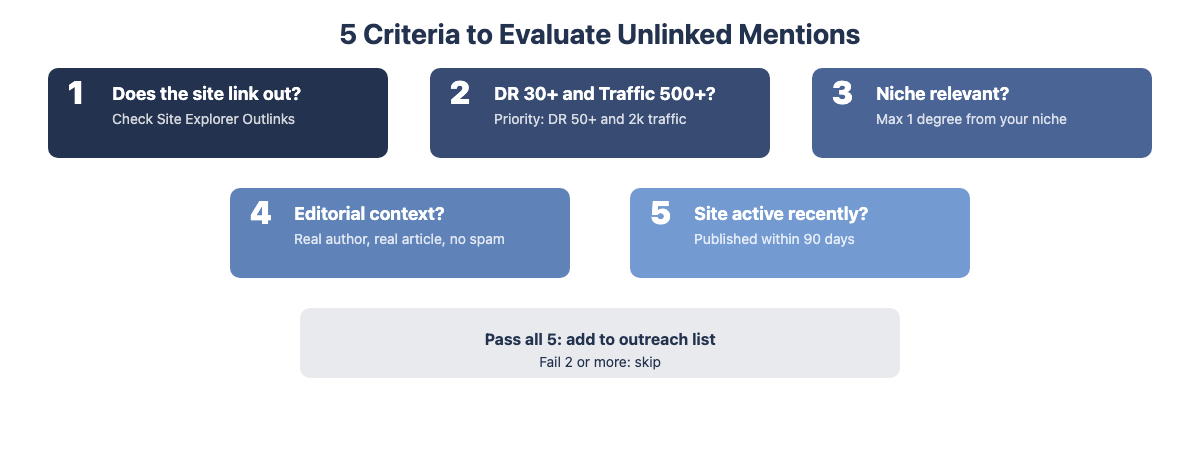
1. Does the site link out to anyone?
Open the domain in Ahrefs Site Explorer and check the Outlinks report. Some sites have a policy of never adding external links to their content. Heavily monetized affiliate sites, closed editorial platforms, or news aggregators. If a domain has very few outbound links relative to its content volume, editors are unlikely to add one for you.
2. Is the DR and traffic above your minimum threshold?
DR 30+ and at least 500 monthly organic visits for lower-tier opportunities; DR 50+ and traffic above 2,000 for priority targets. DR in the 20 to 30 range can still be worth pursuing if the site has clearly active editorial oversight and growing traffic; check the Domain Rating history in Site Explorer.
3. Is the domain relevant to your niche?
Check the site's organic keywords in Ahrefs Site Explorer. The site should rank for topics within one degree of separation from your niche. A fitness blog mentioning your SaaS brand in a technology round-up is probably not a useful link. A marketing blog mentioning your link building tool in an SEO guide is relevant.
4. Does the mention appear in editorial context?
Visit the actual page. Is your brand mentioned in the body of an article with a clear author, a topic, and original writing? Or is it on a spam aggregator, a low-quality listicle factory, or a page that appears auto-generated? Skip the latter. The contextual quality of the link matters for both SEO value and brand association.
5. Is the site recently active?
A site that last published content two years ago is unlikely to respond to an outreach request or be able to update the page. Check the date of the most recent post and look at whether the specific article has been updated recently. Recently active sites convert at meaningfully higher rates.
Domains passing all five criteria go to your outreach list. Domains failing two or more get skipped.
How to Turn Ahrefs Unlinked Mentions into Backlinks
After filtering your list to qualified opportunities, the conversion step is outreach. Practitioners typically see a 5 to 15% conversion rate on unlinked mention outreach. For every 50 qualified mentions you contact, expect roughly 3--7 backlinks. Volume and quality filtering together determine actual results.
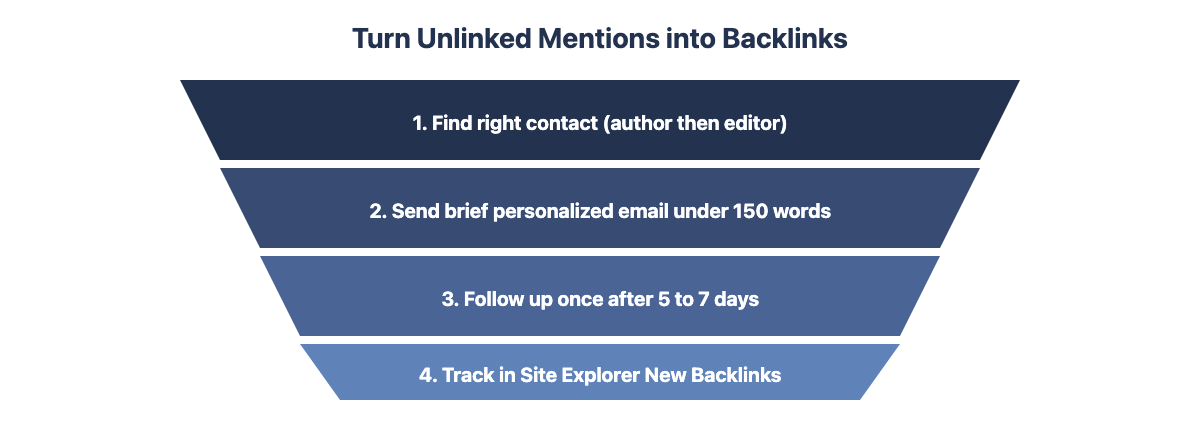
Step 1: Find the right contact
Use LinkedIn to find the author of the specific article or the site's editor or content manager. Hunter.io's domain search surfaces email patterns for the site. For smaller blogs, the contact page usually has a direct email or form.
Contact the author of the specific article first, as they have the most context. An editor or content manager is your fallback.
Step 2: Write a brief, direct email
Keep it under 150 words. Do not explain what an unlinked mention is. Do not pitch SEO benefits at length. Frame the link as helpful for their readers.
Three things that improve response rates: use the author's first name (not their full name), reference the specific article title rather than the site name, and mention one thing specific to their article that shows you actually read it. "I noticed you covered X in that piece" is more effective than a generic opener. Emails that look like they were sent at scale receive less engagement than emails that appear individually written, even if the structure follows a template.
Subject: Your mention of [Brand] in [article title]
Hi [First Name],
I noticed you mentioned [Brand] in your [article title] post. Thank you for including us.
We have a [specific resource] at [URL] that gives your readers more context on [specific topic from their article]. Would you be willing to add a link?
Happy to help in return if there's anything useful I can offer.
[Name]
Short context, one request, one value offer. Personalize with a specific reference to their article or a real observation about their content. Do not send this template verbatim.
Step 3: Follow up once
Wait 5--7 business days. Send one follow-up in the same thread. Keep it to two sentences: acknowledge it's a follow-up, restate the request briefly. Do not send more than two total messages. A lack of response is a signal, not a problem to solve by increasing contact frequency.
Step 4: Track placements in Ahrefs
After sending outreach, set a reminder to check Site Explorer in 2--4 weeks. Use the "New Backlinks" date filter to confirm which outreach converted to live links. This also shows you which publishers tend to respond, so you can prioritize them in future prospecting rounds.
For a deeper guide to writing high-converting link request emails, see Outreach Emails. For the full end-to-end process of running an outreach campaign at scale, see Link Building Outreach.
What a realistic monthly unlinked mention workflow looks like
Week 1 of each month: pull a fresh Content Explorer export using last month's date range. Filter by DR 30+ and traffic 5,000+. Add new opportunities to your tracking spreadsheet. Week 2: send outreach for the new batch. Weeks 3 to 4: send one follow-up per contact, check Site Explorer for confirmed placements. On average, a brand running this process monthly will generate 3 to 10 qualified outreach sends per cycle, depending on brand size and niche. At a 5 to 15% conversion rate, that's typically 1 to 3 new backlinks per month from this tactic alone, not transformational on its own, but compounding cleanly alongside other link building methods.
800+ SaaS marketers swap partner, integration and content links. Free plan, no credit card.
Three Missed Opportunities When Using Ahrefs for Unlinked Mentions
Most practitioners run one Content Explorer search with their main brand name and stop there. Three overlooked variations significantly expand the opportunity set.
1. Only searching the exact brand name
Products, published reports, branded studies, team member names, and coined terminology may all appear in third-party content without attribution. Search for each individually in Content Explorer. Large publications often republish or heavily reference smaller content under a different headline. Run a search for how big outlets covered your content, then find every site that cited that version rather than the original.
2. Ignoring visual content
Infographics, data charts, and original diagrams get embedded by other sites without a source link. Ahrefs Content Explorer won't catch these : they are images, not text. Use Google Reverse Image Search on your key visual assets by dragging the image into Google Images and checking which pages have embedded it. Cross-reference those URLs against your Ahrefs backlink profile to identify the unlinked subset.
3. Skipping international results
English-language content gets picked up by non-English publications. Set Content Explorer's Language filter to "Any" and sort by DR to see what international opportunities exist. A Spanish, German, or French site mentioning your brand at DR 50 is a legitimate link opportunity. Translate your outreach template into the recipient's language. A brief, polite email in their language converts at meaningfully higher rates than an English message sent internationally.
Frequently Asked Questions
Does Ahrefs have a dedicated unlinked mentions tool?
No dedicated "unlinked mentions" report exists as a standalone Ahrefs feature. The workflow combines Content Explorer's Highlight Unlinked filter for retrospective discovery with Ahrefs Alerts for ongoing monitoring. Together, these two tools cover the full scope of what a dedicated feature would provide.
How accurate is Ahrefs Content Explorer for finding unlinked mentions?
Ahrefs Content Explorer indexes tens of billions of pages. The Highlight Unlinked filter checks whether the page has an outbound link pointing to your domain as of Ahrefs' last crawl. If a page was updated after the crawl, the link status shown in Content Explorer may not reflect the current live state. Always manually verify your top candidates before reaching out.
Can I use Ahrefs Alerts for free?
Ahrefs Alerts requires a paid Ahrefs subscription. Free alternatives include Google Alerts (lower coverage volume, no authority filtering) and Mention's free trial. Neither matches the coverage depth of Ahrefs Alerts, but Google Alerts is a reasonable starting point for brands with very low mention volume or limited budget.
What filter settings work best in Content Explorer for unlinked mentions?
DR 30+, Site Traffic 5,000+, target Language, and One article per domain. These four filters together remove the majority of low-quality noise while retaining high-opportunity targets. Adjust the traffic threshold down to 1,000 if you operate in a niche where moderate-traffic sites still carry meaningful editorial authority.
How long does it take to find and convert unlinked mentions using Ahrefs?
First-time setup (Content Explorer filter configuration, export, and building your outreach list) takes 2 to 3 hours for a mid-size brand. Ongoing monthly maintenance with Alerts review and outreach takes 30--60 minutes per cycle once the workflow is established.
Is it worth running unlinked mention outreach for a new brand with low awareness?
For newer brands with limited online mentions, unlinked mention discovery will surface fewer results. The tactic scales with brand awareness: the more publications have written about your brand, the more unlinked mentions exist. For new brands, it's worth running a Content Explorer check every quarter rather than monthly, and setting up Alerts from the start so you capture mentions as they accumulate. Consider combining unlinked mention outreach with link prospecting strategies that don't require pre-existing mentions.
Can Ahrefs find unlinked mentions for a personal brand or individual name?
Yes. The workflow is identical. Search the individual's name in Content Explorer using "In content" mode. Personal names sometimes need quotation marks to match the full name rather than partial matches. For common names, add a disambiguating term in parentheses: "John Smith" SEO to reduce irrelevant results from people sharing the name. The evaluation and outreach process is the same as for a brand name.