

To find toxic backlinks, export your full backlink profile from Google Search Console or a tool like Ahrefs or Semrush, run an automated toxicity scan, filter for links with commercial anchor text or clear spam signals, then manually review each flagged link to decide whether to remove it or add it to your disavow file. Most flagged links are low-quality but harmless. Only links you (or a previous site owner) built for SEO manipulation pose a real risk.
This guide covers the full process: how to pull your link profile, which signals matter, how to evaluate flagged links, what to do with the ones that are harmful and how to set up ongoing monitoring so problems are caught early.
Looking for a toxic backlink checker rather than the full process? seomatic.ai’s checker scores each link with no signup required. SE Ranking, WebCEO and Linkody offer a free scan too, with a paid upgrade for the full report. See the tool comparison further down this guide. But no tool’s score is the final word. The manual-review steps below are what tell you which flagged links actually need action.
What Are Toxic Backlinks?
Toxic backlinks are incoming links that can harm your site’s search rankings or trigger a manual penalty from Google because they form patterns that violate Google’s link spam policies. Google uses automated systems and human reviewers to detect links that appear designed to manipulate rankings rather than guide users to relevant content.
Google’s own documentation uses the term “link spam” rather than “toxic backlinks”. The word toxic comes from third-party SEO tools. What matters under Google’s policies is whether a link was created to manipulate search rankings, not whether it looks low-quality.
Google launched its Penguin algorithm in 2012 to target manipulative link patterns. Today, Google’s automated SpamBrain system handles most link spam detection: in most cases, SpamBrain ignores manipulative links and renders them useless rather than penalising the site that receives them. Google’s link spam policies are documented at developers.google.com/search/docs/essentials/spam-policies/links. Widespread, sophisticated manipulation can still lead to algorithmic ranking drops. And if a human reviewer finds clear evidence of paid link schemes, your site can receive a manual action in Google Search Console, which can drop pages entirely from search results.
Spammy vs. manipulative vs. toxic: three different problems
The industry uses these terms loosely, but the distinction matters when you decide what action to take:
| Link type | What it means | Risk level |
|---|---|---|
| Spammy / low-quality | Links from poor-quality sites, scrapers or irrelevant directories you did not build. Google’s SpamBrain ignores most of these. | Low. No action often needed. |
| Manipulative | Links you, an agency or a previous owner built to inflate rankings (paid links, link exchanges, PBNs) in violation of Google’s policies. | High. These are the links that trigger penalties. |
| “Toxic” (tool score) | Any link flagged by automated scoring in Semrush, Ahrefs or similar tools. | Variable. Many tool-flagged links are harmless natural spam. |
Where do toxic backlinks come from?
Harmful links often come from eight sources:
- Paid links with follow attributes: Buying or selling dofollow links without a
rel="sponsored"tag is a direct policy violation. Userel="nofollow"orrel="sponsored"for paid placements. - Private Blog Networks (PBNs): Sites built solely to pass link equity are one of the clearest manipulation signals Google looks for.
- Excessive reciprocal link exchanges: A few natural editorial reciprocal links are fine; a large-scale “I’ll link to you if you link to me” operation is not.
- Automated link-building tools: Automated submissions to directories, comment spam or profile pages at scale.
- Low-quality or irrelevant web directories: Directories that exist only for link building rather than to serve users.
- Widget and footer links without nofollow: Dofollow links in embedded widgets or site-wide footers that pass link equity with no legitimate editorial reason.
- Negative SEO attacks: A competitor builds large volumes of spammy links to try to trigger a penalty against your site.
- Inherited links from a previous owner or agency: Sites that changed hands or switched agencies may have a history of manipulative link building that the current owner is not aware of.
Warning Signs Your Backlink Profile Has a Problem
Before running a full audit, check for these five signals that a toxic backlink problem may be worth investigating:
- A sudden organic rankings or traffic drop: If it coincides with a Google core update or Penguin refresh, an unexplained drop can indicate a link-related issue.
- A manual action notification in Google Search Console: Check under Security and Manual Actions. A notice for “unnatural links” is the clearest signal that Google has identified a problem. If you see this, start the audit.
- A suspicious spike in referring domains: A large, sudden increase in sites linking to you, especially from irrelevant or foreign-language domains, can signal a negative SEO attack or that a past link-building campaign is being detected by Google’s systems.
- Unusual anchor text concentration: If a high percentage of your backlinks use exact-match commercial keywords (“buy X online”, “best X service”) rather than natural brand mentions or editorial anchors, that is a pattern Google’s manual reviewers look for.
- Recent use of a link-building agency or automated tool: If you or a previous owner paid for links or used a link-building tool, that is reason enough to audit even without any visible ranking changes.
If you received a manual action notice, the urgency is higher and the bar for disavowing is lower: Google has already identified a harmful pattern and wants to see that you are cleaning it up.
How to Find Toxic Backlinks: A Step-by-Step Audit
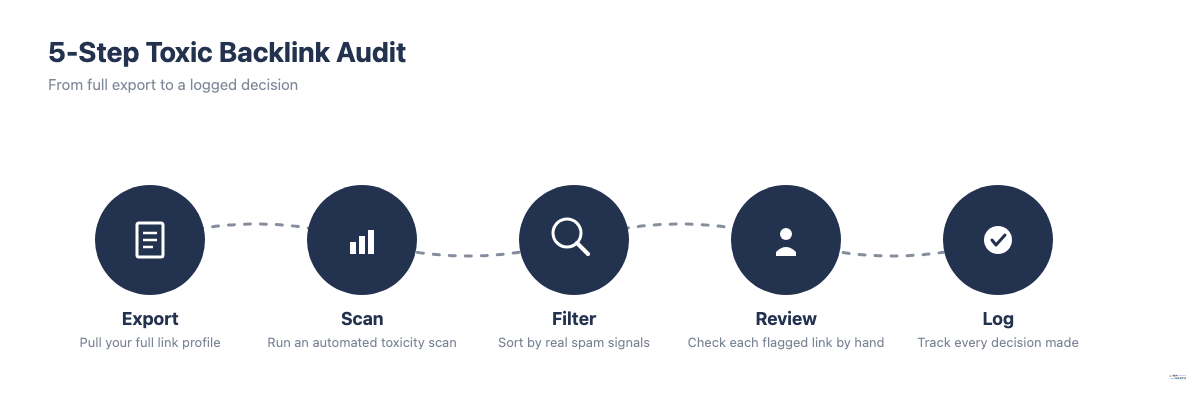
Finding toxic backlinks is a two-stage process: automated scanning surfaces candidates, then manual review identifies which ones are manipulative. The full process has five steps.
Step 1: Export your full backlink profile
Pull a complete list of links pointing to your site from two sources:
Google Search Console: Go to Links > External Links > Top linking sites, then export the full list. This shows you Google’s own view of your link profile but is often incomplete; Google shows only a sample of what it has indexed.
A paid backlink tool (Ahrefs, Semrush or Majestic): These tools maintain their own crawled databases and often show a more complete picture. Export all backlinks and include the referring domain, anchor text and link URL in your columns.
Using both sources matters. Links that appear in Google Search Console but not in your third-party tool are often lower-quality or recently discovered links that the tool has not fully crawled. Cross-referencing both gives you the most complete possible view.
Step 2: Run an automated toxicity scan
With your link list exported, run it through your tool’s toxicity scoring system:
- Semrush Backlink Audit: Assigns a Toxicity Score from 0 to 100 based on over 45 toxic markers, then groups each link as Toxic, Potentially Toxic or Non-Toxic. Start your manual review with whichever links land in the Toxic group; Semrush does not publish a single universal score cutoff, so treat the label, not a specific number, as your filter.
- Ahrefs Site Explorer: Use the Anchors Report to surface the distribution of anchor texts across your profile. Sort the Backlinks report by Spam Score to see the lowest-quality links first.
- Majestic: Use the Trust Flow metric. Links from domains with Trust Flow below 10 combined with a Citation Flow to Trust Flow ratio above 2 are often low-quality.
- Google Search Console: Look for manual action notices under Security and Manual Actions. GSC does not provide a toxicity score, but it tells you what Google has flagged.
At the end of this step you should have a filtered list of flagged backlinks. For most sites this is 100 to 500 links depending on profile size.
Step 3: Filter by spam signals that matter
Not all toxicity signals carry equal weight. Focus your manual review on the signals that correlate with real risk:
| Spam signal | What it means | How to check |
|---|---|---|
| Commercial or money anchor text | Exact-match or phrase-match keyword anchors on low-quality, irrelevant sites | Sort export by anchor text; look for concentrations of keyword-rich anchors from low-DR domains |
| Very low domain authority | Links from sites with DR or DA below 5 and no real traffic | Check DR or DA in your tool |
| Topically irrelevant or foreign-language origin | Links from sites in completely unrelated niches or languages | Review the referring domain’s content |
| Network footprints | Multiple links from domains sharing hosting, contact info or identical site structures (PBN indicators) | Spot-check several suspect domains for shared registration or design patterns |
| Site-wide or footer placement | The link appears in a template area repeated across hundreds or thousands of pages | Check the link position on the live referring page |
| Hacked or compromised sites | The linking page looks spam-injected or contains malware warnings | View the live page and check for injected links or malware notices |
Signals you can deprioritize in manual review: links from scrapers and content aggregators that copied your content without involvement on your part; foreign forum or blog comment links you never placed; low-DR links using branded or generic anchor text (“click here”, “read more”, your brand name).
Step 4: Manually review each flagged link
For every link that passes your filter in Step 3, open the live referring page and answer three questions:
- Did I, an agency I hired or a previous owner of this site build, buy or arrange this link?
- Does the anchor text form part of a pattern, where commercial keywords appear across multiple low-quality sites?
- Would a Google reviewer looking at this link conclude it was placed to manipulate search rankings?
A single low-quality link on an irrelevant site is often not worth acting on. A pattern of similar links (same anchor text, same site type, built around the same time) is what that triggers Google penalties.
You do not need to manually review every link in your profile: only the ones that survived your filter. For most sites, this manual review list will be 50 to 200 links.
Step 5: Log all decisions in a tracking sheet
Create a simple spreadsheet with these columns: referring domain, anchor text, date identified, toxicity score, manual verdict (Remove / Disavow / Keep / Monitor), webmaster contact date, response received, included in disavow file (yes/no) and date resolved.
This log serves three purposes: it gives you an audit trail if you submit a reconsideration request to Google; it prevents re-reviewing the same links in future audits; and it makes it easy to update your disavow file when you do a quarterly review.
Which Tools Find Toxic Backlinks Best
Each major tool approaches backlink toxicity differently. Here is a plain comparison to help you choose, split into dedicated toxic backlink checkers and the fuller audit suites:
| Tool | Cost | Key metric | Best for |
|---|---|---|---|
| seomatic.ai Toxic Backlink Checker | Free, no signup | Per-link spam score (0-100), Low/Medium/High risk bands | Fastest first look; no account needed, disavow file export built in |
| WebCEO Toxic Backlink Checker | 14-day trial | Toxic link detection plus disavow-file generation | Readers who want an end-to-end scan-and-disavow workflow in one tool |
| SE Ranking Backlink Checker | Free sample, paid for full report | Backlink toxicity score alongside broader link metrics | Readers who also want ongoing rank tracking in the same platform |
| Linkody Backlink Checker | Free sample; Spam Score Checker is a separate free tool | Spam Score (separate companion tool) | Readers who want a lightweight, no-frills first scan |
| Google Search Console | Free | No toxicity score; shows Google’s own view of your links | Baseline reference and manual action detection; required starting point |
| Ahrefs Site Explorer | From ~$99/mo | Domain Rating + Spam Score + Anchors Report | Deep anchor text analysis; one of the largest backlink databases |
| Semrush Backlink Audit | From ~$99/mo | Toxicity Score (0-100, based on 45+ toxic markers) | Automated mass-scan; built-in outreach and disavow file builder |
| Majestic | From ~$50/mo | Trust Flow / Citation Flow ratio | Secondary quality filter; good complement to Ahrefs or Semrush |
No tool on this list is authoritative on its own. Each vendor weighs its 40+ signals differently, so the same link can come back with a different score from every tool. Run one scan to get a candidate list, then use the manual-review steps later in this guide to decide what actually needs action.
seomatic.ai, WebCEO, SE Ranking and Linkody
These four are purpose-built toxic and spam backlink checkers, which makes them the fastest starting point if you just want a quick read on your link profile.
seomatic.ai’s checker is free with no signup: enter a domain, get a per-link spam score with a Low, Medium or High risk label, and selectively export the flagged links you choose into a Google Search Console-ready disavow file. WebCEO’s toxic-link checker requires a trial signup but bundles a fuller workflow, including automated disavow-file generation. SE Ranking labels its toxicity metric directly inside a broader backlink checker, useful if you also want ongoing rank tracking. Linkody keeps its spam scoring in a separate, dedicated Spam Score Checker alongside its main backlink tool.
Treat all four the same way: useful for a fast first pass, not a substitute for the manual review in Step 3 and Step 4 below, since none of them can tell you whether a flagged link was actually built to manipulate rankings or just happens to look messy.
Google Search Console
GSC is your required starting point for any toxic backlink investigation. It shows the links Google has chosen to index from your profile and it is the only place you will see a manual action notice if Google has flagged your site. Start here even if you run a paid tool scan as well.
Go to Search Console > Links > External Links to see which domains link to you most. For a full export, click “Top linking sites” then use the export button (top right). Note: GSC does not offer a toxicity score; it is a reference, not a diagnostic tool.
Ahrefs Site Explorer
Ahrefs’ Anchors Report shows the complete distribution of anchor texts pointing to your site. This is the fastest way to identify unnatural anchor text concentration, a strong signal of deliberate link manipulation. Filter by “dofollow” and sort by anchor text to surface exact-match commercial anchors.
Ahrefs’ Spam Score (shown in the Backlinks report) ranges from 0 to 100 and factors in link quality signals. DR (Domain Rating) below 10 combined with a high Spam Score is a useful filter for identifying low-quality links worth reviewing.
Semrush Backlink Audit
Semrush’s Backlink Audit tool scans your full link profile and assigns each link a Toxicity Score from 0 to 100 based on over 45 markers, including anchor text patterns, domain registration signals and link placement. It is the most automated approach and works well for large profiles where manual review of the full list would take too long.
From the Semrush Backlink Audit interface you can filter by score, whitelist links you have reviewed and approved, send webmaster outreach emails directly and build your disavow file with a single click. This makes it the most complete workflow tool if you use Semrush as your primary platform.
Majestic
Majestic’s Trust Flow metric scores how close a site is to a set of manually-vetted trusted seed sites on the web. A Trust Flow below 10 with a high Citation Flow (many links pointing to the domain, but from low-trust sources) is a reliable signal of low-quality link origin. Majestic works best as a secondary filter alongside Ahrefs or Semrush rather than a standalone audit platform.
How Toxicity Scores Work, and Why Tools Disagree
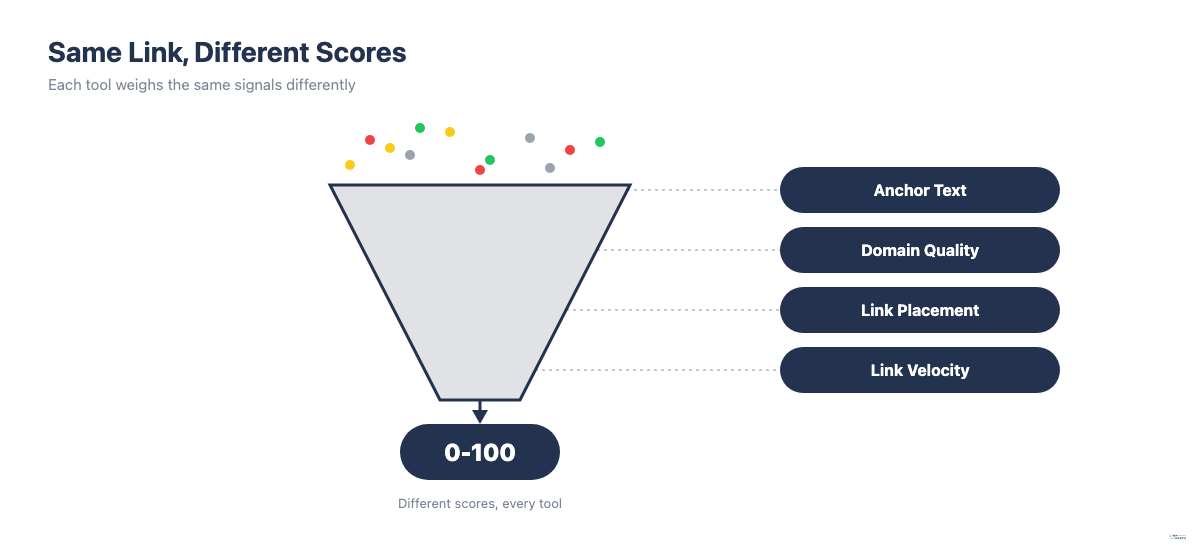
A toxicity or spam score is a weighted count of risk signals, converted into a single 0-100 number. The signals include anchor text patterns: exact-match commercial phrases score worse than branded or generic text. They include referring-domain quality: thin content, no organic traffic, shared hosting with other low-quality sites. They include link placement (a sitewide footer link scores worse than an in-content editorial one) and how quickly a batch of similar links appeared.
Every tool weighs those inputs differently. That is why the same link can score as moderately risky in one tool and clean in another. Semrush’s Toxicity Score draws on 45+ toxic markers combined with machine learning and user feedback. seomatic.ai scores each link individually using DataForSEO’s spam-detection model. Ahrefs and Majestic build their scores from their own crawled link-quality signals. None of these methodologies are published in full. And none of them checks the one thing that actually matters: whether the link was placed to manipulate rankings. That judgment call is why the manual-review steps below exist. Use a tool’s score to shorten your review list, not to make the final call.
How to Evaluate Whether a Flagged Link Is Actually Harmful
Automated toxicity scans flag more links than are harmful. Most flagged links are simply low-quality; they provide no ranking value but do not cause a penalty either. The real risk is a much smaller subset: links that form patterns of deliberate manipulation.
Signals that a link is harmful
These signals, especially in combination, indicate a link Google could interpret as manipulation:
- The link was purchased, traded or arranged specifically for the purpose of improving search rankings
- The anchor text is a commercial keyword phrase on a site with no topical relevance to your domain
- The link is part of a pattern across multiple similar sites using the same or similar keyword anchors
- The referring site has PBN characteristics: thin or spun content, no identifiable organic traffic, registered contact details shared with other suspect sites
- You received a Google manual action notice referencing unnatural links to your site
Signals that are often safe to ignore
These appear frequently in toxicity scans but rarely represent real risk:
- Low DR or DA alone, with no evidence of deliberate link acquisition
- Scraper sites and content aggregators that republished your content without your involvement
- Blog comment links from spam comment bots you never interacted with
- Niche directory listings from legitimate but low-quality directories, particularly old ones
- Links using your brand name, generic phrases or bare URLs as anchor text, even if the linking site is low quality
The two-condition test before disavowing
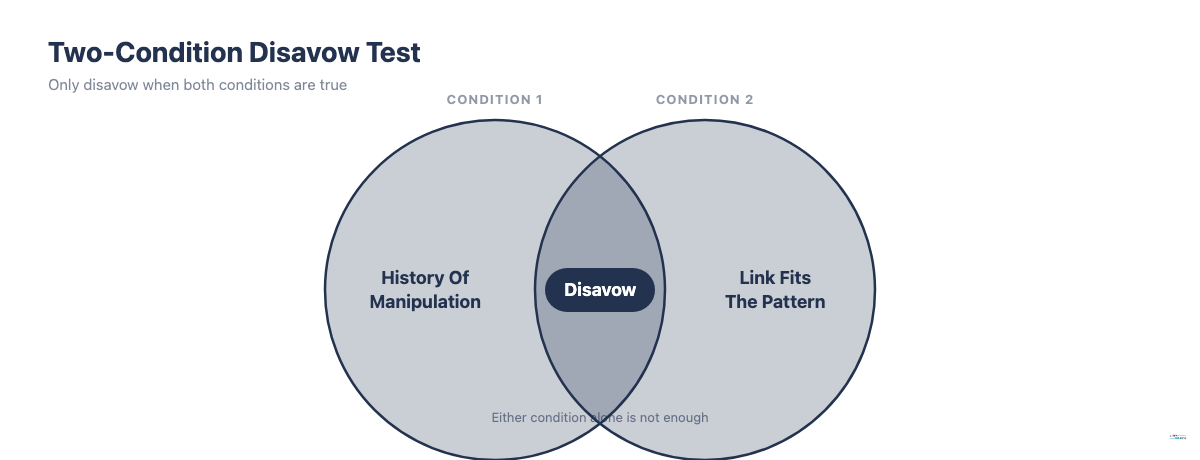
Before adding any link to your disavow file, verify that both of these conditions are true. This test, drawn from Google’s own guidance and long-running expert case studies, is the most reliable filter for avoiding unnecessary disavows that could remove legitimate link authority:
Condition 1: You have received a Google manual action specifically for unnatural links to your site, OR you have clear evidence that manipulative link building was carried out on this domain in the past (by you, a previous owner or an agency).
Condition 2: The flagged link was clearly part of that manipulative pattern, not just a random low-quality link your site attracted naturally.
If both conditions are not met, do not disavow the link. Google’s SpamBrain system handles most natural spam automatically. Disavowing links indiscriminately can reduce your site’s apparent authority by removing links that were neutral or beneficial.
What a Toxic Backlink Problem Actually Looks Like in Practice
Understanding what to look for is easier with concrete examples. These are the three most common patterns that cause real problems.
In the first pattern: a site is sold or switches SEO agencies. The new team discovers that the previous agency built 800 links from a network of thin content sites using exact-match anchor text for commercial keywords. Many of these links have Semrush Toxicity Scores above 70 and the site receives a manual action from Google. This is the most common scenario in which a disavow file helps: the links were manipulative and Google’s manual review confirms it.
In the second pattern: an established blog has 15,000 backlinks and a Semrush scan flags 400 as “toxic.” On manual review, the flagged links are scrapers that reproduced blog posts, foreign-language forums where someone shared a link and directories the site was never submitted to. None were deliberately placed. The correct action is to do nothing. Disavowing them would not help and could remove links that carry minor positive signal.
In the third pattern: a competitive e-commerce site gains 600 new referring domains in a single week, all from irrelevant foreign-language domains with exact-match commercial anchor text pointing to product pages. The correct response is to document the pattern, disavow the spike at domain level, file a reconsideration request noting the suspicious timing and volume and then set up weekly new-backlink alerts to catch future spikes before they accumulate.
The difference between these three patterns (manipulative intent, natural accumulation and external attack) determines which action is appropriate. Tool scores alone cannot tell you which pattern you have.
What to Do After Identifying Toxic Backlinks
Once you have identified links that satisfy both conditions of the two-condition test, you have two actions available: removal requests to webmasters and the Google Disavow Tool as a fallback.
Step 1: Contact webmasters to request removal
Before using the disavow file, attempt to remove the link at the source. Find the webmaster’s contact information using the site’s contact page or a WhoIs lookup, then send a brief, professional removal request. Log the outreach date in your tracking spreadsheet and wait 10 to 14 days for a response.
Webmaster removal rates are low; industry experience suggests 20 to 30 percent of requests receive a response and fewer result in the link being removed. But this step demonstrates good-faith effort to Google and supports any reconsideration request you submit later.
Step 2: Build a disavow file for links that remain
For links that have not been removed after your outreach window, add them to a disavow file. The format required by Google is a plain text file with one entry per line. Use domain-level disavows wherever possible, since this covers all pages on a domain rather than only the single URL you identified:
domain:spammydomain1.com
domain:spammydomain2.com
https://specificspampage.com/single-link/
When you update your disavow file, always append to the existing list rather than replacing it. Google’s system replaces the entire previous file with each upload, so if you submit a partial file, any links in the previous file are no longer disavowed.
Step 3: Submit via Google Search Console and set realistic expectations
Upload your disavow file at support.google.com/webmasters/answer/2648487 (Google’s Disavow Links tool). Google processes disavow files within a few weeks, but ranking changes, if any, can take one to three months to materialise.
Disavowing links does not guarantee a ranking improvement. If those links were not actively causing harm, removing them will have no visible effect. The purpose is to eliminate a manipulation pattern, not to gain rankings. If you submitted in response to a manual action, you will need to file a reconsideration request alongside or after your disavow submission.
For a full guide to building, formatting and submitting a disavow file, see the detailed walkthrough in our guide on how to disavow backlinks in Ahrefs.
How to Assess Audit Results: What a Healthy vs. Problematic Profile Looks Like
After running your audit, you will have a list of flagged links. How do you know if what you found is serious?
Signs that your profile is likely healthy despite tool flags:
- The flagged links are scrapers, aggregators or directories you did not submit to
- The flagged links use branded anchors, bare URLs or generic phrases
- Most flagged links are labeled Non-Toxic or Potentially Toxic rather than Toxic in your tool’s scoring
- You have no manual action notice from Google
- Your organic traffic and rankings have been stable
Signs that you may have a real problem:
- A significant portion of flagged links use commercial exact-match or phrase-match keyword anchors
- Multiple flagged domains share hosting, registration details or site design (PBN footprint)
- You have received or previously received a manual action for unnatural links
- Organic traffic dropped sharply around a Google update date
- The flagged links cluster around specific time periods that match past link-building campaigns
If your audit looks like the healthy profile, close the spreadsheet and schedule a review in three months. If it looks like the problematic profile, proceed to the removal and disavow steps.
How to Monitor for New Toxic Backlinks Over Time
One audit gives you a snapshot of your link profile at a single point in time. For sustained protection, especially if you are building links or operating in a competitive niche, you need an ongoing monitoring system.
A practical monitoring cadence looks like this:
Monthly tasks:
- Check Google Search Console for new manual action notices under Security and Manual Actions
- In your backlink tool, filter new backlinks by acquisition date (last 30 days) and check for unusual anchor text concentration or sudden spikes in referring domains from irrelevant sources
- Review the GSC Links report for any month-over-month jumps in referring domain count that you cannot explain through your own link-building activity
Quarterly tasks:
- Run a full backlink audit using your standard process
- Review links in your tracking spreadsheet logged as “Monitor” to see if they have changed status
- Update your disavow file if any newly identified harmful links were found
- Confirm that all domains in your active disavow file are still included (your disavow file needs to be kept active; it does not accumulate automatically)
Setting up automated alerts:
Ahrefs Alerts (under Alerts > New Backlinks) sends a weekly digest of new links pointing to your site. Set the DR filter to catch low-quality new links quickly.
Semrush Alerts notifies you when significant new referring domains are discovered for your project.
Google Search Console sends email notifications for manual actions by default for all verified properties. Make sure the right people on your team receive these emails.
How to Protect Against Negative SEO Attacks
Negative SEO is when a competitor points large volumes of spammy links at your site to try to trigger a Google penalty. Google has stated its systems are designed to ignore most negative SEO attempts and they generally do. But large-scale or sophisticated attacks can still create issues and early detection makes remediation far easier.
A five-step defence plan:
1. Enable Google Search Console notifications. Google Search Console sends email alerts for manual actions by default. Confirm that the correct email addresses are verified on your property so alerts reach the right people quickly.
2. Set up weekly new-backlink alerts. Configure new backlink notifications in Ahrefs or Semrush. A sudden spike of hundreds of new low-quality referring domains within a week warrants immediate investigation; that pattern is unusual for organic link growth.
3. Maintain an active disavow file. If you have already identified and disavowed known spammy links, keep the file active and update it at each quarterly audit. An active disavow file signals to Google which links you acknowledge and disown. Do not delete the file after submission. Keep it updated and resubmit whenever you make additions.
4. Monitor anchor text distribution monthly. Negative SEO attacks often work by flooding your profile with exact-match commercial keyword anchors. If your anchor text distribution shifts suddenly toward commercial phrases, investigate the new links immediately rather than waiting for the quarterly audit.
5. Document any attack with evidence. If you believe your site is under a negative SEO attack, document the pattern: record the dates, domains, anchor texts and volume of new links. If you later need to submit a reconsideration request, this documentation shows Google that the links were not built by you and that you identified them promptly.
Summary: The Process at a Glance
Finding and acting on toxic backlinks requires a structured process, not a panic response to every low-quality link a tool flags:
- Export your full backlink profile from Google Search Console plus one paid tool
- Run an automated toxicity scan and filter to high-signal candidates
- Manually review each flagged link against the three-question test
- Log all decisions in a tracking spreadsheet for ongoing reference
- Apply the two-condition test before adding any link to your disavow file
- Request removal from webmasters first, then disavow what remains
- Set up monthly monitoring and quarterly audits
- Maintain a baseline disavow file and automated alerts as a negative SEO defence
The central principle: most low-quality links are harmless. Concentrate on patterns of deliberate manipulation, using the two-condition test to avoid removing link authority your site legitimately earned.