

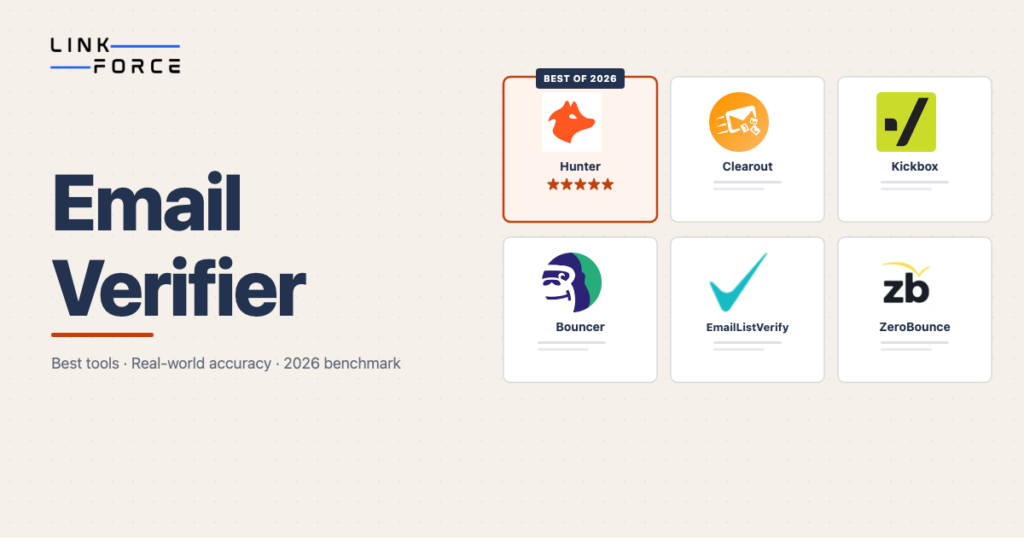
An email verifier is a tool that checks whether an email address is valid and deliverable before you send to it, without actually sending a message. You’ll use it to verify email addresses in your prospect list so that only confirmed, active inboxes receive your outreach. Tools like Hunter, ZeroBounce, and Clearout run the check in seconds per address, and they’ll return a clear result: safe to send, risky, or dead.
For link builders and outreach teams, email address verification sits at the start of every campaign. You can’t build links if your emails never arrive, and if too many bounce, your sending domain takes the hit. Period.
How Email Verification Works
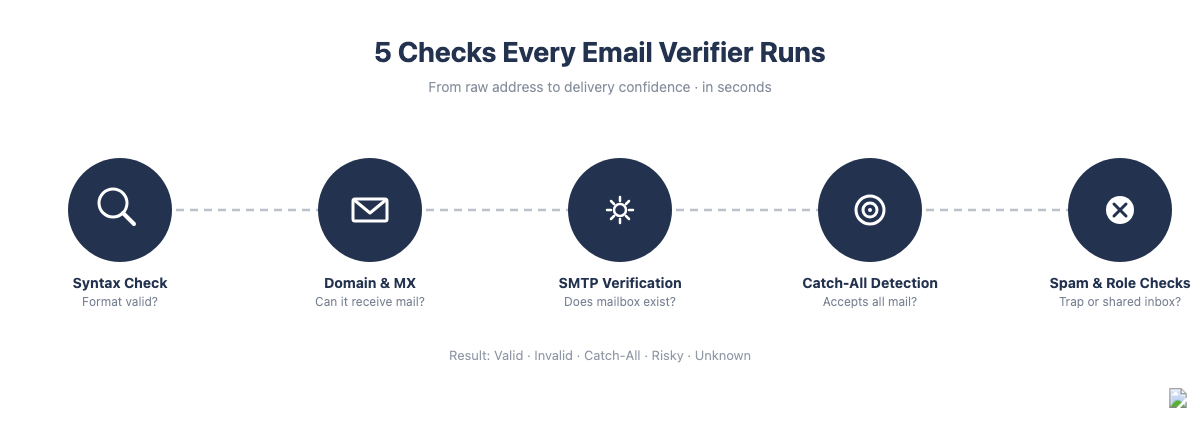
An email verification tool runs five checks in sequence. The first check is fast; the last few are slower but far more meaningful. Most tools complete the full process in a few seconds per address.
Syntax Check
The verifier first confirms the address is formatted correctly: a local part, an @ symbol, a domain, and a valid top-level extension. No spaces, no illegal characters, no double dots. This step catches obvious typos and malformed addresses instantly, but it doesn’t confirm the address actually exists.
Domain and MX Record Check
Next, the email checker checks whether the domain is real and whether its DNS has mail exchange (MX) records configured. A domain without MX records can’t receive email at all. This step catches addresses at defunct or mistyped domains, a common issue when prospecting lists come from outdated databases.
SMTP Verification
SMTP verification is the most important step. The verifier connects to the receiving mail server and runs a simulated delivery attempt without sending any content, asking the server directly whether the mailbox exists. Most servers respond with a yes or no. That’s where the tool learns whether the specific inbox is active.
Some servers block SMTP probing or don’t respond, which is why some addresses come back as unknown even after the check runs.
Catch-All Domain Detection
Some mail servers are configured to accept all incoming email regardless of whether the specific inbox exists. These are called catch-all or accept-all domains. When the email checker hits one of these servers, it can’t confirm individual mailbox validity: the server says yes to everything.
Catch-all domains are common in small businesses, law firms, agencies, and other professional services: exactly the kinds of sites link builders target. Every email verification tool handles them differently, and your approach to catch-all results affects your outreach deliverability.
Spam Traps, Disposable Addresses, and Role-Based Inboxes
The best email verifiers add three more checks on top of the process above.
Spam trap detection identifies email addresses placed by blocklist operators or ISPs to catch senders who use unverified lists. Sending to a spam trap signals poor list hygiene, and it’ll often trigger domain blacklisting too.
Disposable email detection screens for temporary addresses from services like Mailinator or Guerrilla Mail. They exist for minutes or hours and don’t carry any value for outreach.
Role-based address detection flags inboxes like info@, support@, or hello@, shared inboxes monitored by multiple people or bots. They’ll reduce reply rates and increase spam complaints compared to individual mailboxes.
What Email Verification Results Mean
Email verifiers return one of five result types. Knowing what each one means determines what you’ll do with the address.
Valid
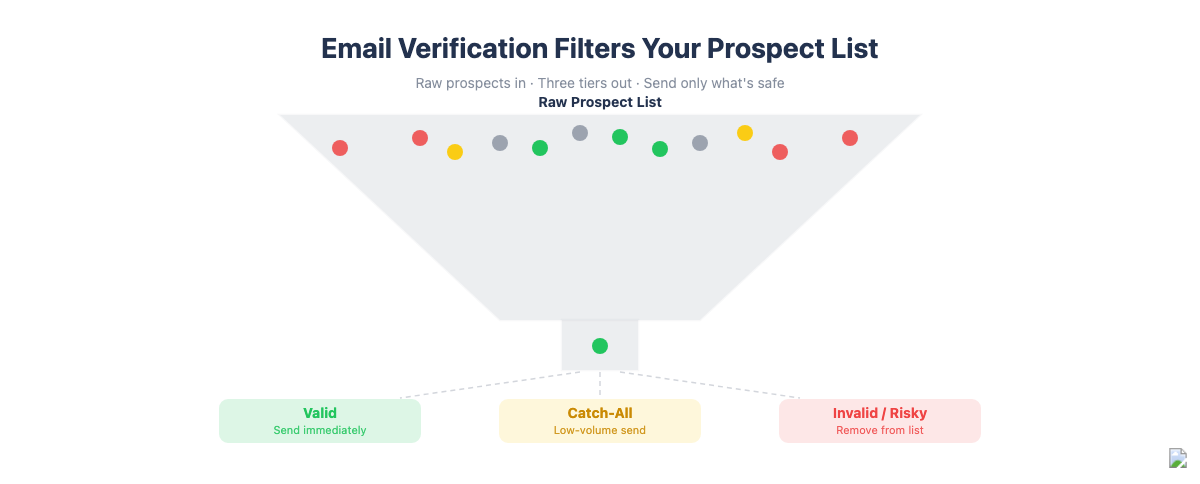
The mailbox exists and is actively accepting email. Safe to send. That’s the result you want.
Invalid
The address doesn’t exist. The domain is real, but the specific mailbox was rejected by the mail server. Remove it from your list before sending. A bounce from this address is a hard bounce and hurts your sender reputation.
Catch-All (or Accept-All)
The domain accepts all incoming mail, so the verifier can’t confirm whether the specific inbox exists. These addresses carry some risk, but they aren’t dead. For link building outreach at small volumes, catch-all addresses are often worth a send attempt. At bulk scale, flag them separately and send at a reduced rate: no more than 20 to 30 per day from a single sending domain to limit bounce risk.
Risky
The address has characteristics that increase bounce or complaint risk: it’s possibly role-based, disposable, or tied to a known spam trap pattern. Most outreach teams exclude risky addresses entirely.
Unknown
The verifier couldn’t determine status. The server didn’t respond, the check timed out, or the server blocked the SMTP probe. Retry once, and if it’s still unknown, treat it the same as catch-all: possible but uncertain.
Why Email Verification Matters for Link Building
Link building outreach isn’t mass email marketing. You’re sending to specific contacts at specific sites, often using a dedicated sending domain. That difference makes email hygiene more consequential, not less.
Hard bounces accumulate per domain, on top of authentication signals like SPF and DMARC that mailbox providers already check. When your sending domain exceeds approximately 2% hard bounce rate, major email providers begin treating your messages as spam. That threshold applies to everything sent from that domain, and it’s not limited to individual campaigns.
For link builders, the consequences stack up quickly:
- Outreach emails land in spam folders instead of inboxes
- Reply rates drop without explanation
- Follow-up sequences stop working
- In severe cases, the sending domain gets blacklisted and all outreach stops
Verification prevents this outright. Cleaning a list of 1,000 addresses costs $4 to $8 with most tools. Losing a sending domain and rebuilding sender reputation costs weeks of reduced campaign effectiveness.
Company email domains, the targets of most link building prospecting, are frequently catch-all. Verifying these lists before sending gives you a clear picture of which addresses are safe to hit aggressively and which deserve a more careful approach.
How to Choose an Email Verifier
The most important criterion is real-world accuracy, not the “99% accuracy” most tools advertise, but independently tested performance across actual business email addresses. According to Hunter’s 2026 benchmark study, which tested 15 email verification providers against 3,000 real business addresses, accuracy ranges from 31% to 70% across major tools. That gap is large enough to materially affect your bounce rates and outreach effectiveness.
Accuracy
Pick a tool that has been independently benchmarked. In real-world conditions, top-performing tools land in the 65 to 70% range, while weaker tools fall below 50%. Accuracy also drops for enterprise company domains with 200 or more employees, the hardest category to verify because those domains are more likely to use catch-all configurations or rate-limit SMTP probing. For outreach work, accuracy above 60% is a practical minimum.
Catch-All Handling
Some tools lump all catch-all domains together and return them as unknown. Others attempt additional steps to distinguish between probably-valid and probably-invalid addresses within catch-all domains. For link building where company domains are common, better catch-all handling means you’ll keep more good addresses instead of cutting them unnecessarily.
Bulk Verification and API
Single-address verification works fine for spot checks during prospecting. For list-scale outreach, you need bulk email verifier functionality: upload a CSV and get results back within minutes, plus ideally an API so you can automate verification within your prospecting workflow. They’re both standard on paid tiers.
Pricing Models
Most email verification software uses a credit system: you pay per address verified, typically $4 to $8 per 1,000 verifications. Monthly subscriptions bundle verification credits with additional features like activity scoring and list monitoring. All prices below come from public company pricing pages, and they’re subject to change.
Pay-per-verify credits suit variable volume and occasional campaigns. Monthly subscriptions work better for continuous prospecting with ongoing monitoring needs.
Free tiers are available on most platforms. Hunter gives you 50 free credits a month, good for roughly 100 checks, once you create an account. Emailable offers 250 free credits. Bouncer and Kickbox each offer 100.
Compliance
GDPR compliance is non-negotiable if you verify European contact lists. For enterprise or agency use, you’ll often need ISO 27001 and SOC 2 certifications too. Bouncer’s the leader in this group on compliance documentation.
Best Email Verifiers for Outreach
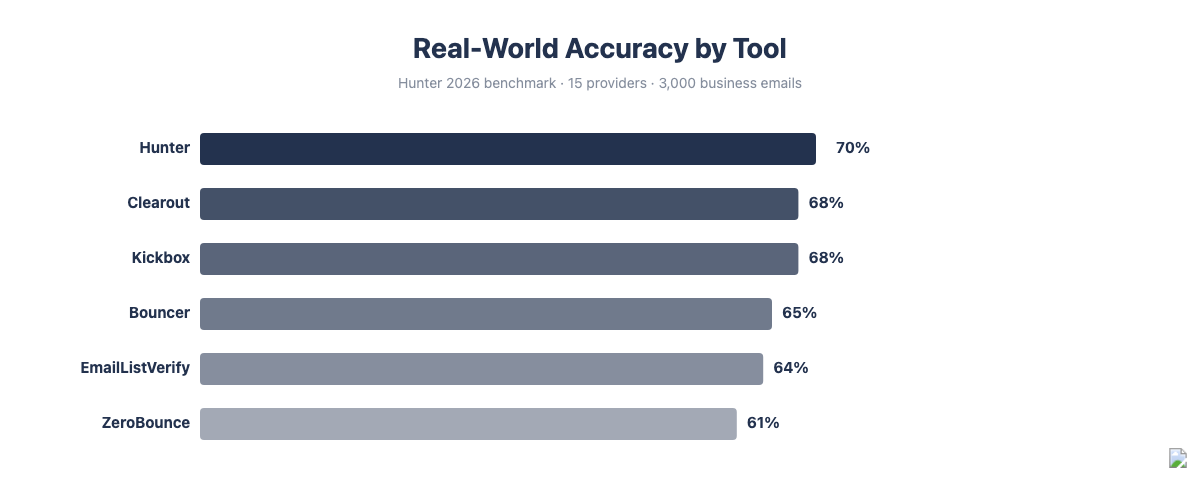
Based on independently tested accuracy from Hunter’s 2026 benchmark study of 15 providers and features relevant to link building outreach, these six tools stand out. Accuracy figures are from that study’s real-world tests against 3,000 business email addresses.
| Email Verifier | Real-World Accuracy (%) | Free Tier | Starting Price (USD) |
|---|---|---|---|
| Hunter | 70% | 50 credits/month (~100 checks), account required | from $49/month |
| Clearout | 68% | 100 credits | from $19.50/month |
| Kickbox | 68% | 100 credits | from $5/500 verifications |
| Bouncer | 65% | 100 credits | from $8/1,000 |
| EmailListVerify | 64% | n/a | from $2/1,000 |
| ZeroBounce | 61% | 100/month | from $99/month |
Hunter
Hunter leads all tools in real-world accuracy at 70% against actual business email addresses. Hunter’s free tier gives you 50 credits a month, good for roughly 100 checks since each one costs half a credit, though you’ll need to create an account to use it. Paid plans start from $49/month and include email finding, domain search, and outreach tools alongside verification. For link builders who want prospecting and verification in one place, it’s the most complete option.
Clearout
Clearout reaches 68% real-world accuracy and runs 20+ validation checks including a dedicated catch-all detection layer that attempts to resolve addresses other tools leave as unknown. Clearout’s free tier gives you 100 credits, and it doesn’t require a credit card. Clearout is a strong choice for outreach teams that prospect heavily into company domains where catch-all is common.
Kickbox
Kickbox offers 68% real-world accuracy with a pay-as-you-go model starting from $5 for 500 verifications, the most accessible entry point for occasional use. Kickbox’s SendEx Score feature grades each address by deliverability risk rather than returning a binary valid/invalid result, which helps teams make smarter decisions about borderline addresses.
Bouncer
Bouncer’s ISO 27001 and GDPR certifications make it the strongest choice when client compliance requirements apply. Pricing starts from $8/1,000 verifications with 100 free credits. The platform supports bulk uploads up to 20,000 rows.
EmailListVerify
EmailListVerify’s lowest bulk price starts from around $2/1,000 verifications, at 64% real-world accuracy. It’ll process up to 100,000 emails per hour, making it the most practical choice for large-volume list cleaning before importing into a full outreach platform.
ZeroBounce
ZeroBounce’s feature set goes beyond basic email address verification, adding activity scoring (showing whether an address has been recently active), blocklist monitoring, and AI-powered deliverability suggestions, on top of its 61% real-world accuracy. For teams running ongoing outreach campaigns where continuous monitoring adds value, ZeroBounce’s higher starting price, from $99/month, is worth it.
How to Add Email Verification to Your Link Building Workflow
Email verification works best as a step between prospecting and outreach, not as an afterthought once your list is already loaded into a campaign. Here’s how to integrate it with your backlink outreach workflow.
- Export your prospect list from your link building software or CRM, such as HubSpot. Most bulk email verifiers accept CSV or Excel files.
- Upload to your verification tool and run bulk verification. You’ll typically get results back within a few minutes for lists under 5,000 addresses.
- Segment the results: Valid addresses go into your outreach sequence immediately. Catch-all addresses go into a separate, lower-volume sequence. Invalid and Risky addresses are removed.
- Send to Valid addresses at your normal outreach cadence.
- Send to catch-all addresses at a reduced rate, no more than 20 to 30 per day from a single sending domain, to limit bounce risk from addresses that may not exist.
- Re-verify any list older than 90 days before reactivating it. Email addresses decay at roughly 22% per year as contacts change jobs, domains expire, and inboxes close. A list that was clean three months ago could easily have 5 to 10% invalid addresses today, so it’s worth rechecking before you send.
Verify as close to your send date as possible. A verified address isn’t guaranteed to remain valid indefinitely, which matters for ongoing link building reporting where you track outreach campaign performance over time.
Frequently Asked Questions
What is the difference between email verification and email validation?
Email validation checks only the format of an address: whether it follows the standard user@domain.tld syntax. Email verification goes further and confirms whether the mailbox actually exists and can receive messages. Validation catches typos; verification catches dead addresses. For outreach, you’ll need full email address verification.
Can a verified email still bounce?
Yes, a verified email can still bounce. Catch-all domains accept the verification check but may reject the actual message. Greylisting, where a server temporarily defers unknown senders, can cause a delivery failure that looks like a bounce even though the address is valid. Mail server configurations also change between when you verify and when you send, so verifying close to your send date reduces but doesn’t eliminate bounce risk.
What is a catch-all email domain?
A catch-all domain is configured to accept all incoming email regardless of whether the specific inbox exists. When an email verification tool checks an address at a catch-all domain, the server responds positively to every address, which means it’s impossible to confirm individual mailbox validity. These domains are common in small businesses and professional services firms, exactly the contacts link builders target most often.
How often should I verify my email list?
Verify before every major outreach campaign, and for any list that hasn’t been checked in the past 90 days. Email addresses decay at roughly 22% per year: contacts leave companies, domains expire, and inboxes get deactivated. A list that was 95% valid six months ago may have drifted to around 84% valid by the time you reuse it.
Does email verification send an email to the address?
No, email verification doesn’t send anything to the inbox. Most email verifiers use an SMTP handshake: they connect to the receiving mail server and ask whether the address exists without sending any content. The check is invisible to the inbox owner. Some tools use a tracking-pixel approach, but the SMTP handshake method is standard and involves no actual send.
What bounce rate is acceptable for cold outreach?
Keep hard bounces below 2% of total sends. Above that threshold, major email providers begin treating messages from your sending domain as high-risk, which reduces inbox placement across all campaigns. Most outreach platforms also pause accounts above 2 to 3% bounce rates, so it’s worth staying under that line.
Is there a free email verifier?
Yes, several free email verifiers exist. Hunter lets you check email addresses, up to 50 per month, without creating an account. Emailable includes 250 free credits on signup. Bouncer and Kickbox each offer 100 free verifications. Free tiers work well for occasional spot-checks. For bulk verification of a full prospecting list, a paid plan is more practical.