

Link building reporting should show progress, quality, and the next action in one clear view. Without a consistent tracking structure, it's hard to tell whether a campaign is building real authority or just accumulating volume.
If you're still choosing software, start with the guide to link building software. This page focuses on the reporting layer: what to track, how to score it, how to explain it to a non-SEO audience, and how to keep weekly and monthly updates useful even in the first month, when there's nothing to show yet.
What should link building reporting show?
Link building reporting should show progress, quality, and next steps in one place. That means combining two data layers: backlink outcomes such as new referring domains or lost links, and campaign context such as outreach movement, blockers, and follow-up actions.
Two audiences typically read these reports.
- the operator who needs to know what happened this week
- the stakeholder who needs a simple summary of progress, quality, and risk
Operators and stakeholders don't need the same level of detail. Operators need movement and exceptions; they're the ones acting on it day to day. Stakeholders need the headline: what was earned, what improved, what slipped, and what happens next.
Strong link building reporting combines campaign workflow data with backlink data. One side tells you about activity. The other tells you about outcomes.
Which metrics matter most?
The strongest reporting stack starts with eight metrics: new backlinks, new referring domains, domain authority or domain rating, lost links, anchor text patterns, dofollow vs. nofollow ratio, referral traffic, and keyword or organic traffic movement on the pages that received links. Everything else should support those eight; it shouldn't bury them.
| Metric | Why it matters | Best use in the report |
|---|---|---|
| New backlinks | shows output from the campaign | weekly and monthly summary |
| New referring domains | shows breadth and authority growth more clearly than raw link count | weekly and monthly summary |
| Domain Authority / Domain Rating | tracks whether the backlink profile is building authority over time | monthly trend view |
| Lost links | shows decay, reversals, or quality problems | weekly exception review |
| Anchor text patterns | helps spot over-optimization or weak relevance | monthly quality review |
| Dofollow vs. nofollow ratio | shows whether the link profile looks natural | monthly profile health check |
| Referral traffic from backlinks | shows whether links send real visitors, not just SEO value | monthly business impact view |
| Keyword and organic traffic on linked pages | connects link work to rankings and search visibility, not just link counts | monthly business impact view |
New backlinks and referring domains
New backlinks and new referring domains are usually the first numbers people ask for, but they do different jobs. New backlinks show visible output and answer what landed this period. New referring domains are often more useful, because they show how many unique sites joined the profile: getting five links from one domain may matter less than earning a first link from a new relevant site. Many agencies use five to ten new domains per month as a rough benchmark, but the right pace depends on niche size and competitor link velocity, so treat it as a planning reference, not a fixed target. Consistent growth in referring domains is a cleaner signal of campaign momentum than raw link count alone.
Report both together. That keeps the weekly view simple without hiding the quality story.
Domain Authority and Domain Rating
Domain Authority (Moz) and Domain Rating (Ahrefs) measure the strength of a site's backlink profile on a 0-100 scale. Both use logarithmic scoring, so moving from 20 to 30 is easier than moving from 70 to 80. They're different tools with different methodologies, but both are reasonable proxies for a link profile's authority. In reporting, DA or DR belongs as a trend metric, not a weekly data point. The useful question is whether the number's moving in the right direction over the past three to six months, not what it reads this week. A single flat month is normal; three flat or declining months in a row is what's worth flagging to a stakeholder.
- show the score at the start of the campaign and the current value
- note which tool produced the score so comparisons stay consistent
- avoid comparing Moz DA and Ahrefs DR directly, since they measure differently
Lost links and link decay
Most reports spend too much time on wins and not enough on reversals. Lost links matter because they tell you whether the campaign's gains are holding or just temporary.
A weekly report doesn't need a long note on every lost link. It needs a quick exception check.
- what disappeared
- whether the link mattered
- whether it needs a recovery action
That small habit makes the report operational instead of cosmetic.
Anchor text and page relevance
Anchor text belongs in reporting when it helps you read the campaign's quality and fit. A short note is usually enough.
- are new anchors mostly branded, generic, or topical
- do the links point to the pages the campaign was supposed to support
- is any pattern starting to look unnatural or low-value
Commentary matters more here than raw counts. A heavy concentration of exact-match keyword anchors is worth flagging even when the link count looks healthy, and most teams start paying closer attention once exact-match anchors pass roughly 10 to 15% of the profile's total.
Dofollow vs. nofollow ratio
Dofollow links pass link equity directly. Nofollow links carry a signal to Google, but they don't pass PageRank in the traditional sense, and a healthy backlink profile includes both.
In reporting, the ratio matters as a profile health check rather than a weekly metric. A profile that's nearly 100% dofollow can look unnatural. A profile with very few dofollow links may not be building the authority the campaign intends.
- flag if the nofollow share grows sharply in a short period
- note whether high-value placements are dofollow or nofollow
- don't treat every nofollow link as worthless, since brand mentions from strong sites still carry signal
Referral traffic from backlinks
Referral traffic shows whether backlinks are sending real visitors to the site, not just passing SEO value. A placement on a high-traffic relevant page often drives more meaningful results than a placement on a high-DA page that nobody's actually reading.
Check referral traffic in Google Analytics (under Acquisition, then Traffic Acquisition, filtering by Referral source). Monthly's the right cadence for this metric, since weekly data is usually too thin to be useful.
- note which placements are actually sending visitors
- track whether referral sessions show engaged behavior, not just a single pageview bounce
- use this to make the case for high-traffic placements in future outreach
Keyword rankings and organic traffic on linked pages
Link counts describe activity. Rankings and organic traffic on the pages that received those links describe results, and that's usually the gap between a report people skim and a report that keeps a campaign funded.
Track the target keyword's position before and after a link push, paired with the page's organic sessions from Search Console. Expect a lag: ranking movement from a new batch of links usually shows up four to twelve weeks later, not the same week the link goes live, and reporting a position change too early makes a working campaign look stalled when it's actually fine.
- log the position of each target keyword at the start of the campaign as a baseline
- update it monthly, next to the referring domains added for that page
- note organic sessions for the page, not just site-wide traffic, so the link work stays traceable to a result
Link quality and context
You don't need a single universal authority threshold in every report. Different teams use different quality signals and different tools label them differently. The practical rule is simpler.
- show whether the placement is relevant to the target topic or niche
- show whether the linked page makes sense as a destination
- call out anything that looks weak, off-topic, or risky
Toxic backlinks (links from spammy domains, hacked pages, or known link networks) belong in quality review too. If the profile is growing quickly or using freelance vendors, run a periodic check with Ahrefs or Semrush to surface any links that may need disavowing before they compound into a risk.
Paste any domain into the free Domain Rating Checker by LinkForce.
How do you turn link metrics into something a non-SEO stakeholder acts on?
A stakeholder who approved the budget usually doesn't think in referring domains or domain rating. They think in revenue and traffic, so the report has to spell out that translation instead of leaving them to guess.
The fix is a one-line rewrite habit applied to every headline metric before it goes in front of leadership. Take the raw number, attach the business outcome it produced, and drop the number that doesn't carry meaning on its own.
- weak: "we earned nine new referring domains this month"
- stronger: "the pages we built links to gained nine new referring domains and moved from page three to the top five results for their target keywords, which is where most of the click volume sits"
- weak: "domain rating moved from 24 to 27"
- stronger: "domain rating has climbed for four straight months, and the pricing page it supports now ranks high enough to show up in a typical buyer's search"
If your backlink tool reports an estimated traffic value, a twelve-month view of that number climbing is one of the clearer ways to show a CFO the campaign's compounding, since it's a figure they already track in other channels.
How do you score link quality across placements?
A simple scoring model turns "this is a good link" from a gut call into something you can compare month over month. Weight it toward relevance and permanence first: a high-authority link on the wrong topic, or one that gets pulled in a month, does less for the campaign than a moderate-authority link that sticks.
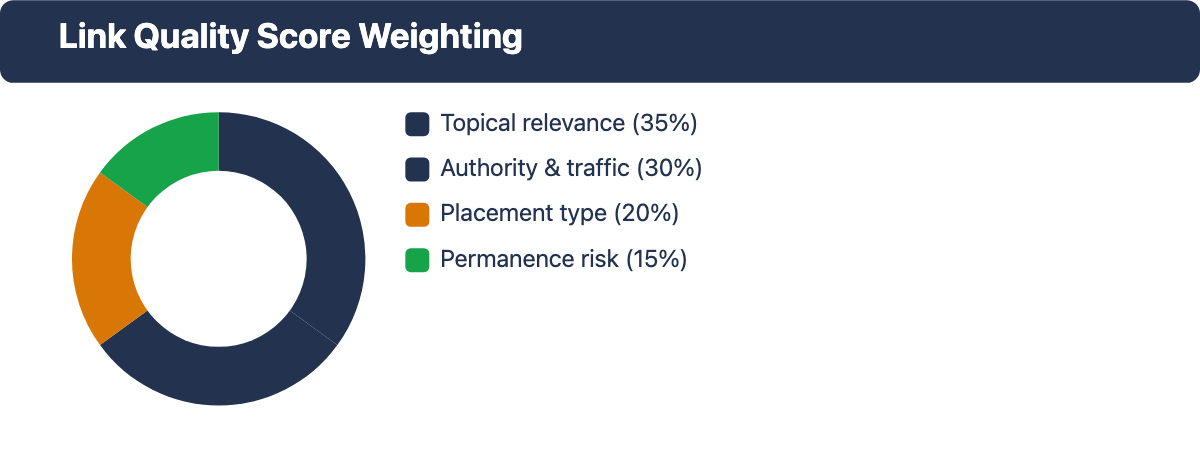
| Factor | What to check | Weight (%) |
|---|---|---|
| Topical relevance | does the linking page sit in the same niche or a closely adjacent one | 35% |
| Authority and traffic | DR/DA band plus whether the linking domain gets real organic traffic, not just a high score | 30% |
| Placement type | editorial mention inside real content scores higher than a directory listing, resource-page row, or profile link | 20% |
| Permanence risk | guest posts and paid placements carry more removal risk than earned editorial links | 15% |
Score each factor above on a 1 to 3 scale (weak, adequate, strong), multiply by its weight, and sum the result into one quality score per link. Report the average alongside the raw link count: "eleven links this month, average quality score 2.4 out of 3, up from 2.1 last month." That single number shows a quality trend without a link-by-link table, and it's an easy line for a client who won't read the full sheet.
How should weekly and monthly reporting differ?
Weekly reporting helps operators move work forward. Monthly reporting helps stakeholders understand whether the campaign is compounding. Both views can draw from the same source data, but they shouldn't read like the same document.
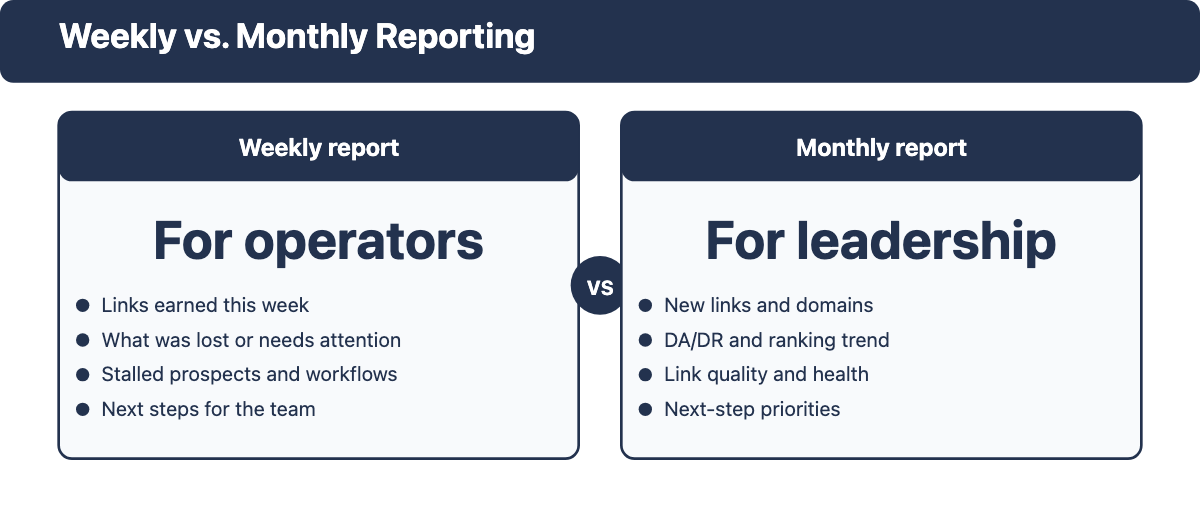
Weekly report for operators
The weekly update should be light, fast, and useful. It isn't the place for a long narrative. It answers.
- what links were earned this week
- what was lost or needs attention
- which campaigns moved forward
- which prospects or workflows are stalled
- what the team will do next
If you can't produce this view quickly, the stack is probably missing a source of truth for either outreach workflow or backlink monitoring.
Monthly report for leadership
The monthly report compresses the detail into a story.
- progress over the month: links earned, referring domains added
- authority trend: DA or DR movement since campaign start
- ranking and organic traffic movement on the pages the campaign targeted
- quality of links earned and any profile health notes
- important wins or losses worth calling out
- next-step priorities
Leadership usually doesn't need every outreach status change. They need a clean answer to whether the campaign is building the kind of links it actually wants, and whether the work is compounding. For a founder or CMO who wasn't part of setting up the campaign, a three-slide or three-bullet version of this same summary usually lands better than the full spreadsheet.
What do you report in the first month, when there is nothing to show yet?
Month one is where most reporting habits break. There are rarely earned links yet, and the temptation is to send nothing or pad the update with activity that doesn't mean much on its own. Both choices cost trust with a client who's watching for early proof the budget was a good call.
A useful month-one report still has four real things to say, even with zero links earned.
- campaign setup: target pages selected, anchor text briefs written, prospect lists built
- prospecting progress: how many relevant opportunities were identified and their rough quality mix
- baseline numbers: current DR or DA, referring domain count, and starting keyword positions for the target pages, recorded so every later report can show movement against them
- a written timeline: when the first links are expected, and when ranking movement typically starts to show given the four-to-twelve-week lag described earlier
Setting that timeline in writing during month one is what stops a client from cutting the budget at month three over a false read that nothing's happening, and it gives the following reports something concrete to measure against.
Which tools help you build the report?
Most reports pull from more than one source. One tool usually owns backlink outcomes, another owns outreach activity, and the reporting layer turns both into something readable.
- a backlink intelligence tool such as Semrush or Ahrefs for link and referring-domain visibility, DA/DR tracking, and toxic link detection
- an outreach workflow tool such as BuzzStream, Pitchbox, or Respona for campaign status and follow-up context
- Google Analytics and Google Search Console for referral traffic, keyword positions, and link indexing status
- a contact support tool such as Hunter when discovery and verification need their own workflow
The mistake is expecting one dashboard to tell the whole story automatically. It won't. The reporting layer works when you decide which source owns which question: backlink data explains outcomes, outreach workflow data explains effort and next steps, and commentary connects the numbers to decisions.
What is a simple report structure you can reuse?
A useful link building report works with four sections: summary, core metrics, commentary, and next actions. That structure's easy to scan and still leaves room for context.
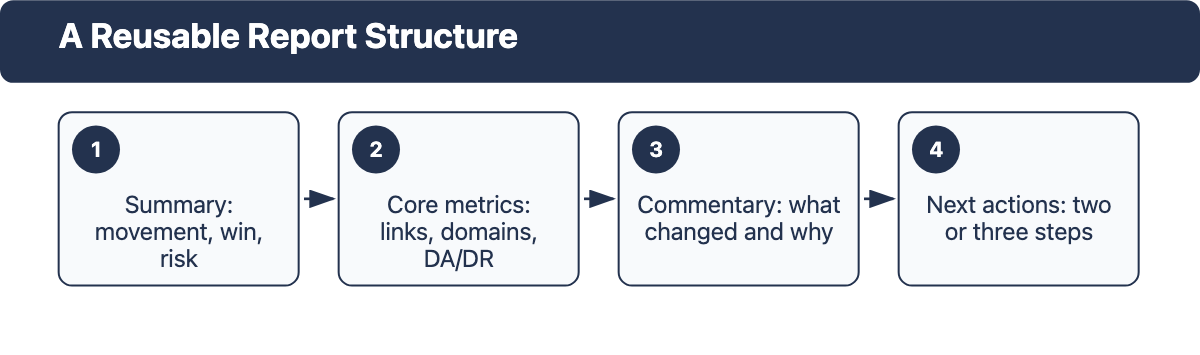
Section 1: Summary
Start with a short paragraph covering.
- overall movement for the period
- the most important win or placement
- the biggest risk or blocker
- the next action
Section 2: Core metrics
Include a small table or bullet list for.
- new backlinks and referring domains added
- DA or DR change since last period or campaign start
- lost links worth noting
- notable anchor text or target-page patterns
- target keyword position and organic traffic change for the linked pages
Section 3: Commentary
Add interpretation, not just numbers.
- what changed that matters
- which placements were strongest
- where quality looked weaker
- what needs follow-up
Section 4: Next actions
Close with a short list of two to three follow-up actions. Reporting's most useful when the reader knows what happens next, not just what happened last period.
Common reporting mistakes
Treating volume as the whole story
More links doesn't automatically mean better links. A report that celebrates raw totals without context, such as anchor quality, placement relevance, or dofollow vs. nofollow mix, is easy to misread.
Mixing every stakeholder into one view
The operator and the executive shouldn't get the same level of detail. One report can serve both, but only if it separates the fast summary from the working detail.
Hiding losses
Lost links, weak fits, and campaign stalls belong in the report. They aren't embarrassing side notes. They're part of the operating picture, and surfacing them early is what makes the report useful rather than cosmetic.
Overloading the dashboard
When every available metric appears in the report, nothing stands out. Keep the report narrow enough that somebody can read it quickly and still know what's happened.
Missing your own red flags
A report can look busy and still hide a problem. Before you send it, scan for patterns that usually mean the campaign's due for attention, not just a status update.
- every new link points to the homepage instead of the target pages the campaign was supposed to support
- every link earned this month sits in the same narrow DR band, which often points to a single low-effort source or vendor
- rankings and organic traffic stay flat for five or six months despite steady link growth, which usually means a technical or content problem is capping the page, not a link problem
- referring domains grow but the count of unique domains barely moves, which can mean the same sites are being counted again after a data refresh
Catching these patterns in your own report before a client or manager does is what makes a reporting habit look like expertise instead of a mail-merge.
800+ SaaS marketers swap partner, integration and content links on LinkForce.
FAQ
What metrics matter most in link building reporting?
The most reliable starting set is new backlinks, new referring domains, domain authority or domain rating, lost links, anchor text patterns, dofollow vs. nofollow ratio, referral traffic, and keyword or organic traffic movement on the linked pages. Start with those eight and trim or expand based on what the campaign actually needs.
Should reporting be weekly or monthly?
Reporting works best as both weekly and monthly, since each serves a different purpose. Weekly reporting keeps operators aligned on what moved and what needs attention. Monthly reporting gives stakeholders a clean summary of progress, quality, and the campaign's direction.
Do I need special software just for reporting?
You don't always need special software just for reporting. Many teams report well by combining backlink intelligence with outreach workflow data. The bigger question is whether the stack makes it easy to produce a fast, reliable view without rebuilding the report from scratch every cycle.
Should I track Domain Authority or Domain Rating?
Track whichever one your primary tool produces: Domain Authority if you use Moz, Domain Rating if you use Ahrefs. Don't mix them in the same trend line, since they are calculated differently and their scores aren't comparable. Pick one and stick with it for consistent reporting across the campaign.
What do you send a client when no links have landed yet?
Send the setup work instead of staying silent: target pages chosen, prospect lists built, baseline DR and keyword positions recorded, and a written timeline for when the first links and ranking movement are expected. That keeps the client informed without inventing progress that hasn't happened.
How long does it take for a new link to move rankings?
Plan for four to twelve weeks between a link going live and a measurable ranking change on the target page. Reporting a lack of movement before that window's passed usually reads as a stalled campaign when it's actually on schedule.
Final takeaway
Good link building reporting shows eight core metrics in a four-part structure: summary, core metrics, commentary, and next actions. It separates the weekly operational view from the monthly stakeholder summary, tracks whether authority and rankings are building over time, scores link quality instead of just counting links, and surfaces losses and red flags before they compound.
If the stack's still unclear, decide which tool owns backlink outcomes, which owns campaign activity, and which owns referral traffic and keyword visibility, then build the report from those three sources. And if month one hasn't earned anything yet, report the setup and the timeline instead of staying quiet.