
The term „sponsored link“ means two different things depending on where you encounter it. In paid search and search engine marketing (SEM), it refers to the ads Google labels as „Sponsored“ at the top of its search engine results pages. In content publishing and link building, it refers to a paid link that carries the rel="sponsored" HTML attribute — an instruction introduced by Google in September 2019 to identify links resulting from paid arrangements. Both matter for anyone doing SEO or link building work, but they work differently and have different implications for your strategy.
This guide covers both meanings, with a focus on the rel=“sponsored“ attribute and what it means for link building compliance, SEO, and outreach operations.
What Is a Sponsored Link?
A sponsored link is a paid advertisement in search engine results or a paid hyperlink in web content marked with the rel="sponsored" attribute, depending on context.
Meaning 1 — Paid search ads (SEM): In Google Search, the results at the top and bottom of the search engine results page labeled „Sponsored“ are paid advertisements served through Google Ads. These are also called sponsored results or paid placements. The advertiser pays each time a user clicks through (pay-per-click or PPC model). This is the search engine marketing (SEM) definition of a sponsored link.
Meaning 2 — The rel=“sponsored“ HTML attribute: In web content, a sponsored link is any hyperlink that carries the rel="sponsored" attribute. This attribute, introduced by Google in September 2019, tells search engines that the link resulted from a commercial arrangement — an affiliate deal, a paid guest post, a link insertion, or a sponsored article. These links appear within pages, not in search engine results.
If you work in SEO or link building, meaning 2 is the one that affects your day-to-day decisions. The sections below address both, but the rel=“sponsored“ attribute gets the main treatment.
The rel=“sponsored“ Attribute: What It Does and How to Use It
The rel=“sponsored“ attribute is an HTML tag that signals to search engines that a link was created as part of a paid arrangement, financial partnership, or advertising placement. Google introduced rel=“sponsored“ (and rel=“ugc“ for user-generated content) in September 2019 to replace the overloaded rel=“nofollow“ approach. Before 2019, all paid and untrusted links used nofollow, which made it impossible to distinguish between different reasons for non-editorial links. The 3 new attribute types (nofollow, sponsored, ugc) each serve a distinct purpose.
The syntax is straightforward:
<a href="https://example.com" rel="sponsored">anchor text</a>Multiple attributes can be stacked on a single link:
<a href="https://example.com" rel="sponsored nofollow">anchor text</a>Use rel=“sponsored“ on any link where money or significant value changed hands in exchange for the placement. Google’s documentation lists affiliate links, paid placements, and sponsored articles as the primary use cases.
sponsored vs nofollow vs ugc: How They Compare
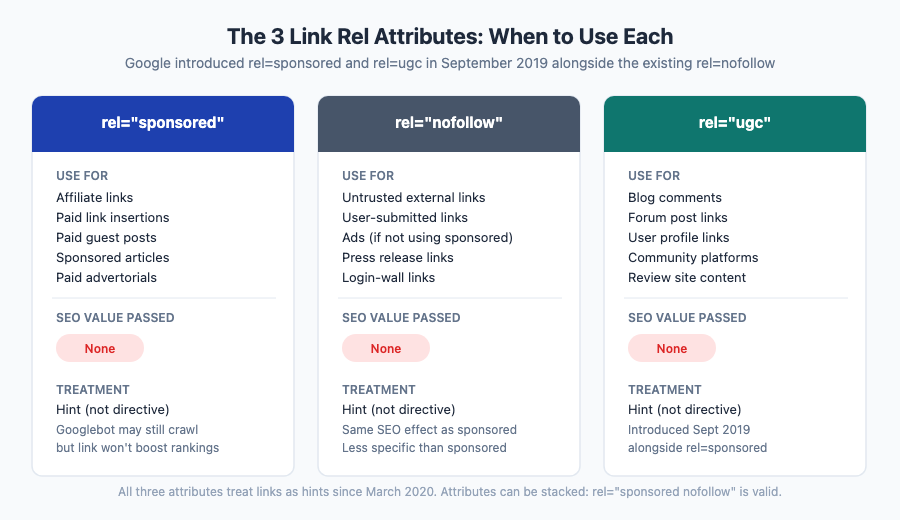
| Attribute | When to use | SEO value passed | Notes |
|---|---|---|---|
| rel=“sponsored“ | Paid links, affiliate links, paid placements | None (hint, not directive) | Google-recommended for paid/affiliate links since 2019 |
| rel=“nofollow“ | General untrusted links, user-submitted links, ads without sponsored tag | None (hint, not directive) | Works for paid links too, but less specific than sponsored |
| rel=“ugc“ | Comments, forum posts, user-generated content | None (hint, not directive) | Best practice for community platforms |
All three pass no link equity in the traditional sense. Google treats all of them as hints rather than hard directives, which means Googlebot may still follow and index the linked page, but the link does not count as an endorsement for ranking purposes.
Multiple values can be combined: rel="sponsored nofollow" is valid and commonly used by affiliate networks as an extra layer of compliance.
Does rel=“sponsored“ Affect SEO?
No — a link marked rel=“sponsored“ does not pass link equity to the linked page. From a rankings perspective, it behaves the same as a rel=“nofollow“ link: it is treated as a hint that the link should not influence rankings.
Google updated its handling of nofollow-family attributes in March 2020, shifting from treating them as directives to treating them as hints. That means Googlebot can choose to follow a sponsored link for crawling and indexing purposes — but it will not count the link as a quality signal for the linked page’s rankings.
The practical takeaways:
- A paid link with rel=“sponsored“ will not boost the linked page’s rankings.
- A paid link without any attribute (a bare dofollow link from a paid placement) violates Google’s webmaster guidelines and can result in a penalty.
- Using rel=“sponsored“ correctly on your own site’s outbound links does not harm your site.
Key takeaway: Sponsored links do not improve rankings, but they can still drive referral traffic and support brand awareness. The attribute protects both the linking site and the receiving site from guideline violations.
Sponsored Links in Paid Search: The Other Meaning
When you search on Google, the results labeled „Sponsored“ at the top of the search engine results page are Google Ads placements — this is the search engine marketing (SEM) meaning of the term. Advertisers bid on keywords through Google’s real-time auction system, and winning ads appear in those labeled positions at the top and sometimes the bottom of search results.
These sponsored placements in paid search are entirely separate from the rel="sponsored" HTML attribute. They involve no code on your website — you manage them through Google Ads campaigns.
How they work, briefly:
- Advertisers bid on keywords they want their ads to appear for.
- Google assigns each ad a Quality Score based on 3 main factors: keyword relevance, expected click-through rate, and landing page experience.
- Higher Quality Scores lower the effective cost-per-click (CPC) and improve ad position.
- The highest bidder does not always win — ad placement is based on Ad Rank, which combines bid with Quality Score.
- Winning ads appear with a „Sponsored“ label to maintain transparency in search results.
If you run Google Ads campaigns alongside a content site where you use rel=“sponsored“ on affiliate links, you are using both types simultaneously. They operate in separate systems and do not interact with each other.
When to Use rel=“sponsored“
Use rel=“sponsored“ on any outbound link where money or comparable value changed hands in exchange for the link or the surrounding content.
Use rel=“sponsored“ for:
- Affiliate links — any link that earns you a commission when someone clicks through and takes an action
- Paid link insertions — links you purchased by paying a site owner to add a link to existing content
- Paid guest posts — posts you paid a site to publish, where you control the links
- Sponsored articles or native advertising — content paid for by an advertiser, even if you wrote it
- Press releases submitted through paid wire services (Google recommends nofollow or sponsored for these)
- Advertorial content — articles formatted to look editorial but paid for by a brand
Do not use rel=“sponsored“ for:
- Organic editorial links — links you earned through outreach without any payment
- Links you included in your own content to your own pages (internal links)
- Natural citations in articles where no money changed hands
- Nonprofit or government links where no commercial arrangement exists
One common point of confusion: some publishers mark all outbound links as nofollow or sponsored as a blanket policy. Google has indicated this is not ideal — nofollow and sponsored attributes are meant to communicate the nature of the link, not to hoard PageRank from all external sites. For genuinely editorial links, a standard dofollow link is the correct choice.
What Happens If You Don’t Disclose a Sponsored Link?
Google’s webmaster guidelines treat undisclosed paid links — links intended to pass PageRank without disclosure — as a violation of its link schemes policy. The potential consequences:
- Manual penalty: Google’s webspam team can issue a manual action that removes the affected pages from search results until the issue is resolved and a reconsideration request is approved.
- Algorithmic devaluation: Google’s ranking algorithms are trained to detect patterns associated with paid links. Undisclosed paid links may be algorithmically discounted even if no manual action is filed.
- Site-wide ranking impact: For sites that systematically sell or buy undisclosed dofollow links at scale, Google may apply a site-wide penalty.
Beyond Google, the FTC (in the US) requires disclosure of any material connection between a publisher and an advertiser. This includes affiliate relationships. Using rel=“sponsored“ addresses the technical side of Google compliance, but visible on-page disclosure („this post contains affiliate links“ or „sponsored content“) is required for FTC compliance. The HTML attribute alone is not sufficient for regulatory disclosure.
Recommendation: Always use rel=“sponsored“ on paid placements. It signals transparency, not weakness. Google explicitly endorses its use and it is the lowest-effort way to stay on the right side of the link schemes policy.
How to Add rel=“sponsored“ in WordPress
There are three practical ways to add the rel=“sponsored“ attribute to links in WordPress:
1. HTML editor (classic or block editor source view)
Switch your editor to the HTML/code view, then manually add rel="sponsored" to the tag:
<a href="https://example.com/product" rel="sponsored">Product name</a>This works for any link on any WordPress installation without a plugin.
2. Gutenberg block editor link settings
In the block editor:
- Select the linked text and click the link icon.
- Click the arrow to expand advanced options.
- In the „Link rel“ field, type
sponsored.
Gutenberg adds the attribute to the HTML output automatically.
3. Affiliate link plugins
Plugins like ThirstyAffiliates or Pretty Links let you set default rel attributes for all links in a link category. ThirstyAffiliates adds rel="nofollow sponsored" to cloaked affiliate links by default. This approach works well if you manage large volumes of affiliate links and want consistent attributes without editing each link individually.
How to Find Sponsored Links Pointing to Your Site
Understanding how many of your inbound links carry a sponsored attribute is useful for two reasons: it shows you how Google likely views those links, and it helps you spot cases where a site has labeled what should be an editorial link as sponsored.
Method 1: Ahrefs Site Explorer
Open Ahrefs Site Explorer, enter your domain, go to the Backlinks report, and filter by the „Sponsored“ nofollow type. This returns a list of all inbound links that carry rel=“sponsored“.
Method 2: Ahrefs for outgoing links on your site
In Site Explorer, use the „Outgoing links“ report and filter by „Sponsored“ to see which links you are currently marking as sponsored. Useful for an internal compliance audit.
Method 3: Screaming Frog
Crawl the referring pages directly and look for the link attribute in the HTML source. Screaming Frog’s custom extraction feature can identify rel attribute values across large crawls.
What to do if you find unexpected sponsored attributes:
Two scenarios arise:
Unexpected rel=“sponsored“ on links FROM your site: Many affiliate plugins (ThirstyAffiliates, Pretty Links) and some CMS configurations automatically add rel=“sponsored“ or rel=“nofollow“ to outbound links. If you see sponsored attributes you did not intentionally add, check your plugin settings first — this is often automated behavior from an affiliate or link management plugin. To verify, open the HTML editor in your CMS and locate the link tag. If the attribute was added unintentionally, delete rel="sponsored" from the tag and clear your site cache. Also check Google Search Console’s Manual Actions report to confirm no penalty has been issued for any previously undisclosed paid links.
Unexpected rel=“sponsored“ on links TO your site: If a site has labeled what should be an organic editorial mention as sponsored — perhaps because they later joined an affiliate program or sold the placement — contact the publisher and ask them to correct the attribute. If they are unresponsive and the link is creating a compliance issue for you, add the domain to your disavow file as a precaution.
Sponsored Links and Your Link Building Strategy
Paying for links that pass PageRank violates Google’s guidelines. But that does not mean all paid content relationships are off limits — it means the link equity component needs to be removed.
What sponsored links can and cannot do for your strategy:
| Role | What sponsored links support |
|---|---|
| SEO rankings | No — they carry no link equity |
| Referral traffic | Yes — if the placement is on a relevant, high-traffic page |
| Brand visibility | Yes — especially on niche publications your audience reads |
| Affiliate revenue (your site) | Yes — if you are the publisher monetizing affiliate links |
| Topical authority signals | Minimal — Google does not count them as editorial endorsements |
Dos and don’ts:
- Use rel=“sponsored“ on every paid placement and affiliate link — no exceptions.
- Do not pay for links expecting an SEO lift — the attribute removes that benefit.
- Do evaluate paid placements for referral traffic potential and brand fit even when SEO is not the goal.
- Do pursue editorial links through content (digital PR, linkable assets, resource page outreach) when rankings are the objective.
- Do not use sponsored links as a replacement for white-hat link building tactics.
For SEO-relevant link building, focus on earning editorial links that do not require attribution or payment. Sponsored links, used correctly, are a brand awareness and monetization tool — not a ranking lever.
Internal resources: editorial links, white-hat SEO link building
Sponsored Link FAQ
Are sponsored links the same as paid links?
The terms overlap but are not identical. All links marked rel=“sponsored“ are paid links in some form — the attribute exists specifically to label links that result from a commercial arrangement. But not all paid links use the sponsored attribute. Historically, paid links were marked rel=“nofollow“, and many publishers still do this. Both approaches comply with Google’s guidelines. „Sponsored link“ more specifically refers to links using the rel=“sponsored“ attribute introduced in 2019.
Do sponsored links count as backlinks?
Technically yes — a sponsored link is still a hyperlink from another domain to yours, so it appears in your backlink profile in tools like Ahrefs. Practically, it counts as a backlink without link equity. It does not contribute to your domain’s ranking authority the way an editorial dofollow link would. Think of it as a citation that Google registers but does not use as a ranking signal.
Should I use rel=“sponsored“ or rel=“nofollow“ for affiliate links?
Google recommends rel=“sponsored“ for affiliate links because it is more specific. Both attributes result in the same SEO outcome — the link passes no link equity. If you are starting fresh, use rel=“sponsored“. If your existing affiliate setup already uses rel=“nofollow“ consistently and you do not want to audit hundreds of links, the nofollow links are already compliant and there is no urgency to change them.
Can a link have both rel=“sponsored“ and rel=“nofollow“?
Yes — rel="sponsored nofollow" is a valid HTML attribute combination and is commonly used by affiliate platforms. Some publishers prefer the belt-and-suspenders approach: the sponsored attribute signals the commercial nature of the link, and nofollow is included for older crawlers that understand nofollow but not sponsored. There is no SEO downside to stacking them.
Does using rel=“sponsored“ on outbound links hurt my site?
No. Adding rel=“sponsored“ to paid outbound links is precisely what Google asks publishers to do. It does not affect how Google views your site’s content quality, crawl budget, or ranking signals. If anything, consistent use of the sponsored attribute on genuinely paid links signals that your site follows editorial standards and does not attempt to manipulate rankings by selling undisclosed dofollow links.