

Backlinks remain one of Google's most powerful ranking signals, but a high backlink count tells you almost nothing on its own. Backlinks analysis is the process of evaluating the external links, referring domains, anchor text distribution, and link quality signals that shape a website's link profile, turning that data into decisions. This guide covers every metric you need to track, a step-by-step analysis process, how to read competitor link profiles, and how to act on what you find.
What Is Backlinks Analysis?
Backlinks analysis is the systematic process of evaluating the external links pointing to a website to assess the health of its link profile and inform SEO strategy.
It goes well beyond counting links. A website with 10,000 backlinks from 8 referring domains has a concentrated, fragile profile. A website with 10,000 backlinks from 3,000 referring domains has a distributed, resilient one. The raw count is identical. Only analysis reveals the difference.
Backlinks analysis answers the questions that link counts cannot:
- Which links are passing authority to your pages?
- Does your anchor text distribution look natural or manipulated?
- Are competitors earning links you are not, and from what sources?
- Are there links in your profile that are likely doing harm?
- Which pages collect the most link equity, and which pages are starved of it?
The output of a backlinks analysis is not a score. It is a prioritized action list.
Why Backlinks Analysis Matters for SEO
Google's PageRank algorithm evaluates the quality and quantity of backlinks pointing to a page as a core ranking signal. This foundational mechanism has evolved but not been replaced: earning links from authoritative, relevant sources remains one of the strongest signals you can send.
Several things make regular backlinks analysis essential:
Key Metrics to Understand in Backlinks Analysis
Referring Domains vs. Total Backlinks
Referring domains are the number of unique websites that link to your site. Total backlinks is the count of all individual links: a single domain can send hundreds of links from different pages.
Google views links from 50 different websites as 50 independent votes of confidence. Getting 50 links from one website helps, but securing links from 50 unique referring domains has a significantly larger impact on your Domain Rating and Authority Score. Multiple links from one domain also deliver diminishing returns. The second link from a domain passes far less equity than the first.
When comparing your site to a competitor's, referring domain count is the more honest measure of link breadth. A competitor with 500 referring domains and 2,000 total backlinks has a healthier profile spread than a site with 5,000 backlinks from 30 domains.
Domain Rating and Page Rating
Domain Rating (DR in Ahrefs) and URL Rating (UR) measure the cumulative link equity pointing to a domain and to a specific URL, respectively. Semrush uses Authority Score for the equivalent domain-level metric.
A critical nuance: a DR 50 link from a topically relevant niche site often outperforms a DR 85 link from a general news aggregator for niche-specific keywords. Topical relevance and DR are both inputs. Neither alone predicts link value.
Link Juice and PageRank Flow
Link juice is the informal term for the authority a link passes from the linking page to the target page. A page linked from a site's homepage passes more link juice than a page buried three levels deep with no internal links pointing to it.
Understanding how link equity flows through a site and your own internal linking architecture lets you identify pages that collect authority without distributing it to where you need it most.
Anchor Text Distribution
The chart below shows healthy percentage benchmarks for each anchor category, based on post-Penguin research into natural link profiles.

The text used in a hyperlink signals to Google what the linked page is about. After Penguin algorithm updates, over-optimized anchor text (too many exact-match commercial phrases pointing to money pages) remains a manipulation signal Google actively monitors.
A natural anchor text distribution for most sites looks like this:
- Branded anchors: 30-50% (your brand name, domain name, or recognizable product names)
- Naked URL anchors: 15-25% (the raw URL used as the link text, common in forums and directories)
- Partial-match anchors: 15-25% (topic variations combined with filler words)
- Generic anchors: 5-10% (call-to-action phrases like "click here", "read more", "this article")
- Exact-match commercial anchors: under 5% (your target keyword phrase used verbatim)
Exact-match commercial anchors, for example "best backlink checker" used as anchor text, should stay below 5% of your total anchor distribution. Deviation from a natural distribution pattern in either direction warrants investigation.
Importantly, these benchmarks shift by stage. A newly-launched page will naturally skew toward branded and naked URL anchors before earning topic-relevant links. A mature page with an unusually high exact-match ratio warrants closer scrutiny even if the absolute percentage seems modest. A sudden change in the ratio over a 90-day window is more diagnostic than the absolute figure.
Dofollow vs. Nofollow vs. Sponsored vs. UGC
Google recognizes four link attribute types, each with a different SEO interpretation:
- Dofollow (no rel attribute): passes PageRank authority and directly contributes to ranking signals
- Nofollow (rel="nofollow"): since Google's 2019 update, treated as a "hint" rather than a hard rule. Google may follow nofollowed links for crawling and indexing, but typically does not pass ranking authority
- Sponsored (rel="sponsored"): marks paid links and ads; Google expects these to be correctly labeled, and mislabeling can result in a penalty
- UGC (rel="ugc"): marks user-generated content like forum posts and blog comments; signals lower editorial endorsement
Dofollow links from editorial placements are the goal. A healthy profile has a majority of dofollow links. Heavy reliance on nofollow links from comment spam or forum profiles, or a large cluster of sponsored links without correct labeling, are red flags.
Toxicity Score
Tools like Semrush and SE Ranking assign a toxicity score (SE Ranking uses a 0-100 scale) to backlinks based on patterns associated with spam: low domain authority, keyword-stuffed anchor text, links from obvious link farms, links from unrelated gambling or adult sites, sitewide footer links across many pages.
The important caveat: toxicity scores are heuristic. A link can score as toxic and be perfectly harmless. Use toxicity scores to prioritize manual review, not as an automatic disavow trigger.
Link Velocity (New and Lost Links)
Link velocity tracks how fast you are gaining or losing backlinks over time. Sudden spikes (a large number of new links appearing in a short window from unfamiliar domains) can trigger algorithmic scrutiny if the pattern looks unnatural. Sudden drops (losing many links at once) may indicate that a major linking site changed its content, or that a link-building campaign has stopped.
Context matters: a velocity spike during a PR campaign that earned coverage in major publications is healthy. A spike from 400 links appearing overnight from domains you have never heard of is a red flag.
Topical Relevance
A link from a domain in your niche passes more topical authority than one from an unrelated industry, even at lower DR. A DR 45 link from an SEO agency's blog is worth more to a link-building pillar page than a DR 80 link from a food recipe site.
When assessing individual links, always evaluate topical relevance alongside domain authority.
Paste any domain into the free Domain Rating Checker by LinkForce.
How to Conduct a Backlinks Analysis (Step by Step)

Step 1: Define the Scope
Before opening a tool, clarify what you are analyzing:
- Whole domain: full profile health check, good for audits and quarterly reviews
- Specific URL: deep dive into a page you are trying to rank
- Competitor domain: intelligence gathering for link gap analysis
- Subdomain or subfolder: relevant for large sites with distinct content sections
The goal of the analysis shapes every downstream decision.
Step 2: Choose Your Analysis Tool
No single tool has a complete backlink index. The main options differ in database size, freshness, and metric reliability. Use the comparison table in the tools section below to pick the right one for your goal.
Step 3: Pull the Full Backlink Report
Export the complete backlink list. The minimum fields to include:
- Source URL (where the link lives on the linking site)
- Target URL (which page on your site it points to)
- Anchor text
- DR of the linking domain
- Link type (dofollow/nofollow/sponsored/UGC)
- First seen / last seen dates
- Link status (active, deleted, 301-redirected)
Understanding link status matters: active links pass equity, deleted links represent lost equity, and 301-redirected links preserve equity as long as the redirect chain is clean.
The Ahrefs Site Explorer backlinks report, shown below, provides all these fields in a single exportable view.
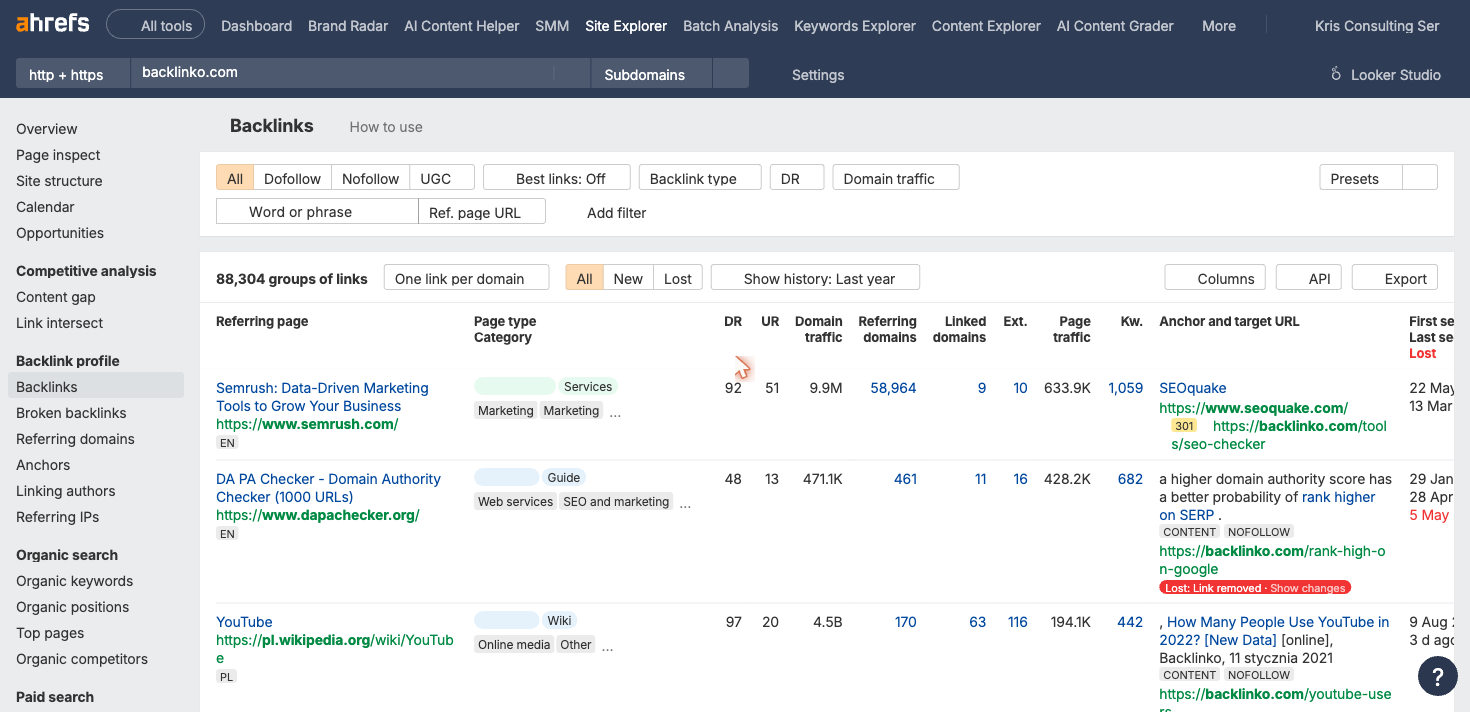
Ahrefs Site Explorer backlink report with referring domain count, DR, and anchor text columns visible. (Source: Ahrefs) For large profiles, export at the referring domain level first to get the summary picture, then drill into individual links for problem areas.
Step 4: Filter Out Noise
Raw exports include a lot of irrelevant data. Apply filters to reduce noise:
- Remove links with DR under 10 (unless specifically hunting for toxicity signals)
- Focus on active, non-deleted links first
- Separate dofollow from nofollow to understand real link equity
- Flag any link pointing to a 404 or redirect-missing URL on your site (these are lost equity opportunities)
Step 5: Analyze Anchor Text Distribution

The Ahrefs Anchors tab groups all anchor text variants by referring domain count so you can spot over-optimization at a glance. (Source: Ahrefs) In your filtered export, group anchors by type. Most tools provide anchor text reports built in. Look for:
- An unusually high percentage of exact-match commercial anchors
- Anchors that cluster around the same money pages (even if the anchor text varies)
- Branded anchors that are misspellings or obvious variations (can indicate link farm networks)
- Generic anchor text from otherwise high-DR domains (often means the link is in a sidebar or footer, not editorial content)
Step 6: Assess Toxicity and Flag Problem Links
Use the tool's toxicity or spam score to shortlist links for manual review. When reviewing manually, flag a link for investigation if:
- The linking domain has no real content (thin, scraped, or template pages)
- The linking domain is in a clearly unrelated high-risk niche with no topical connection to your site
- The anchor text is exact-match commercial with no editorial context on the linking page
- The link is part of a large sitewide placement (footer or sidebar on every page of a domain)
- The domain shows private blog network patterns (identical or templated content across many similar-looking domains)
Google's own guidance is clear: only disavow links if you have received (or expect to receive) a manual action for unnatural links, or if you have clear evidence a pattern of manipulative links is causing harm. For most sites with no manual action, Google ignores low-quality links on its own.
Step 7: Extract Opportunities
This is where analysis generates the highest return. Look for:
- Competitor links you do not have: which referring domains link to competitors but not to you? These sites already cover your topic and have shown willingness to link
- Broken links pointing to your site: a referring page with a broken link to one of your old URLs is a quick redirect fix or a reclamation opportunity
- Lost links worth recovering: links that existed in the past but no longer point to your site. A short outreach email can sometimes restore them
- Linking content patterns: which content types earn the most links in your niche? Guides, tools, original data, opinion pieces? This shapes future editorial decisions
Competitor Backlinks Analysis
Analyzing competitors' link profiles is often more immediately actionable than auditing your own. The goal is to find the referring domains that trust your competitors but have never linked to you: proven link sources in your niche that have already shown link-building willingness.
- Identify 3-5 competitors who rank above you for your target keywords
- Run each domain through your backlinks tool
- Export referring domains for each competitor
- Use a backlink gap tool (available in Ahrefs, Semrush, and SE Ranking) to identify domains linking to competitors but not to you
- Prioritize the resulting list by DR, topical relevance, and link context (editorial vs. directory)
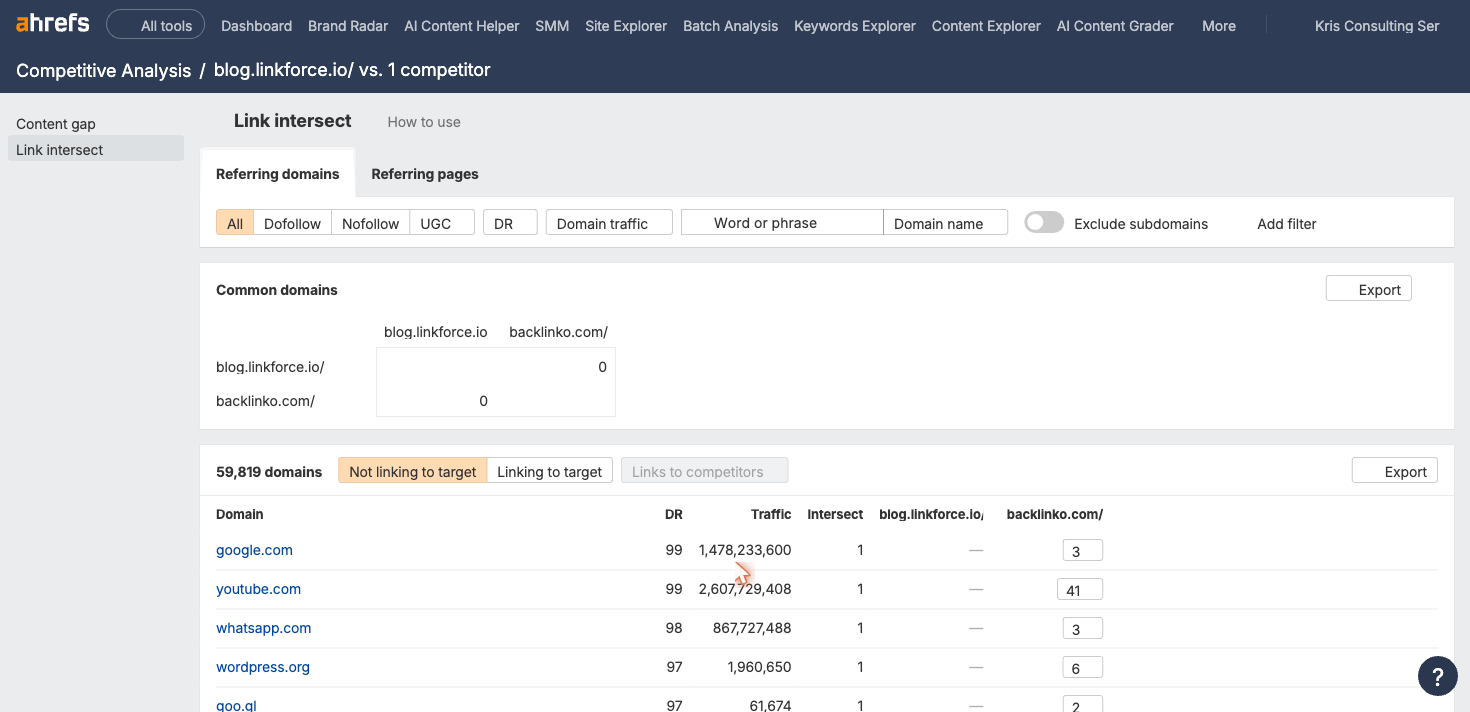
The screenshot below shows Ahrefs Link Intersect identifying gap domains: sites that link to a competitor but not to your site.
- Sites that linked via guest posts are typically open to more contributor content
- Sites that linked from resource pages or curated lists can be pitched for inclusion
- Sites that mentioned a competitor by name without a link may do the same for you with PR outreach
- If the competitor's page that earned the link no longer exists, you have an opening to suggest your content as a replacement
800+ SaaS marketers swap partner, integration and content links. Free plan, no credit card.
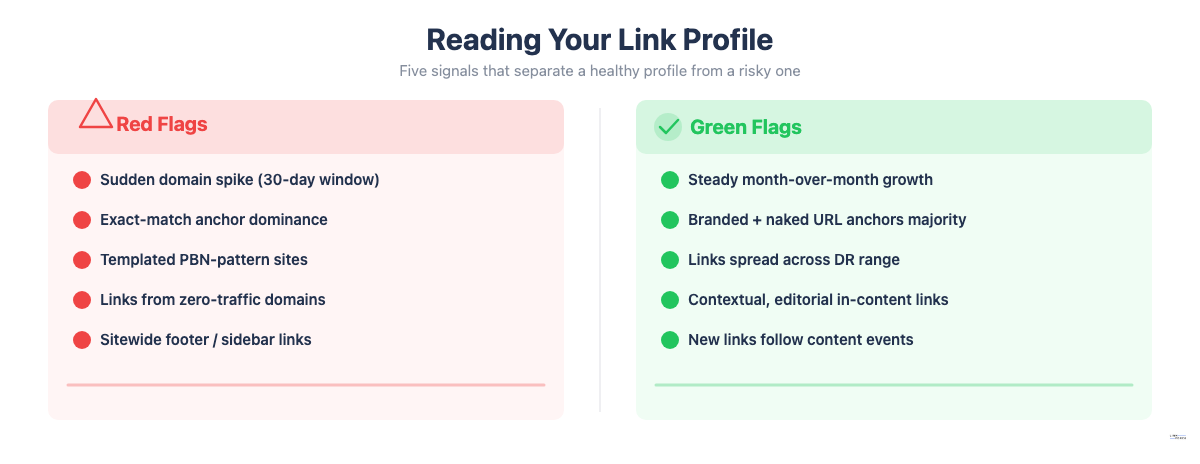
Reading Your Link Profile: What to Look For
Red Flags
- A sudden spike in new referring domains over a 30-day window from unrecognized sites
- Anchor text dominated by exact-match commercial phrases such as "best backlink checker" or "buy backlinks"
- More than 20% of links coming from a single country's TLD when that country is not your target market
- Multiple links from sites with nearly identical templates or content (a private blog network pattern)
- Links exclusively from sites with no organic traffic of their own
- A high percentage of sitewide placements (links appearing on every page of a domain)
Green Flags
- Steady month-over-month growth in unique referring domains
- Anchor text dominated by branded mentions and naked URL variants
- Links spread across a range of DR levels. A mix of lower-DR and higher-DR sources looks more natural than links exclusively from DR 80+ sites
- Contextual, in-content links with relevant surrounding text on the linking page
- Link acquisition correlating with content publication events (a new guide publishes, links appear within days from relevant sites)
What a Healthy Link Profile Looks Like
There is no single universal benchmark, but consistently healthy profiles share these characteristics:
- No single referring domain accounts for more than 10% of total link equity
- Fewer than 5% of anchors are exact-match commercial keywords pointing to money pages
- At least 70% of links are dofollow, with nofollow, sponsored, and UGC making up the rest
- The referring domain count has grown steadily over time without sharp unexplained drops
Tools for Backlinks Analysis
| Tool | Database size | Free tier | Best for |
|---|---|---|---|
| Ahrefs | 35 trillion links (2025) | Ahrefs Webmaster Tools (own site only) | Deepest index, competitor research, historical data |
| Semrush | 43 trillion backlinks (claimed) | Free checker (limited rows) | Backlink gap analysis, toxicity scoring |
| SE Ranking | 3 trillion+ | 14-day free trial | Toxicity scoring (0-100 scale), link monitoring alerts |
| Google Search Console | Own site only | Free | Verifying which links Google has indexed |
| Moz | Smaller index | Free limited checker | DA metric used by many publishers as a quality benchmark |
Ahrefs
Ahrefs is the most trusted tool for raw backlink data among professional SEO practitioners. Its Site Explorer provides full referring domain and backlink reports, an anchor text breakdown, a new-and-lost link feed, and historical referring domain charts. Ahrefs Webmaster Tools lets you analyze your own property for free. For competitor research and link gap analysis, a paid plan is required.
Semrush
Semrush's Backlink Analytics covers similar ground with additional emphasis on authority scoring and the Backlink Gap feature, which compares up to five domains simultaneously to identify link gap opportunities. Its Backlink Audit tool assigns toxicity scores and allows direct export of a disavow-ready TXT file for Google Search Console.
SE Ranking
SE Ranking assigns a 0-100 Toxicity Score to each backlink, with 0 being completely safe and 100 being highly toxic. It evaluates backlinks against specific risk markers, providing granular insight into which links may be harming rankings. It also includes a backlink monitoring feature that alerts you when links are gained or lost.
Google Search Console
Google Search Console is free and shows the links Google has actually indexed for your site. Not every link in Ahrefs or Semrush is one Google counts. Data is limited (no DR metrics, limited anchor data), but GSC is a useful reality check for confirming which important links are being recognized.
Moz
Moz's Domain Authority (DA) and Page Authority (PA) are still used by many site owners and publishers as a benchmark for link quality assessments. If you are evaluating potential links from sites that quote their own DA, Moz Link Explorer is the reference tool. Its backlink index is smaller than Ahrefs or Semrush, but the DA metric remains widely referenced in outreach workflows.
How to Act on Your Backlinks Analysis
Disavow Toxic Links
Use Google's Disavow Tool (accessed at search.google.com/search-console/disavow-links, not through standard Search Console navigation) for links you have strong reason to believe are harmful. The bar should be high: a clear pattern of manipulative links, a manual action in Search Console, or links you know were purchased.
- Export your flagged links from your backlink analysis tool as a list of URLs and domains
- Format as a plain text .txt file with UTF-8 encoding
- To disavow a specific page: add the exact URL on its own line (e.g.,
http://example.com/page) - To disavow an entire domain (recommended when the entire site is the problem): use the
domain:prefix (e.g.,domain:spammysite.com) - Use lines starting with
#to add comments for your own documentation; Google ignores these lines - File limits: maximum 100,000 lines or 2MB
The disavow file replaces any previously uploaded file. Maintain a cumulative list rather than uploading only new additions. Google processes the file over several weeks as it recrawls linking pages.
Recover Lost Links (Reclamation)
Links disappear for many reasons: a site redesigns and removes the page, an editor updates content and removes a citation, a site goes offline temporarily. A quarterly pass through your lost links report surfaces quick wins.
For lost links worth recovering:
- Check whether the original linking page still exists and still covers the topic
- Send a short email to the editor or webmaster noting the removed link and requesting restoration
- If the linking page itself no longer exists, check whether the site has a replacement page covering the same topic
Fix Broken Backlinks Pointing to Your Site
If links point to URLs on your site that now return 404 errors, set up 301 redirects from the old URL to the most relevant current page. This recovers link equity without any outreach required.
For large sites, running a broken backlinks check quarterly is standard maintenance.
Scale What Earns Links
Pattern recognition is the highest-leverage output of backlinks analysis. If data study pages consistently earn three times more referring domains than your how-to guides, produce more original data studies. If a particular content format drives link acquisition (original research, comparison tools, interactive calculators), build your editorial calendar around it.
The sites that build strong link profiles over time are not the ones with the most aggressive outreach. They are the ones that have learned through analysis what content their audience and industry actually links to, and created more of it.
Frequently Asked Questions
Industry consensus recommends a comprehensive audit every 3-6 months, supplemented by automated weekly or monthly alerts for new and lost links.
Quarterly cadence (every 3-4 months) is appropriate for content-heavy sites in competitive niches such as finance, SaaS, or legal, and for any site actively running link-building campaigns.
Semi-annual analysis (every 6 months) works for smaller sites with modest link-building activity: local businesses, niche blogs, and sites not currently acquiring new links.
Run an immediate ad-hoc analysis any time you observe a sudden organic traffic drop, suspect a negative SEO attack (a spike in unfamiliar low-quality referring domains), or receive a manual action notification in Google Search Console.
For sites running active outreach or agency link-building, real-time backlink monitoring with weekly alert reviews catches issues much faster than any scheduled audit.
There is no universal benchmark. A local business may rank well with 50-100 quality referring domains, while highly competitive national or global keywords can require hundreds or thousands. The only meaningful benchmark is the referring domain count of the pages currently ranking above you for your target keyword.
When evaluating referring domain counts, quality and quantity both matter. Ten high-DR referring domains from authoritative publications in your niche can outperform 200 referring domains from unrelated directories and forum profiles.
Individual links rarely cause measurable damage unless they are part of a pattern. Signs worth investigating: a toxicity score above 60 in SE Ranking or a high Toxicity Score in Semrush or a high Spam Score in Moz, anchor text that is clearly manipulative across multiple similar links, links from obvious link farms or PBNs, and a coincidence between a new link cluster's appearance and a rankings drop. Correlation does not mean causation. If a clear pattern exists across many similar links, act on it.
The terms overlap. A link audit typically refers to a structured review focused on identifying and removing problematic links, often in response to a penalty or in preparation for one. Backlinks analysis is broader: it includes opportunity finding, competitor research, and ongoing monitoring, not just risk assessment.
For a basic sense of what Google has indexed from your own site, Google Search Console is useful and free. For competitive intelligence, metric-rich analysis, historical data, or link gap work, a dedicated tool like Ahrefs or Semrush is necessary. Most professional workflows use GSC as a verification layer alongside a primary backlink analysis tool.