
Ahrefs’ Share of Voice (SOV) measures the percentage of organic clicks your site captures from a set of tracked keywords, compared to all clicks going to every result on those same SERPs. It is the closest thing Ahrefs offers to a market share metric for organic search, and it lives primarily inside Rank Tracker.
This guide covers how SOV is calculated, where to find it, how to set it up accurately, how to read the trends, and how to connect SOV data to link building priorities.
What Is Share of Voice in Ahrefs?
Share of Voice in Ahrefs is a brand visibility metric available inside Rank Tracker. It tells you what percentage of the total organic clicks available across your tracked keywords actually go to your site.
The key phrase is “tracked keywords.” SOV is not a measure of your overall search visibility. It reflects your share only within the keyword universe you have explicitly added to a Rank Tracker project. A project tracking 10 branded queries will give you a very different SOV number than one tracking 200 broad informational queries in your niche. The metric is only as representative as the keyword set you choose.
SOV appears in three places inside Rank Tracker:
- Dashboard: a summary SOV card showing your current share and recent change
- Overview: a time-series chart of your SOV over time, added in January 2025
- Competitors Overview: a side-by-side breakdown of your brand visibility vs. each tracked competitor
How Ahrefs Calculates Share of Voice
Ahrefs calculates SOV using click-based data, not impressions. The formula is:
SOV (%) = Clicks your site receives from tracked keywords divided by total clicks going to all results for those keywords, multiplied by 100
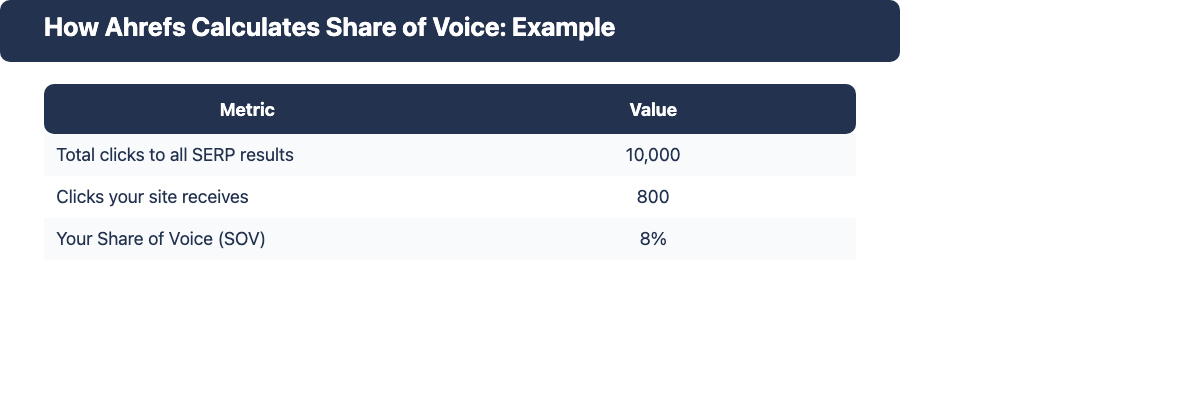
Here is a concrete example. Suppose you are tracking the keyword “content marketing tools” in Rank Tracker:
| Metric | Value |
|---|---|
| Total clicks to all SERP results | 10,000 |
| Clicks your site receives | 800 |
| Your Share of Voice | 8% |
Ahrefs applies this calculation across every keyword in your project, then aggregates the result into a single SOV score for your site. The competitors you add to the project get the same calculation run for their domains on the same keyword set.
Accuracy depends on your keyword set. The most common SOV mistake is tracking too few keywords, or a set that is disproportionately branded or narrow. If your tracked keywords do not represent your actual niche, the SOV number will be misleading. A brand that tracks only its own name will see very high SOV. A brand tracking 100 competitive informational queries in its category will see a much more realistic number. Treat SOV as a relative and comparative metric, not an absolute one.
According to Ahrefs’ help documentation, SOV reflects exactly the clicks your target site receives divided by the total clicks going to all results in the SERP for your tracked keywords.
Where to Find Share of Voice in Ahrefs
Share of Voice is a Rank Tracker feature. To access it:
- Rank Tracker > Dashboard: The SOV card shows your current share and the week-over-week or month-over-month change for your entire tracked keyword set.
- Rank Tracker > Overview: The SOV chart shows your brand visibility trend over time as a line graph, with competitors shown as additional lines when you have added them to the project.
- Rank Tracker > Competitors Overview: This view shows the SOV breakdown for every competitor you have added. You can see at a glance which competitor owns the most share across your tracked keywords and which clusters they dominate.
You can also segment SOV by keyword tag. If you have tagged your tracked keywords by topic cluster, funnel stage, or content type, you can filter the Rank Tracker views to show SOV only for that tag. This lets you see your share in, for example, your “tools comparison” cluster separately from your “how-to guides” cluster. This is a much more actionable signal than a single aggregate number.
How to Set Up Rank Tracker for Accurate SOV Tracking
The quality of your SOV data is determined at setup. A well-configured Rank Tracker project gives you a meaningful SOV signal. A poorly configured one gives you noise.
Choosing the Right Keyword Set
The keyword set should be representative of the niche you actually compete in. Practical guidelines:
- Minimum size per cluster: Aim for at least 20 to 30 keywords per topic cluster to get a stable SOV signal. Fewer than that and a single ranking change can swing your SOV substantially.
- Mix of informational and commercial: Include both because your competitors likely rank across both intent types. An SOV score that only covers commercial queries misses the visibility battle at the top of the funnel.
- Keep branded queries in a separate project: Branded keywords inflate your own SOV and make it harder to gauge genuine competitive brand visibility. Track them separately, but keep your primary SOV project non-branded. Mixing branded and non-branded keywords in the same project is the most common setup mistake. Competitors with strong brand recognition will show disproportionately low SOV on branded queries, distorting the competitive comparison.
- Add new keywords as you publish: Keep the project growing as your content library grows. An SOV project that does not expand with the site becomes less representative over time.
Adding Competitors to Your Project
Rank Tracker lets you add competitors per project based on your plan. Use the Suggested Competitors feature to find domains that rank for the same keywords you are tracking. These are the domains your SOV calculation will benchmark against.
Add 3 to 5 genuine organic competitors, not aspirational benchmarks. If you want to find exactly where they are outperforming you, run a Content Gap or Link Intersect analysis in Ahrefs after reviewing the Competitors Overview. The SOV breakdown tells you which competitor is winning; those tools tell you why.
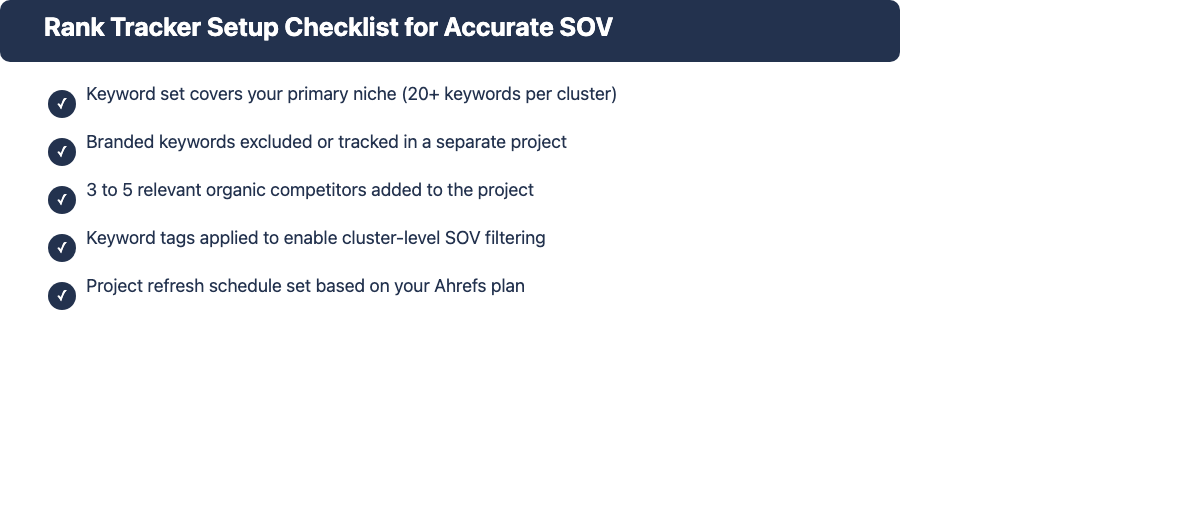
Setup checklist:
- Keyword set covers your primary niche (20 or more keywords per cluster)
- Branded keywords excluded or in a separate project
- 3 to 5 relevant organic competitors added
- Keyword tags applied to allow cluster-level SOV filtering
- Project refreshes scheduled based on your plan
Reading and Interpreting Your SOV Data
Once data starts accumulating, you will see trends in the SOV chart. Here is how to read them:
Rising SOV: Your site is capturing a larger share of clicks in the tracked keyword space. This can mean new rankings, improved positions on high-volume queries, or a competitor losing ground. Correlate with ranking changes in the same view to understand the cause.
Flat SOV: You and your competitors are roughly holding position. On competitive SERPs, flat SOV over a long period often signals a stalemate. Neither side is gaining organic ground without a deliberate push.
Declining SOV: Either you lost rankings, a competitor gained rankings, or both. When SOV drops, check the Competitors Overview to see which domain gained the share you lost. That competitor is worth investigating in Site Explorer to understand their recent link acquisition or content activity.
Excess Share of Voice (eSOV) and What It Signals
Excess share of voice (eSOV) is the concept that your SOV should exceed your current market share if you want your market share to grow. The relationship works like this: if your SOV is 20% but your actual market share (revenue or customers) is only 12%, that excess 8% acts as a reservoir that tends to push market share upward over time.
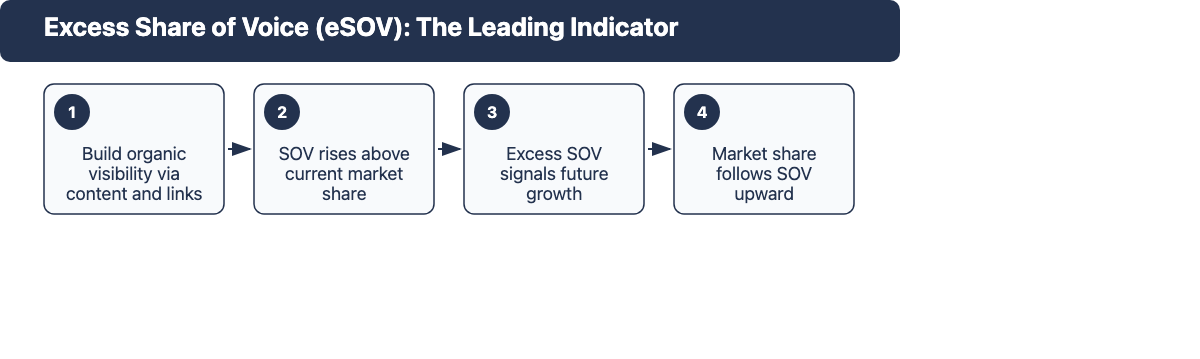
Research cited in the Ahrefs blog’s SOV guide points to Lidl as a case study. By maintaining excess SOV above its market share, Lidl consistently grew its market share in competitive retail categories. The implication for SEO is that investing in organic brand visibility above your current market position creates compounding returns that show up in market share later.
For most teams, eSOV is a useful framing for setting SOV targets. The goal is not just to match a competitor’s SOV. It is to exceed your own current market share percentage in the SOV metric, which then acts as a leading indicator of where market share will move.
How to Export Share of Voice Data from Ahrefs
Rank Tracker’s export gives you the raw SOV data for offline analysis, reporting to stakeholders, or historical tracking in a spreadsheet.
Export steps:
- Open Rank Tracker and select your project.
- Navigate to Overview.
- Click the Export button in the top-right area of the report view.
- Choose CSV as the format.
- Download the file.
The export includes columns for: date, keyword, tracked position, ranking URL, estimated clicks, and SOV% for your site. If you have added competitors, their positions and SOV% on the same keywords are also included.
Analyzing the export in Google Sheets: Create a pivot table with keyword tags as rows and SOV% as values. Track the monthly average SOV per tag over time. This gives you a cluster-level SOV trend dashboard that is more actionable than the single aggregate number in the Rank Tracker UI. When a tag cluster shows declining SOV over three months, that is a clear signal to audit the content and backlink profile for those keywords.
You can also pull the Competitors Overview export separately to compare SOV per competitor per keyword. This is useful for identifying the specific queries where each competitor is strongest.
Using Share of Voice to Inform Your Link Building Strategy
SOV data is valuable beyond brand reporting. It is one of the cleaner signals for identifying where link building effort will have the most impact.
Finding Link Gaps Using SOV Data
Low SOV in a keyword cluster is a direct symptom of relative authority deficit. If your SOV in the “enterprise SEO tools” cluster is 6% and a competitor’s is 22%, they have significantly more ranking strength there. The next step is a backlink comparison via Ahrefs’ Link Intersect tool: find domains that link to that competitor (and the other top rankers in that cluster) but not to you. Those are your highest-priority link prospects for closing the SOV gap.
SOV trend drops are especially actionable. When your SOV in a cluster declines over two or three months, a likely cause is a competitor earning links to pages targeting those same queries. Investigate via Site Explorer > the competitor’s domain > New Backlinks report to see what they acquired recently. The domains linking to them there are your outreach targets.
SOV as a Link Building KPI
Share of voice is a credible metric for reporting the impact of a link building campaign to clients or stakeholders. It is easier to understand than raw ranking position changes across dozens of keywords, and it directly measures whether your brand visibility is growing relative to competitors.
A useful framing for campaign reporting: show SOV at the start of the engagement, set a 6-month SOV target for the primary keyword cluster, and track progress monthly. When link acquisition drives new rankings, the SOV chart shows the upward shift in a form that non-SEO stakeholders can interpret. Correlating link acquisition events with SOV inflection points makes the cause-and-effect relationship visible in client-facing reports.
Using Rank Tracker’s Top Pages data alongside SOV: When a cluster’s SOV is declining, check which competitor pages are driving their share (Competitors Overview > click on the competitor > view their top-ranking pages in that cluster). The pages with the highest click share are where they have concentrated link and content authority. Prioritize earning links to your own comparable pages to contest that share.
Share of Voice vs. Share of Search vs. Organic Visibility
These three metrics are often confused but measure different things:
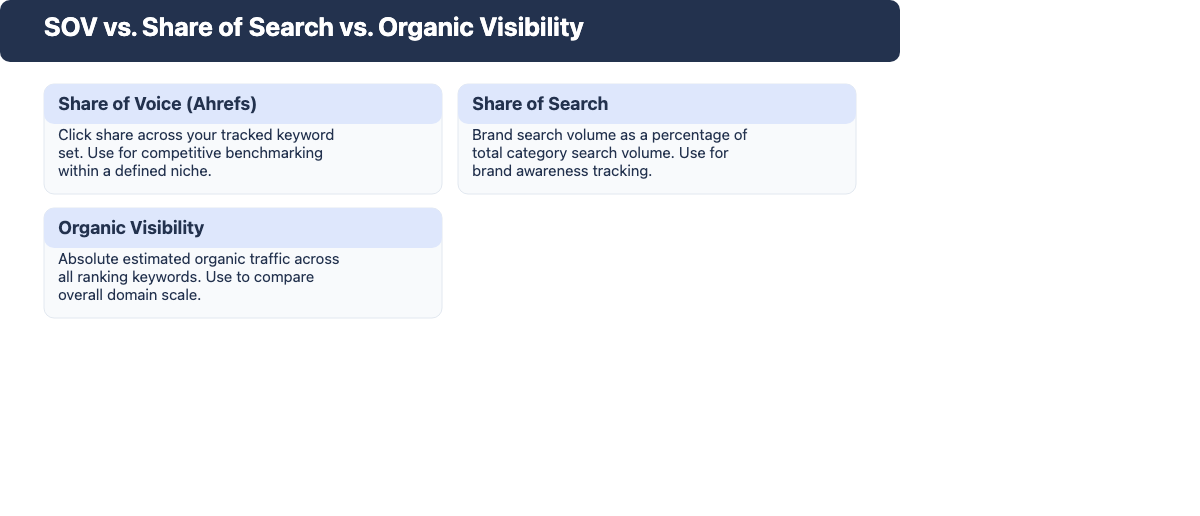
| Metric | What it measures | When to use it |
|---|---|---|
| Share of Voice (Ahrefs Rank Tracker) | Click-based, relative to your tracked keyword set and tracked competitor set | Competitive brand visibility benchmarking within a defined niche; link building KPI tracking |
| Share of Search | Brand search volume as a percentage of total category search volume (Google Trends or keyword tool method) | Brand awareness tracking; comparing brand salience against category competitors |
| Organic Visibility (Site Explorer / absolute traffic) | Estimated organic traffic across all ranking keywords on a domain | Absolute growth tracking; comparing domains without a shared keyword set |
The main practical distinction: SOV is relative and bounded by your tracked keyword set. Share of search is brand-level and unbounded. Organic visibility is absolute traffic, not relative. Use SOV when you want to benchmark your progress in a specific niche against a specific competitor set. Use organic visibility when you want to compare the overall scale of two domains. Use share of search when the question is about brand recognition at a category level.
Common Mistakes When Using Ahrefs Share of Voice
1. Tracking too few keywords. A 10-keyword project can show 80% SOV simply because the set is too small and narrow. SOV on a small keyword set is not a useful competitive signal. Build the project to at least 50 to 100 representative non-branded keywords before treating the SOV number as meaningful.
2. Including branded keywords in your main SOV project. Branded queries inflate your own SOV and understate competitors’ share. Competitors who do not target your brand will show near-zero SOV on those queries, distorting the competitive picture. Keep branded and non-branded SOV projects separate.
3. Mixing incompatible keyword intents. A project that mixes transactional, informational, and navigational queries produces an SOV number that is an average of very different competitive landscapes. A transactional keyword cluster may have different competitors than an informational one. Segment by intent and track SOV per intent type.
4. Comparing SOV across projects with different keyword sets. SOV is only comparable within the same project (same keyword set, same competitor set). If you create a new project with a different keyword set to re-check your SOV, the numbers are not comparable to the original project’s history. Changing the project’s keyword set resets the meaningful baseline.
Frequently Asked Questions
Is Ahrefs SOV the same as impression share?
No. Impression share (a Google Ads metric) measures how often your ad appeared out of all eligible impressions. Ahrefs SOV measures organic clicks, not impressions or ad auctions. They track different channels with different data sources.
Why is my SOV 0% even though I rank for tracked keywords?
The most common cause is that Rank Tracker has not yet collected enough data for a fresh project. It takes at least one full data refresh cycle before SOV populates. If the project is not new, check that your domain is entered correctly and that the ranking positions are actually pulling in for those keywords.
How many keywords do I need for SOV to be meaningful?
There is no single threshold, but fewer than 20 non-branded keywords in a single cluster will produce a volatile number that moves significantly with each individual ranking change. A project with 50 to 100 well-chosen non-branded keywords in a defined niche gives a stable enough signal to track trends meaningfully.
Can I track SOV for a specific country or language?
Yes. When you create or edit a Rank Tracker project, you set the target country and optionally city or region, along with the search engine. SOV is calculated based on the click data for that specific location. If you need SOV for multiple countries, create a separate project per country.
Does SOV update in real time?
No. SOV updates on Rank Tracker’s regular data refresh schedule, which varies by plan. The SOV chart reflects position data from each refresh cycle, not live search results. For accurate trend tracking, stick to comparing SOV at the same cadence as your refresh schedule.